

- Pixieset offers a clean, user-friendly client gallery experience combined with an all-in-one business suite featuring website hosting, online booking, invoicing, and contract tools.
- Pic-Time prioritizes editorial gallery presentations, automated email/marketing sales campaigns, and high-end print store integration to maximize post-delivery income.
- Pic-Time stands out with client-facing facial recognition, guest “selfie search,” and automated album design, while Pixieset sticks to traditional browsing and favorite-list proofing.
- Pic-Time and Pixieset both offer a free tier (3 GB) and budget entry plans; Pixieset includes a handy 1 TB mid-tier plan, while Pic-Time steps directly to unlimited photo storage with add-on options for video.
- Pixieset is best for solo photographers seeking simple setup and unified administrative tools, while Pic-Time suits wedding/event pros focused on passive print sales and multi-user access.
“Should I use Pictime or Pixieset for my client galleries?”
If you’re reading this, you’re probably wrestling with this exact question. Maybe you’re starting a photography business and trying to choose your first gallery platform. Or perhaps you’re an established pro considering a switch because your current solution just isn’t cutting it anymore.
If I’m being honest, choosing between Pic-Time and Pixieset is not simply a matter of counting features. Pic-Time is usually the better fit if print sales, gallery marketing, AI-powered image discovery, and presentation tools are central to your business. Pixieset is usually the better fit if you want a straightforward gallery experience and the option to run your website, bookings, contracts, invoices, and galleries within one ecosystem.
Here is the short answer you’ve been looking for:
- Choose Pixieset for simpler gallery delivery and a broader all-in-one business suite with a website builder and CRM.
- Choose Pic-Time for stronger sales automation, advanced gallery discovery, and a more commerce-focused client experience.
- Choose Aftershoot Galleries if you want client delivery connected to the same workflow you use to cull, edit, and retouch your photos.
Quick note before we move forward: Pricing and features were checked in September 2026. Platforms change their plans regularly, so confirm current availability before subscribing.
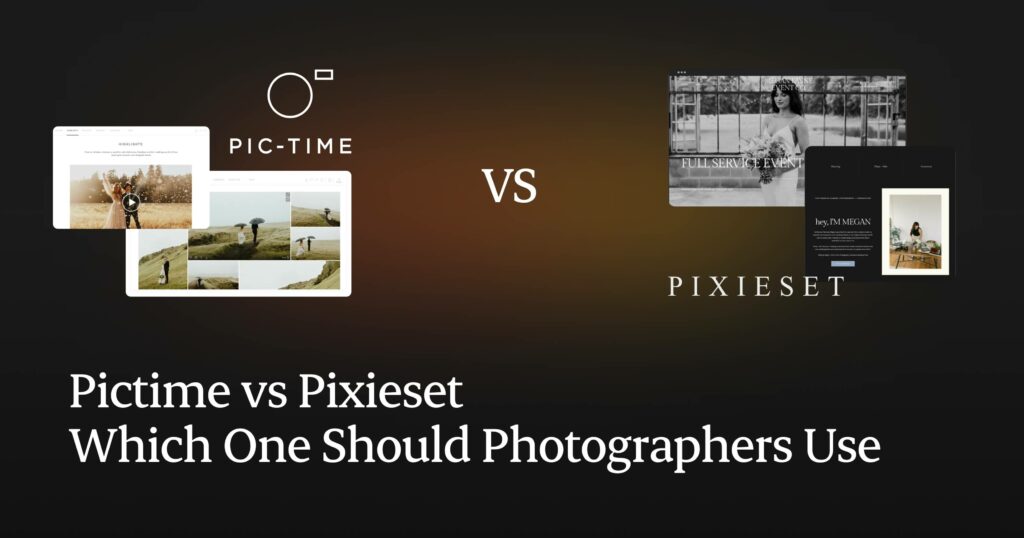
I get it; the platform you choose for sharing photos with clients isn’t really a technical decision, it affects your photography workflow, brand image, client experience, and even your bottom line. The wrong choice can mean frustrated clients, missed sales opportunities, and hours of unnecessary admin work.
After scouring every corner of the internet, from photography forums to Reddit threads and YouTube channels, we’ve gathered reviews from photographers who’ve used both platforms extensively. We’ve analyzed their candid feedback, compared features side-by-side, and condensed everything into this comprehensive guide to help you make the right choice for your specific needs.
Let’s dive into what makes each platform unique, where they excel, where they fall short, and ultimately, which one is the perfect fit for you.
How We Compared Pic-Time and Pixieset
We compared the platforms against the same end-to-end jobs a working photographer needs to complete:
- Create and brand a client gallery.
- Upload a finished set and organize it into sections.
- Configure privacy, download permissions, and proofing.
- Review the gallery from a client’s perspective on desktop and mobile.
- Examine print-store setup, fulfillment choices, and sales tools.
- Map the gallery into the wider workflow, from booking and post-production to delivery and follow-up.
We checked current pricing pages, product pages, and help documentation from both companies. We also separated features that are included across plans from those restricted to higher tiers. This is important because a feature appearing on a product page does not mean it is available on the plan you intend to buy. We’ve also kept in mind that upload and gallery-loading speed vary with file size, video length, connection speed, browser, location, and gallery design.
Pictime vs Pixieset: Overview
| Feature | Pic-Time | Pixieset |
| Client Gallery pricing | Free plan; paid plans start at $7/month when billed annually | Free plan; paid plans start at $10/month when billed annually |
| AI features | AI search for photographers; client-facing people and keyword search on eligible plans; AI-powered album tools | AI-assisted tools are not the core gallery differentiator |
| Print sales | Integrated store, worldwide labs, pricing tools, and sales automations | Integrated Store with lab fulfillment and self-fulfillment |
| CRM | No full native CRM comparable to Studio Manager | Yes, through Studio Manager |
| Website builder | Portfolio page plus blog and SEO tools on eligible plans, but not a full business website builder comparable to Pixieset Website | Yes |
| Photo storage | 10 GB free; paid tiers from 20 GB to unlimited | 3 GB free; paid tiers from 10 GB to unlimited |
| Automation | Strong gallery and print-sales automations, including promotional apps and cart recovery tools | Email campaigns and business workflows, depending on the product and plan |
| Mobile apps | Pic-Time mobile app for photographers and a mobile-responsive client experience | Mobile Gallery Apps for clients and a Studio Manager app for photographers |
| Proofing | Client selections, favorites, and album proofing workflows | Favorites lists and client selections |
| Video support | Photos and clips can appear together; dedicated video storage is plan-based and expandable | Video support on paid Client Gallery plans; resolution depends on plan |
Before we get into the nitty-gritty, let’s establish what these platforms actually offer.
Pixieset launched in 2013 as a client gallery solution and has since evolved into an all-in-one platform for photographers. It now offers client galleries, portfolio and website building, online stores, and tools for managing client communications. The platform is known for its clean, minimalist aesthetic and user-friendly interface.

Pictime entered the scene as a more premium, feature-rich alternative specifically designed for professional photographers. With a focus on sales automation (more on this later in the post), marketing tools, and sophisticated presentation options, Pictime has positioned itself as the platform for photographers who want to maximize their client experience and revenue potential.
Pictime vs Pixieset: Which One Should Photographers Use?
We’ve categorized this guide into the most important categories that photographers care about. Let’s dive in:
1. User Experience & Interface
| Factor | Pic-Time | Pixieset |
| Dashboard approach | More feature-dense, with galleries, store tools, automations, slideshows, albums, and AI features | Clean, familiar, and relatively easy to navigate |
| Initial setup | Requires more setup if you want to use its design, sales, and automation tools fully | Faster to understand for photographers who want straightforward delivery |
| Best for | Photographers willing to invest setup time for more gallery and sales control | Photographers who value simplicity or want connected business tools |
| Learning curve | Higher because more options sit within the gallery and store workflow | Lower for basic gallery creation and delivery |
Pic-Time
Pic-Time presents more possibilities from the start. Alongside gallery design and delivery, photographers can configure a store, automation apps, slideshows, album tools, vendor access, visitor registration, and AI-powered search. During onboarding, Pictime automatically creates online gallery from your images, built stores printables, blog posts, social promotions, slideshows, and even Instagram reels. This automation immediately showcases the platform’s focus on helping photographers maximize each shoot across multiple channels. (That makes the dashboard more capable, but it also means there are more decisions to make.)
The extra setup is most worthwhile when you intend to use the gallery as more than a download page. A photographer who builds price lists, product campaigns, vendor workflows, and album offers can get significantly more from Pic-Time than someone who uploads a gallery and sends a link.
Find Out the Best Alternatives of PicTime
Pixieset
Pixieset is designed around a relatively simple collection workflow. You create a collection, divide it into sets, choose a cover and layout, configure privacy and downloads, and share it. Settings are grouped in a way that is generally approachable for a new photographer. This makes it an excellent choice for photographers who are just starting out or those who prefer simplicity over extensive customization.
That simplicity extends to the client side. Clients can enter a gallery, move between sets, mark favorites, download permitted files, or visit the store without first learning an unfamiliar interface. When clients receive a Pixieset gallery, they’re greeted with a visually clean interface that puts the focus on your images. The viewing experience is smooth across devices, and downloading is straightforward for clients. For photographers who mainly need to deliver finished JPEGs and collect selections, this can be a meaningful advantage.
Pixieset also benefits from consistency across its wider suite. A photographer using Website and Studio Manager can keep branding, contacts, bookings, payments, and gallery delivery within one account. However, the products remain distinct areas of the platform, so the Suite still requires setup across multiple tools.

Discover How Aftershoot Galleries is the Best Alternative to Pixieset
Editor’s Pick: Pixieset has the easier starting experience. Pic-Time rewards deeper setup. Choose based on how much of the platform you will realistically configure, not how impressive the complete feature list looks.
2. Pic-Time vs Pixieset: Feature Comparison
Let’s break down the key features that photographers care about most:
a. Client galleries, design, and branding
| Factor | Pic-Time | Pixieset |
| Gallery style | Storytelling-led presentation with more visual and commercial touchpoints | Clean and minimal, with the photographs kept central |
| Branding | Custom branding, gallery themes, design controls, and premium presentation features depending on plan | Logo, colors, typography, custom domain, and removal of Pixieset branding on eligible plans |
| Organization | Galleries, scenes, collections, and storytelling layouts | Collections and sets |
| Mixed media | Photos and video clips can appear together; slideshow tools and expanded video storage are available by plan | Photos, GIFs, embedded cover video, and uploaded video on supported plans |
| Privacy | Gallery roles, access controls, registration, download permissions, and configurable AI-search access | Collection password, download PIN, email registration, and visibility controls |
Pic-Time
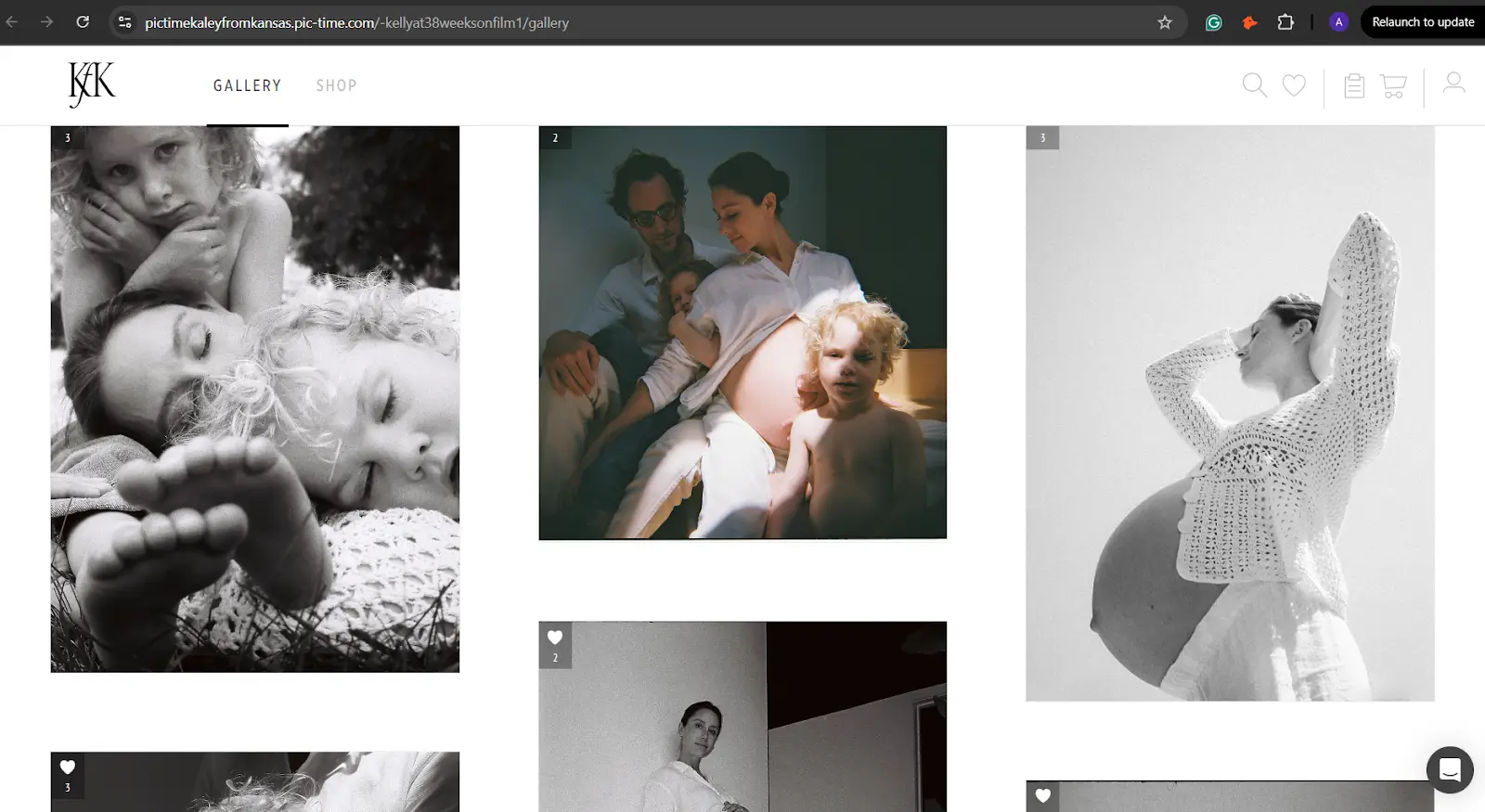
Pic-Time gives photographers more tools for shaping the gallery into a visual story. Its grids, scenes, cover options, typography, slideshows, and mixed photo-and-video presentation can make delivery feel more editorial. That can suit wedding and portrait studios where the reveal is part of the premium experience.
Pic-Time also connects presentation with selling. Product banners, store prompts, album offers, and automation messages can appear as part of the client journey rather than as a completely separate storefront.
The AI features in Pictime are particularly impressive. The platform automatically recognizes faces, making it easy for clients to find photos they’re in. For wedding photographers, this means the mother of the bride can quickly find every photo featuring her daughter without scrolling through hundreds of images.
Pictime also offers vendor galleries that automatically pull together relevant images for each vendor (florists, venues, planners, etc.). This feature helps you build relationships with vendors, a crucial source of referrals, without additional work.
Explore How Aftershoot Galleries Compares to Pic-Time
Pixieset
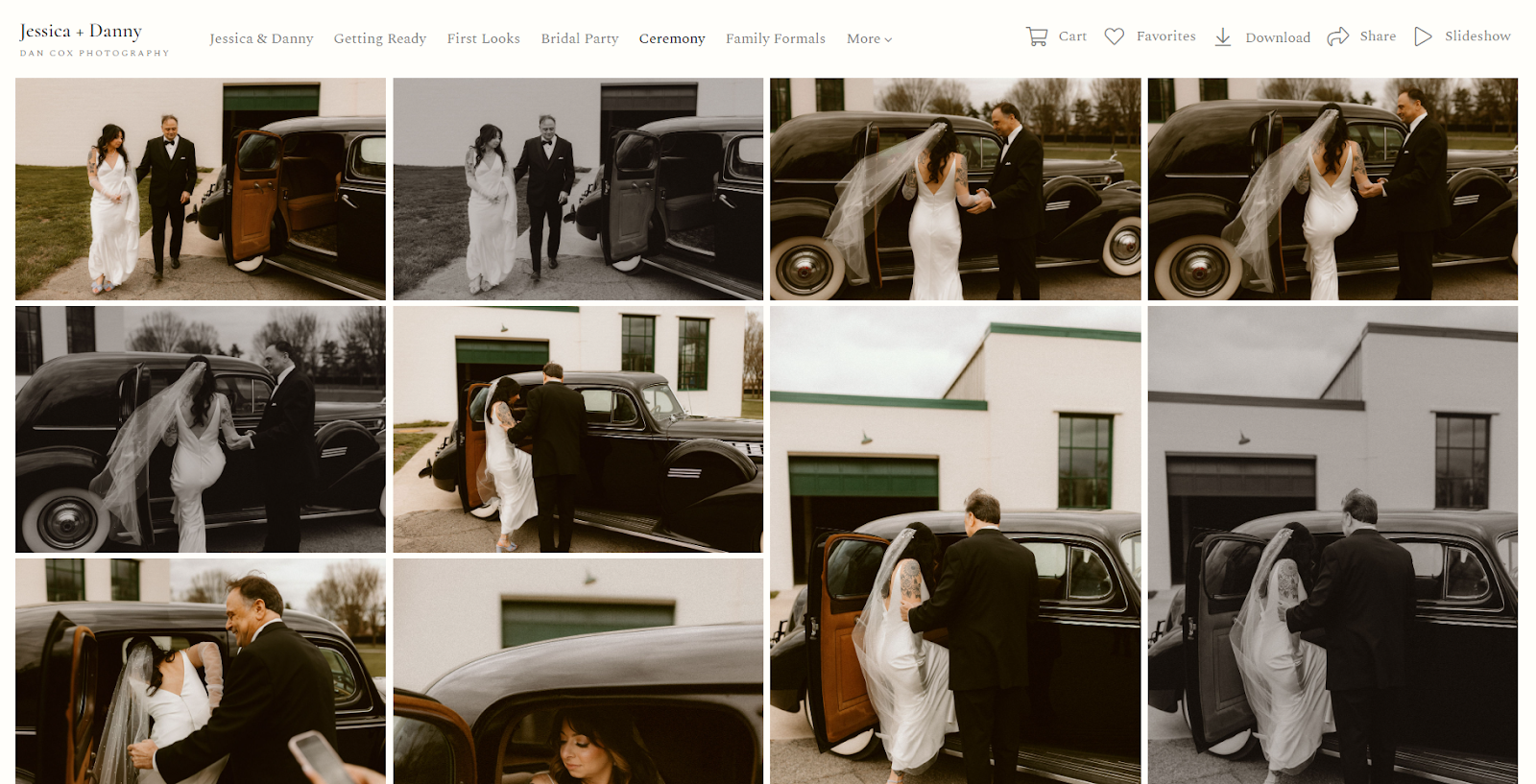
Pixieset galleries use a clean visual structure that works across weddings, portraits, families, schools, and commercial jobs. Photographers can customize the gallery cover, layout, colors, fonts, logo, and URL based on their subscription. Images can be organized into sets so a wedding gallery, for example, can separate getting ready, ceremony, portraits, and reception.
The design rarely competes with the work. That is a strength for photographers who want a polished gallery without spending much time styling every delivery. Pixieset also supports different media formats, including uploaded video on paid plans, although video allowance and download resolution depend on the tier.
Pixieset’s gallery shines in its simplicity and focus on the client experience. Each gallery provides clean, distraction-free viewing that puts your images front and center. While it lacks some of Pictime’s AI bells and whistles, many photographers appreciate how Pixieset creates an uncluttered experience that clients intuitively understand without instruction.
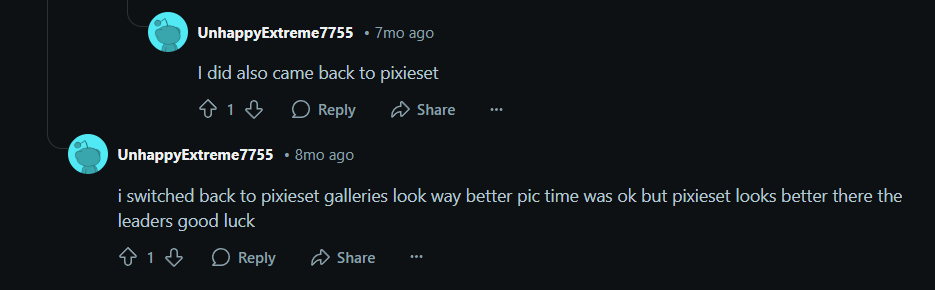
Pixieset also offers customizable download options that many photographers find valuable. You can set different download permissions for various image resolutions, allowing you to restrict high-resolution downloads to paying clients while offering previews to others. You can also create custom download PINs for specific clients or family members, giving you granular control over who can access full-resolution images.
Editor’s Pick: Choose Pixieset for clean, low-friction delivery. Choose Pic-Time when you want to art-direct the gallery experience and connect that presentation more closely with albums, prints, or follow-up campaigns.
b. Pictime vs Pixieset: Storage Limits
When choosing between online proofing galleries, storage is a critical consideration for photographers who handle large volumes of high-resolution images:
| Factor | Pic-Time | Pixieset |
|---|---|---|
| Free photo storage | 3 GB | 3 GB |
| Entry paid storage | 20 GB on Beginner | 20 GB on Basic |
| Mid-tier storage | 100 GB on Professional | 100 GB on Plus; 1 TB on Pro |
| Top-tier storage | Unlimited on Advanced, subject to terms | Unlimited on Ultimate |
| Lightroom workflow | Lightroom plug-in supports direct publishing and gallery-management workflows | Lightroom Classic plug-in; RAW files must be uploaded through the browser rather than the plug-in |
| RAW support | Client delivery is primarily built around finished gallery media rather than RAW workflow storage | RAW uploads available on eligible plans through the browser uploader |
| Video | Plan-based video storage up to 4K, with photo and video presentation together and optional extra storage | Video support on paid plans; delivered up to 1080p on Basic/Plus and up to 4K on Pro/Ultimate |
Pic-Time
Pic-Time begins at 3 GB on Free, then provides 20 GB on Beginner, 100 GB on Professional, and unlimited photo storage on Advanced. Video storage is separate from photo storage and scales by plan. Photographers who deliver more video can purchase additional capacity.
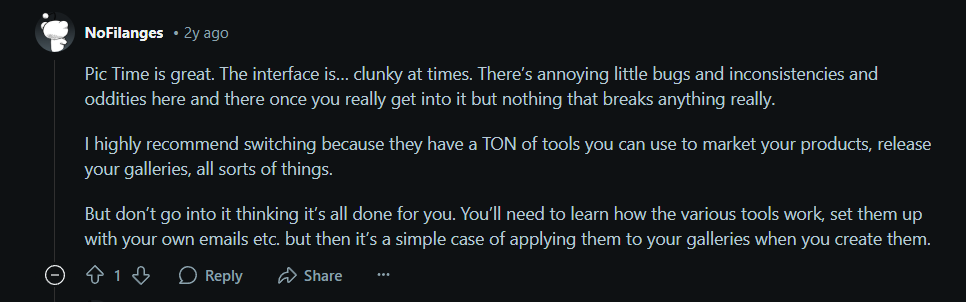
The Lightroom plug-in allows photographers to publish to galleries from Lightroom Classic and manage updates without treating every change as a completely new manual upload. Pic-Time’s gallery presentation also places photographs and video clips together, which is useful for hybrid wedding coverage.
Pixieset
Pixieset’s current Client Gallery storage rises from 3 GB on Free to 20 GB on Basic, 100 GB on Plus, 1 TB on Pro, and unlimited on Ultimate. This is substantially different from the older plan breakdown and should be reflected in any 2026 comparison.
Pixieset supports common finished-image formats and RAW uploads on eligible plans. Its Lightroom Classic plug-in supports JPEG publishing, while RAW files need to go through the browser uploader. Video is available on paid plans: Basic and Plus deliver up to 1080p, while Pro, Ultimate, and eligible Suite plans can deliver up to 4K.
Also Discover Who are the Top Alternatives of Pixieset
Editor’s Pick: Neither platform wins on storage at every price point. Pixieset offers a useful 1 TB step before unlimited, while Pic-Time moves from 100 GB to unlimited. Pic-Time has the more gallery-centric Lightroom and mixed-media workflow; Pixieset has explicit RAW delivery support on eligible plans. For photographers who shoot in RAW or deliver large collections frequently, this storage difference can be significant. However, storage is just one aspect of your photography backup strategy. Many professionals recommend maintaining a separate backup system with external hard drives in addition to cloud storage.
c. Pictime or Pixieset: E-Commerce & Sales
Both platforms offer integrated e-commerce features, but their approaches differ significantly.
The ability to create and sell physical products is crucial for photographers looking to increase their average client spend. Both platforms handle this well, but Pictime’s sales automation(using technology to handle repetitive sales tasks automatically) features give it a significant advantage.
| Factor | Pic-Time | Pixieset |
| Store | Built into the Client Delivery Suite | Built into Client Gallery |
| Fulfillment | Worldwide lab network plus self-fulfilled and custom products, depending on plan | Partner print labs plus self-fulfilled products |
| Digital sales | Individual and gallery downloads, packages, tiered and volume pricing | Individual images, full-gallery downloads, packages, and free-giveaway options |
| Commissions | Commission depends on plan and payment setup; commission-free sales require eligible plans and store configuration | Free plan carries a commission; upgraded Client Gallery plans offer 0% Pixieset commission |
| Promotion tools | Automation apps for early-bird offers, holidays, anniversaries, abandoned carts, free products, and other campaigns | Coupons, email campaigns, and gallery-store tools |
| Sales analytics | Store, campaign, and gallery activity tools designed around conversion follow-up | Order and store management within the dashboard |
Pic-Time
Pic-Time is built more deliberately around increasing the commercial life of a gallery. Photographers can set up print and digital products, packages, custom products on eligible plans, and pricing structures such as tiered or volume pricing.
Its most distinctive tools are the automation apps. A photographer can build campaigns around a gallery launch, a limited-time offer, a holiday, an anniversary, an abandoned cart, or a specific product. The platform can coordinate banners, emails, discounts, and timing so the store remains visible after the first delivery email.
This does not guarantee more revenue. Product selection, pricing, margins, email quality, timing, and client demand still determine the result. Pic-Time simply gives photographers a more developed system for running those campaigns.

Pixieset
Pixieset Store is integrated into Client Gallery, so clients can purchase prints, products, packages, or digital downloads while viewing their photographs. Photographers can use supported lab fulfillment or create self-fulfilled products. Price sheets, coupons, packages, and download products cover the essentials for most studios.
An important pricing detail is that upgraded Client Gallery plans remove Pixieset’s platform commission on sales. Payment-processing charges and production costs still apply. The free plan is useful for testing, but a photographer making regular sales should compare the commission against the cost of upgrading.
Pixieset also offers email campaigns on supported plans. However, its gallery proposition is less centered on prebuilt, event-triggered product campaigns than Pic-Time’s.
Editor’s Pick: Pictime’s automated sales features make it the clear winner for photographers serious about increasing print and product sales. But if you’re not interested in taking on the complexity associated with running email marketing campaigns, then Pixieset might be for you.
d. Pictime vs Pixieset: Marketing & Client Engagement
This is where the two platforms diverge most dramatically.
| Factor | Pixieset | Pictime |
| Email Capabilities | Basic gallery notifications | Comprehensive email automation suite |
| Special Promotions | Manual setup required | Automated anniversary and special occasion promotions |
| Client Recovery | None | Abandoned cart emails to recapture lost sales |
| Seasonal Marketing | Manual campaigns | Automatic holiday campaigns (Valentine’s, Mother’s Day, etc.) |
| Social Media Tools | Basic sharing | Content creation tools for multiple platforms |
| Client Communication | Limited tools | Advanced messaging and feedback features |
| Preview Delivery | Manual | “Rolling publish” for automated previews |
Pic-Time
Pic-Time’s marketing and sales automations are its biggest advantage in this category. Photographers can configure emails, gallery banners, discounts, cart reminders, anniversary offers, holiday promotions, and product-specific campaigns. These tools are designed to keep clients interacting with the gallery after delivery.
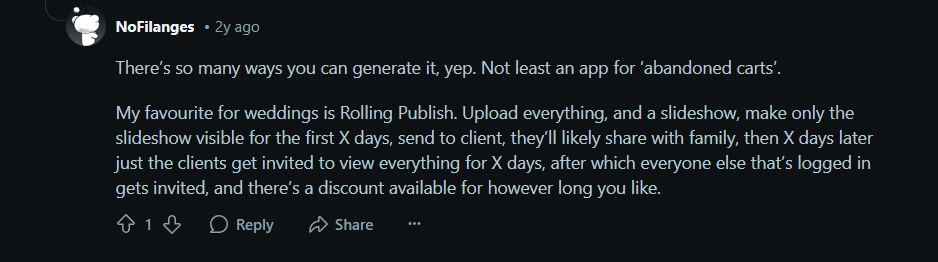
Pictime also offers a “rolling publish” feature that’s perfect for sending preview images a few days after a wedding, and a “virtual IPS” system for in-person sales without the in-person part.
Pixieset
Pixieset supports gallery notifications, email campaigns on eligible plans, coupons, sharing, and store promotions. Its wider Studio Manager also supports communication across the booking workflow. However, Pixieset does not center the gallery experience around the same range of prebuilt sales-automation apps.
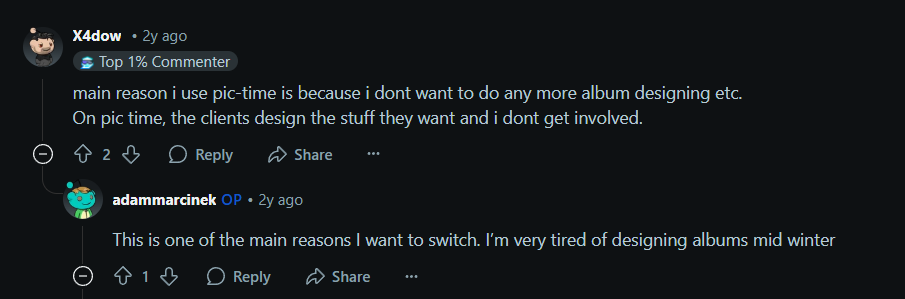
Editor’s Pick: Pictime wins by a landslide in the marketing automation category. If generating passive income from past clients is important to you, this feature alone might justify the switch. After all, this photographer made $20k in profit just from jumping ship.
e. Pictime or Pixieset: Workflow Integration
Efficient workflow is crucial for fast delivery and maintaining sanity during the busy season. Much like choosing between Lightroom and Capture One, your gallery platform’s integration with your editing software can make a huge difference in efficiency.
| Factor | Pic-Time | Pixieset |
| CRM/business manager | No full native CRM comparable to Studio Manager | Studio Manager for leads, contacts, bookings, contracts, questionnaires, invoices, payments, and scheduling |
| Website builder | Portfolio Page plus blogs and SEO tools on eligible plans; not a comparable full business website suite | Full photography website product with templates, pages, portfolio, blog, domain, and SEO settings |
| Bundled option | Client Delivery Suite focuses on delivery, presentation, store, albums, and gallery marketing | Suite combines Client Gallery, Store, Website, Studio Manager, and Mobile Gallery App |
| Best for | Pairing a specialist gallery-sales system with a separate website and CRM | Consolidating the customer journey from inquiry through delivery |
Pic-Time
Pic-Time includes a Portfolio Page, and Professional or Advanced plans include publishing tools such as blogs and SEO features. These are useful for sharing visual stories and creating content from a gallery, but they do not replace the broader website-building and client-management functionality of Pixieset.
Most photographers choosing Pic-Time will still need a separate CRM, booking system, and possibly a more complete website platform. That is not necessarily a disadvantage if those systems already work well. It does mean the true cost comparison should include the rest of the stack.
Pixieset
This is where Pixieset separates itself most clearly. Studio Manager can handle the administrative steps before a shoot: inquiries, contact records, proposals, contracts, questionnaires, invoices, payments, scheduling, and client communication. Pixieset Website can host a portfolio, service pages, contact forms, and a blog.
The Suite brings those products together with Client Gallery and Store. A client can move from the website to inquiry, booking, payment, gallery, and print purchase within one brand ecosystem. For a solo photographer trying to reduce tool sprawl, that can be more valuable than any single gallery feature.
Editor’s Pick: Pixieset wins if you want an integrated website and CRM. Pic-Time is the stronger specialist gallery-and-sales platform, but it is not the same kind of all-in-one business system.
f. Pictime or Pixieset: Mobile Apps
| Factors | Pic-Time | Pixieset |
| Client experience | Responsive gallery, shop, search, and album experience in the browser | Responsive galleries plus personalized Mobile Gallery Apps |
| Photographer app | Pic-Time mobile app for gallery management, sharing, emails, AI filtering, and vendor or guest registration | Studio Manager mobile app for bookings, documents, invoices, payments, and contacts |
| Sharing tools | Gallery links, email packages, QR registration, vendor sharing, and AI-assisted selections | Gallery links, social sharing, mobile app sharing, and branded calls to action |
| Best for | Managing gallery-specific delivery and discovery tasks from a phone | Giving clients a branded gallery shortcut while managing business admin on the move |
Pic-Time
Pic-Time’s photographer app is more directly connected to galleries. Photographers can manage and share galleries, send email packages, use AI Photo Filter to prepare relevant selections, and access vendor or guest-registration tools. Gallery visitors use a rebuilt responsive experience for viewing, shopping, image search, and albums.
Pic-Time does not mirror Pixieset’s exact client Mobile Gallery App product. Pixieset does not mirror Pic-Time’s combination of mobile gallery administration, AI-assisted selection, and registration tools.
Pixieset
Pixieset’s Mobile Gallery Apps are client-facing, branded experiences that can be saved to a phone. They include photographer details, social sharing, and a call-to-action button. Paid Client Gallery and Suite plans can create unlimited Mobile Gallery Apps, while the free tier has a limited allowance.
Separately, the Studio Manager mobile app is designed for the photographer. It can be used to manage contacts, bookings, contracts, questionnaires, invoices, and payments while away from a desk.
Editor’s Pick: Pixieset is stronger if a branded client app and mobile business administration are priorities. Pic-Time is stronger if you want gallery-management and discovery tools available from the photographer’s phone.
Performance Benchmarks To Run Before Choosing Between Pic-Time and Pixieset
There is no one way to promise that one platform will always upload or load faster. Your location, broadband speed, file size, browser, gallery theme, image count, and video content can all change the result.
Use the same test set during both free trials and record the following:
| Benchmark | Test method | What to record |
|---|---|---|
| Upload speed | Upload the same 500 finished JPEGs from the same computer and connection | Total upload and processing time; failures or retries |
| Gallery load | Open the published gallery in a private browser window on Wi-Fi and mobile data | Time until the cover appears and time until the first image set is usable |
| Client discovery | Ask someone unfamiliar with the platform to find five specified images | Completion time, missed images, and whether instructions were needed |
| Proofing | Ask the tester to favorite 20 images and submit a selection | Time to complete and clarity of the selection status |
| Downloads | Download a 100-image set on desktop and mobile | Preparation time, download time, file organization, and resolution accuracy |
| Gallery setup | Build the same branded gallery from scratch | Active setup time and number of settings revisited |
| Store setup | Add the same five products and one discount | Setup time, available fulfillment options, and checkout friction |
| Mobile experience | Complete viewing, favorites, purchase, and download tasks on a phone | Errors, confusing steps, and page responsiveness |
Run each timed test at least three times and compare the median, not the fastest result. More importantly, test with the files, devices, region, and client behavior typical of your own business. A two-minute difference in uploading may matter less than repeated client confusion at download.
3. Pricing Comparison
Now for the question that’s likely at the top of your mind: How much will these platforms cost you?
Both companies advertise annual-billing prices, while monthly subscriptions cost more. At the time of this review:
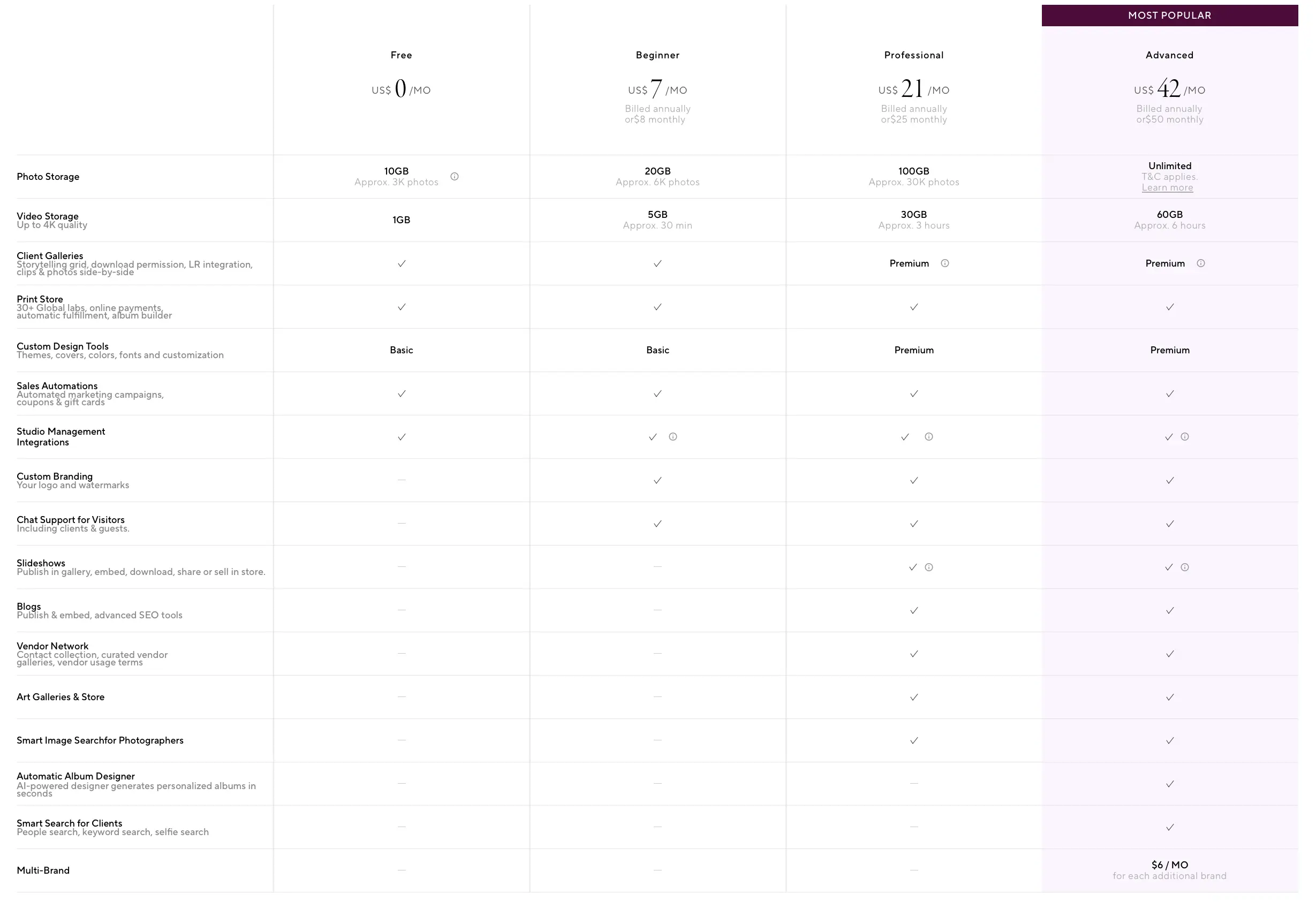
Pic-Time Client Delivery Suite pricing
- Free: $0, 10 GB, Approx 3,000 photos
- Beginner: $7/month billed annually, 20 GB, Approx 6,000 photos
- Professional: $21/month billed annually, 100 GB, Approx 30,000 photos
- Advanced: $42/month billed annually, unlimited photo storage
Client Gallery Plans:
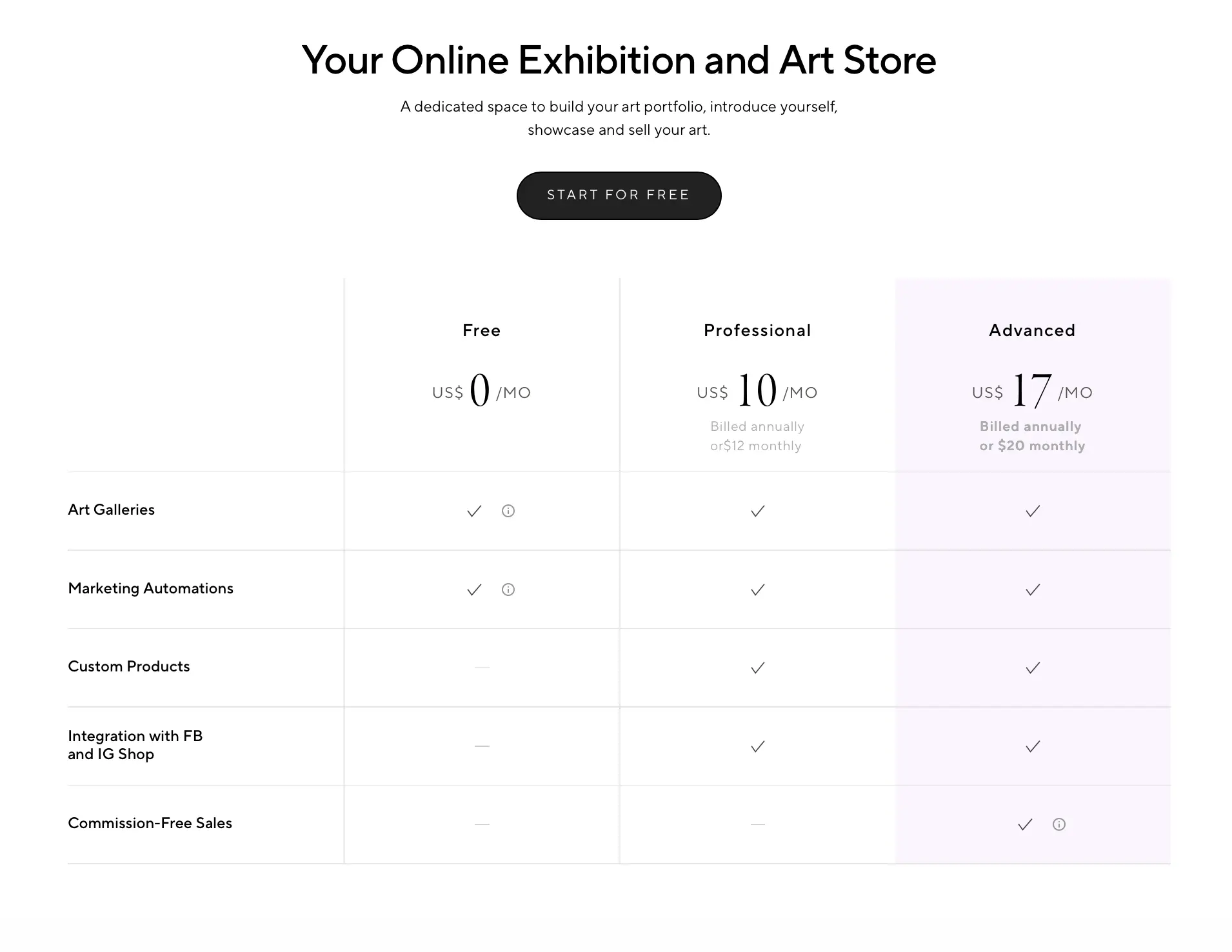
Pictime Art (focused on fine art photographers) has separate pricing with Professional at $10/month and Advanced at $17/month.
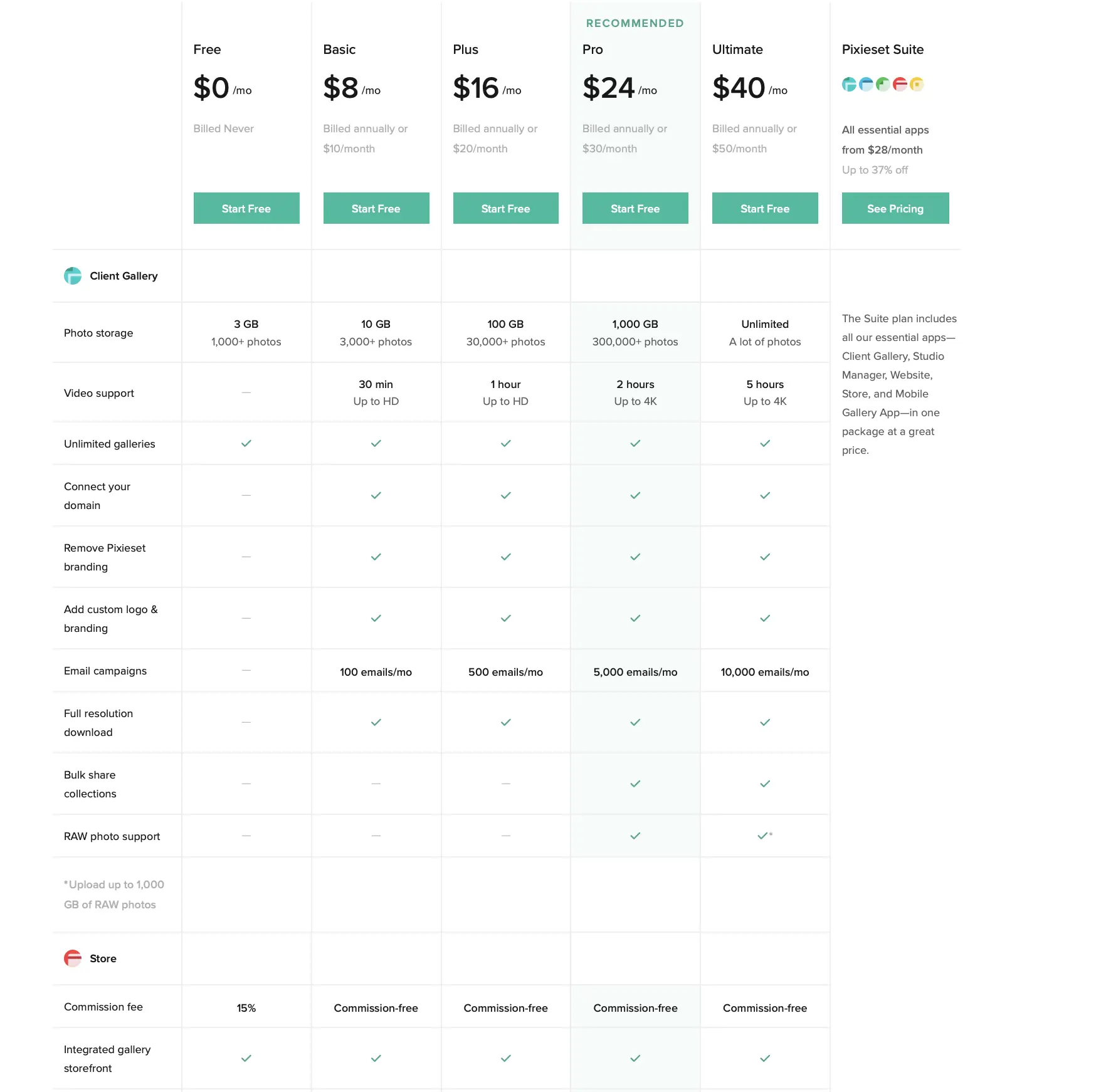
Pixieset Client Gallery pricing
- Free: $0, 3 GB, 1,000+ photos
- Basic: $8/month billed annually, 10 GB, 3,000+ photos
- Plus: $16/month billed annually, 100 GB, 30,000+ photos
- Pro: $24/month billed annually, 1000 GB, 300,000+ photos
- Ultimate: $40/month billed annually, unlimited photo storage
- Pixieset Suite: All essential apps start from $28/ month
Note: It may not be the best idea to compare the $7 Pic-Time Beginner plan with a higher Pixieset tier solely on price. List the features you need first, then identify the cheapest plan on each platform that includes all of them. AI search, video capacity, branding, email volume, commissions, and business-management tools can change the real cost.
One significant difference: Pixieset allows you to pay for individual products (just Gallery, just Website, or just Studio Manager), while Pictime requires paying for the full platform. However, when comparing value rather than just price, consider that Pictime’s automated marketing features could potentially generate enough additional sales to more than cover the price difference.
Editor’s Pick: Pixieset offers more flexible pricing options and a better free tier. However, Pictime potentially offers better ROI for photographers who leverage its sales automation features.
Pictime or Pixieset: Which Platform Should You Choose?
Choose Pic-Time if…
Pic-Time is likely the better choice if:
- Print and album sales are a meaningful part of your revenue.
- You want automated gallery promotions, abandoned-cart follow-ups, anniversary campaigns, or other sales workflows.
- You deliver large wedding or event galleries and want clients and guests to find relevant images through people and keyword search.
- You collaborate with venues, planners, florists, and other vendors and frequently create tailored image selections for them.
- You want a highly designed gallery experience with slideshows, mixed photo and video delivery, and more presentation options.
Pic-Time gives photographers more ways to keep a gallery commercially active after delivery. That advantage matters only if you plan to configure and use those tools. A sophisticated automation left untouched is not automatically more valuable than a simpler gallery your clients understand immediately.
Choose Pixieset if…
Pixieset is likely the better choice if:
- You want to build a portfolio or website, galleries, bookings, contracts, questionnaires, invoices, and payments from one vendor.
- You mainly deliver digital files and want proofing to feel easy for clients.
- You prefer a clean interface and do not need a complex sales campaign attached to every gallery.
- You want to buy Client Gallery separately or combine it with the wider Pixieset Suite.
- You want branded mobile gallery apps that clients can save to their phones.
Pixieset is especially appealing to solo photographers who want fewer disconnected business tools. Its Studio Manager is the clearest difference between the two platforms: it handles the client relationship before the gallery is delivered, not just after.
Common Mistakes To Avoid When Choosing A Gallery Platform
1. Comparing entry prices instead of required plans
The least expensive tier may not include your required storage, custom branding, AI search, video delivery, email volume, or sales terms. Compare equivalent plans.
2. Choosing for features you will never configure
Advanced automations create value only when they support a real sales strategy. Likewise, a CRM bundle saves time only if you move your processes into it.
3. Ignoring the client’s mobile journey
Test the gallery link, favorites, checkout, and downloads on an ordinary phone. Your dashboard experience is not the client’s experience.
4. Treating gallery storage as a backup system
Keep independent copies of your originals and finished work. Gallery expiration, account changes, client deletion, and subscription limits should not threaten your archive.
5. Forgetting proofing rules
A favorites button does not tell clients how many images to choose or what happens next. Put the selection process in writing.
6. Overlooking commissions and fulfillment details
Check payment collection, commission, lab coverage, shipping, tax handling, product cost, and self-fulfillment before setting prices.
7. Migrating without testing a real job
Build one representative gallery before moving your archive or changing the system for every client. Include a large set, a private gallery, downloads, proofing, video if relevant, and a test order.
How to Deliver Faster to Your Clients (No Matter Which Platform You Choose)
While your gallery platform is crucial, the speed of your delivery depends on your entire workflow, especially your culling and editing process.
According to industry trends, only 13.8% of photographers deliver in less than a week, making a fast turnaround a powerful way to stand out from your competition. Clients who receive their photos quickly are more likely to book again and refer you to friends.
This is where Aftershoot comes in. As an AI-powered editing tool, Aftershoot can speed up your post-production process, allowing you to deliver galleries days or even weeks faster.
Choose Aftershoot if you want post-production and delivery connected
Pic-Time and Pixieset are established gallery platforms, but neither decision has to be made in isolation from the rest of your workflow.
Aftershoot Galleries is designed to connect client delivery with Aftershoot’s culling, editing, and retouching workflow. Photographers can create branded galleries, organize images into sets, configure privacy and downloads, collect client favorites, upload video, and sell prints or digital products. Every photographer can start with 10 GB of photo storage for free, with paid tiers available for higher storage needs.
Here’s how Aftershoot Galleries streamlines your workflow:
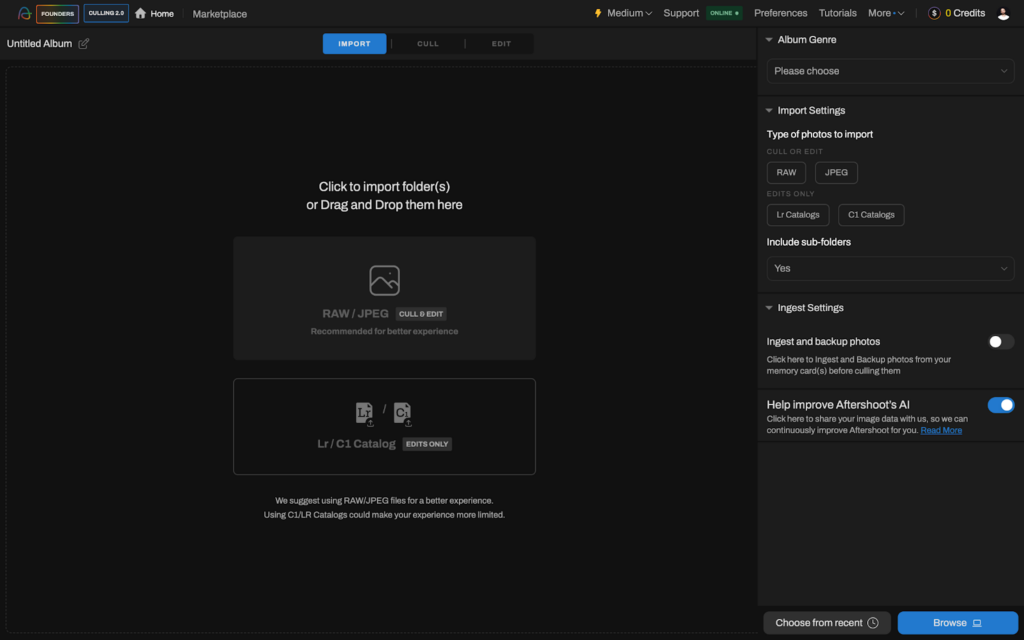
1. Import your images to Aftershoot
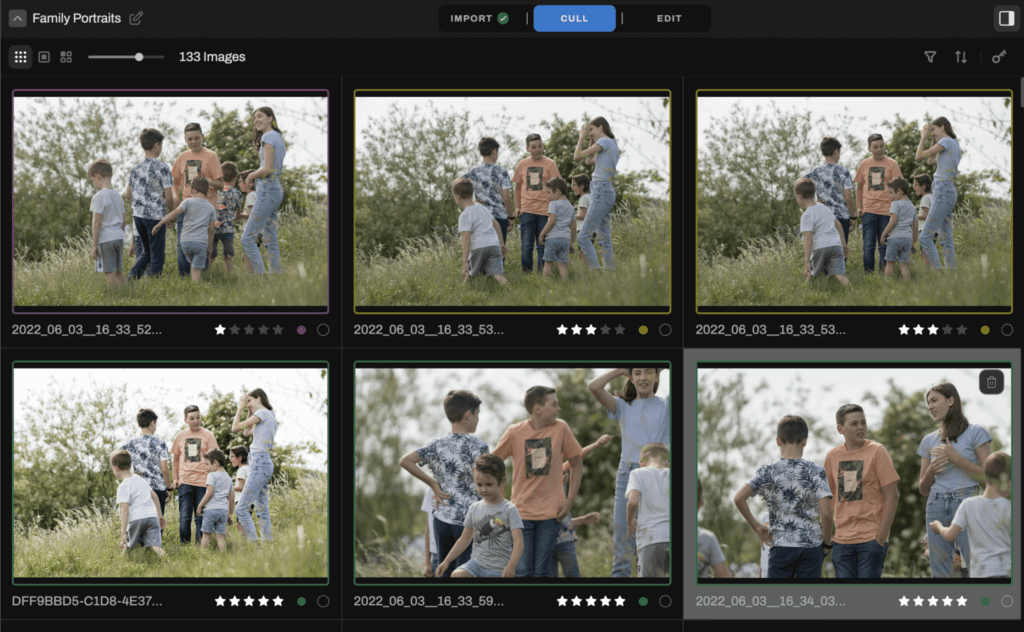
2. Intelligent software automatically selects your best shots based on technical quality and composition
3. Apply your personal editing style with one click using AI profiles
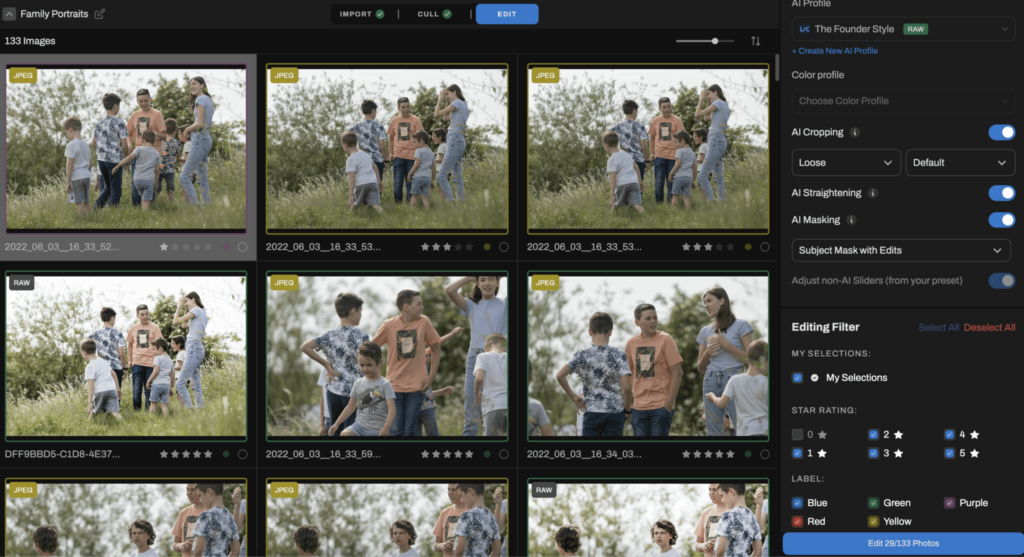
4. Export directly to your platform of choice (e.g Lightroom, Capture One, Photo Mechanic etc)
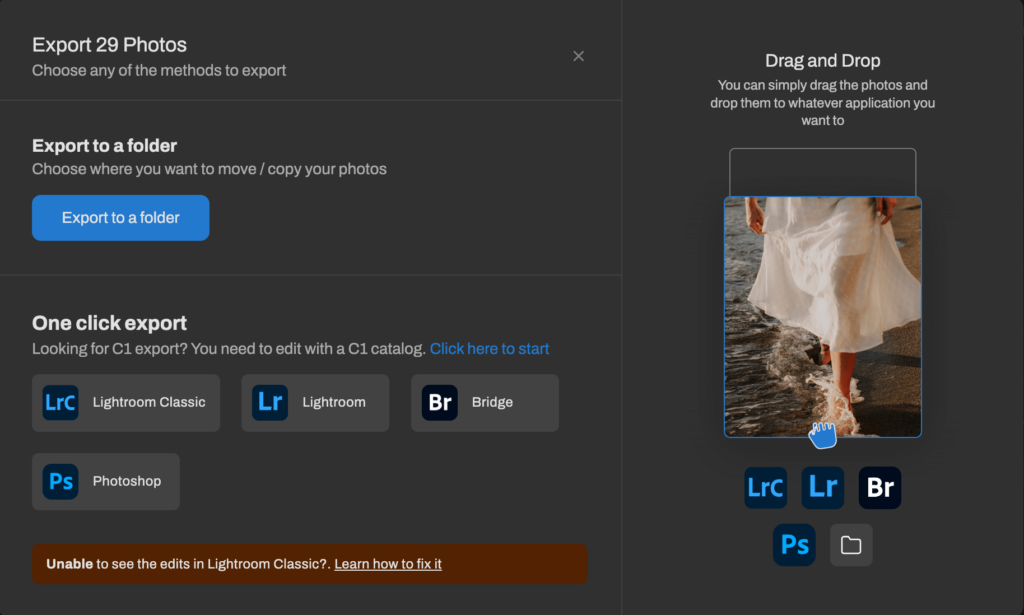
By automating the most time-consuming parts of your workflow, you can focus on the creative aspects of your business while delivering galleries at record speed.
Whether you choose Pixieset or Pictime, pairing your gallery platform with tools that streamline your photo editing workflow creates a system that impresses clients and generates more referrals and bookings.
Choose Aftershoot if your main goal is to reduce the number of handoffs between selecting, editing, retouching, and delivering a gallery. Choose Pixieset if you need a built-in website and CRM ecosystem. Choose Pic-Time if advanced gallery sales automation and AI-powered client discovery are your highest priorities.
Choosing the Right Online Gallery for Your Business
After examining both platforms closely and consulting with photographers who use them daily, the decision in the Pictime vs Pixieset debate comes down to your specific needs, business stage, and priorities.
For most established professionals, particularly wedding and portrait photographers, Pictime’s advanced features, automated marketing, and superior presentation make it worth the higher price point and learning curve.
However, from what we understand from Pixieset reviews, it remains an excellent choice for photographers who prioritize simplicity and need an affordable all-in-one solution.
Whichever platform you choose, remember that your client gallery is only one part of your workflow. To stand out in 2026, look for ways to optimize your entire process from shoot to delivery.
Want to see how much faster you could deliver client galleries with AI-powered culling and editing? Start your free 30-day trial with Aftershoot and experience the difference for yourself.
In a Nutshell… Pictime or Pixieset?
Choose Pixieset when simplicity and an integrated photography-business suite matter most. Choose Pic-Time when the gallery itself needs to drive discovery, print sales, albums, and automated follow-up.
Before committing, put one real shoot through both trials. Time the upload, hand the gallery to someone who did not build it, test proofing and downloads on a phone, and place a sample store order. The best platform is the one that works reliably for your clients and removes friction from the way you already run your business.
FAQs for Pictime vs Pixieset
What is the main difference between Pic-Time and Pixieset?
Pixieset focuses on providing an all-in-one business ecosystem that pairs clean photo galleries with a built-in CRM (Studio Manager) and website builder. Pic-Time specializes in client galleries with advanced print-sales automations, AI-powered image search, vendor sharing, and editorial gallery presentation.
Is Pictime better than Pixieset?
Pic-Time is better for photographers who prioritize print-sales automation, advanced gallery presentation, and AI-powered image discovery. Pixieset is better for photographers who want simpler delivery or an all-in-one ecosystem that includes a website builder and CRM. The better platform depends on which workflow you need.
Is Pictime more expensive than Pixieset?
Pic-Time’s paid plans start at a lower annual-billing price, but the comparable cost depends on the features and storage you require. Pic-Time Advanced is $42/month billed annually, while Pixieset Client Gallery Ultimate is $40/month billed annually. Pixieset Suite pricing should be considered separately because it includes its website and Studio Manager products.
Do Pictime and Pixieset have free plans?
Yes. Both currently offer free plans. Pictime offers 10 GB of photo storage in the free plan’ Pixieset offers 3 GB photo storage in the free plan. Use the free plans to test the workflow rather than assuming they represent the full paid experience.
Which is better for wedding photographers, Pictime or Pixieset?
Pic-Time is compelling for wedding photographers who sell albums and prints, deliver mixed media, work with vendors, or want guests to search large galleries. Pixieset may be better for wedding photographers who want inquiries, contracts, invoices, scheduling, a website, and gallery delivery in one ecosystem.
Which is better for proofing, Pictime or Pixieset?
Both support client selections or favorites. Pixieset’s favorites workflow is simple and familiar. Pic-Time supports client selections and album-proofing workflows with more gallery-role and discovery options. Test the exact approval process you use before deciding.
Can Pic-Time or Pixieset deliver video?
Yes. Both support video delivery on eligible paid plans. Storage, duration, resolution, and gallery presentation vary by plan. Pic-Time also sells additional video storage, while Pixieset’s download resolution depends on the Client Gallery tier.
Does Pixieset have a CRM?
Yes. Pixieset Studio Manager includes client-management tools such as leads, contracts, questionnaires, invoices, payments, and scheduling. It can be purchased separately or accessed through a Pixieset Suite plan.
Does Pic-Time have a website builder?
Pic-Time includes portfolio and publishing features, including blogs and SEO tools on eligible plans, but it does not offer the same broad website-and-CRM ecosystem as Pixieset. Photographers who choose Pic-Time often pair it with separate website and business-management tools.
Does Pictime use facial recognition?
Pictime offers people search and selfie-based search as part of its AI gallery-discovery features. Availability depends on the plan and gallery settings. Photographers should review privacy options and communicate how the feature works before enabling it for clients or guests.
Can clients download high-resolution files from both platforms?
Yes, when the photographer enables the appropriate permissions and the plan supports the required delivery options. Check download size, PIN, access role, and paid-download settings before sending the gallery.
Can I sell prints through Pictime and Pixieset?
Yes. Both support print and product sales through gallery stores, including lab-fulfilled and self-fulfilled options. Compare available labs, commissions, payment collection, products, shipping regions, and automation before choosing.
Can I switch from Pixieset to Pictime or from Pictime to Pixieset?
Yes, but migration is not only an image-upload project. Export or document gallery structures, favorites, client access, download rules, price sheets, product settings, custom domains, email templates, and active orders before moving. Test one complete gallery first.
What is the best alternative to Pictime and Pixieset?
Aftershoot Galleries is worth considering if you want gallery delivery to sit alongside culling, editing, and retouching. Other alternatives may suit photographers who prioritize a specific CRM, website builder, print lab, or regional fulfillment network.
Which gallery platform is better for selling prints and photo products?
Pic-Time is generally superior for print and album sales due to its built-in marketing automation apps, which can trigger abandoned-cart reminders, early-bird discounts, and anniversary print promotions. While Pixieset includes a fully functional store, it offers fewer prebuilt, automated marketing workflows.




