TL;DR
- Decide your delivery number before you cull, not after. Wedding benchmarks sit around 70–100 delivered photos per hour of coverage.
- Cull in passes: remove technical rejects first, then pick your best frames. Mixing the two is what makes culls drag.
- Review by section (getting ready, ceremony, formals, portraits, reception) rather than scrolling the whole day in order.
- Work backward through each sequence; the strongest frame is often near the end, once people relax.
- Use AI for the repetitive first pass, then check family formals, emotional beats and guest moments yourself.
- Cull before you edit. Every extra frame you keep is another frame you have to edit and deliver.
A full wedding day can leave you with 3,000 to 6,000 frames: bursts from the processional, near-identical family formals, a dance floor’s worth of motion blur. Photo culling is where you turn that into a gallery the couple will actually look through, and for most wedding photographers it’s the most draining part of post-production.
The photographers who cull fastest aren’t making faster decisions frame by frame. They’ve built a system that removes most of the decisions before they have to make them.
Quick answer: How Do You Cull Wedding Photos Fast?
Back up and import from a fast drive, decide how many photos you’ll deliver before you start, and run a quick first pass that removes blinks, missed focus and duplicates (manually or with AI). Then review the day section by section, work backward through each sequence, keep one frame per moment, and check that every must-have person and moment made it in before you export to edit.
This guide walks through that workflow step by step, with delivery benchmarks, a keep-or-cut checklist, and a comparison of the tools photographers use to cull weddings in 2026.
How Many Wedding Photos Should You Keep?
Most photographers deliver somewhere between 70 and 100 photos per hour of coverage for a full-day wedding. Shorter elopements land lower; long, event-heavy days land higher.
| Coverage | Typical delivered range | Approx. photos per hour |
|---|---|---|
| 2–4 hours (elopement or micro wedding) | 150–350 | 50–75 |
| 6–8 hours (full day) | 500–800 | 70–100 |
| 10+ hours (extended coverage) | 800–1,200+ | 80–100 |
Use the table as a starting point, then adjust for three things:
- Event complexity. A first look, a big wedding party and a long list of family formal combinations produce more distinct moments than a small guest list with a simple timeline.
- Your packages. If a higher tier promises a bigger gallery, the number you cull to needs to reflect that.
- Your own history. Look at your last three to five galleries of a similar length and see which ones clients responded to best. That’s more reliable than any published benchmark.
More isn’t better. Couples remember a gallery that flows, not one where they scroll past eight versions of the same toast. And every extra 100 photos is 100 more to edit and deliver.
Read also: Best Photo Culling Software for Photographers
How Long Does It Take to Cull a Wedding?
It depends on how many frames you shot, how fast your previews load, and how many decisions you hand off to software. Rough ranges for a full-day wedding:
| Approach | Who makes the picks | Typical time | Best suited to |
|---|---|---|---|
| Manual (Lightroom or Photo Mechanic) | You, frame by frame | 3–5 hours | Smaller weddings, or photographers who want every call to be theirs |
| AI-assisted | You, with AI grouping duplicates, scoring frames and flagging faces | Between manual and automated, depending on how hands-on you are | Photographers who want speed without handing over selection |
| AI-automated + your review | AI makes the first selection; you review and swap | Around 20–30 minutes of review for most shoots, per Aftershoot | Busy seasons and high-volume weddings |
If a manual cull is taking you well beyond that range, the cause is usually slow previews or editing while you cull, not slow decisions. Both are fixed in the workflow below.
“With 20 weddings and 100’s of sessions this year, it’s given me my work/life balance back… Aftershoot is like my very reliable assistant that takes care of 70% of my workload.”
– Ashlee Weaver, professional photographer
How to Cull Wedding Photos: A Step-by-Step Guide
This workflow works whether you cull manually, with AI, or a mix of both. Where Aftershoot speeds up a step, the specific feature is called out.
Step 1: Back Up and Import for Speed
Before anything else, copy the cards to two locations. Then set yourself up so previews load instantly, because waiting on every frame to render is the most common reason a cull takes all evening.
- Cull from a fast internal SSD, not an external spinning drive or straight off the card.
- In Lightroom Classic, build Smart Previews or use embedded previews on import so you aren’t waiting on full RAW renders. Our guide to culling photos in Lightroom covers the setup and shortcuts.
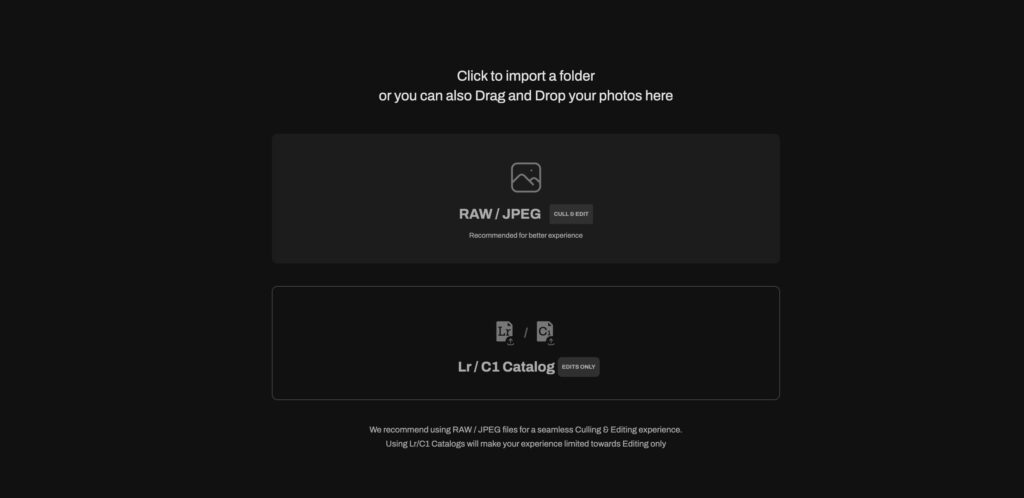
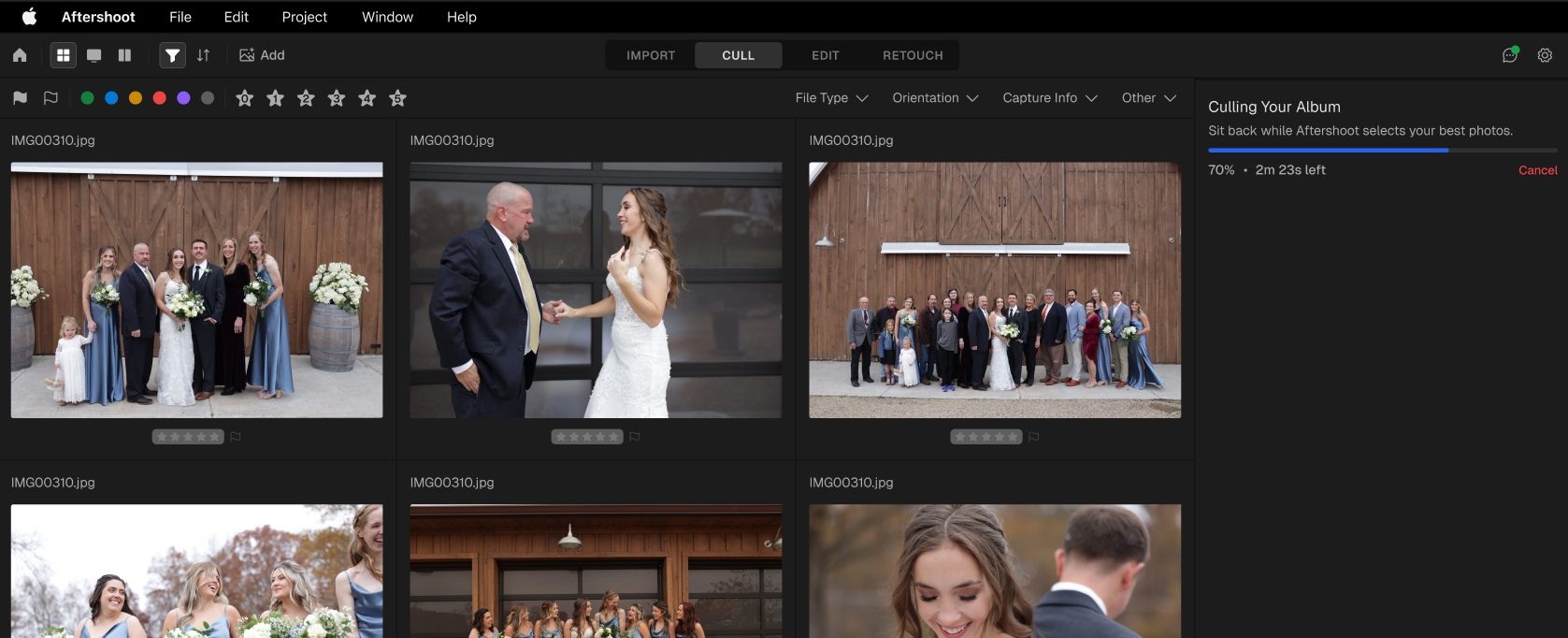
- In a dedicated culling app, previews are generated as part of import. In Aftershoot you can drag in a folder or import straight from a card, and analysis starts in the background while files copy.
If you shot with a second photographer, sync both cameras’ capture times before you start so the day sorts in the right order.
Step 2: Set Your Delivery Target Before You Start
Pick your number now, using the coverage table above. If you promised the couple roughly 500 photos, a cull that lands on 850 means another round of trimming later, and that’s where whole evenings disappear.
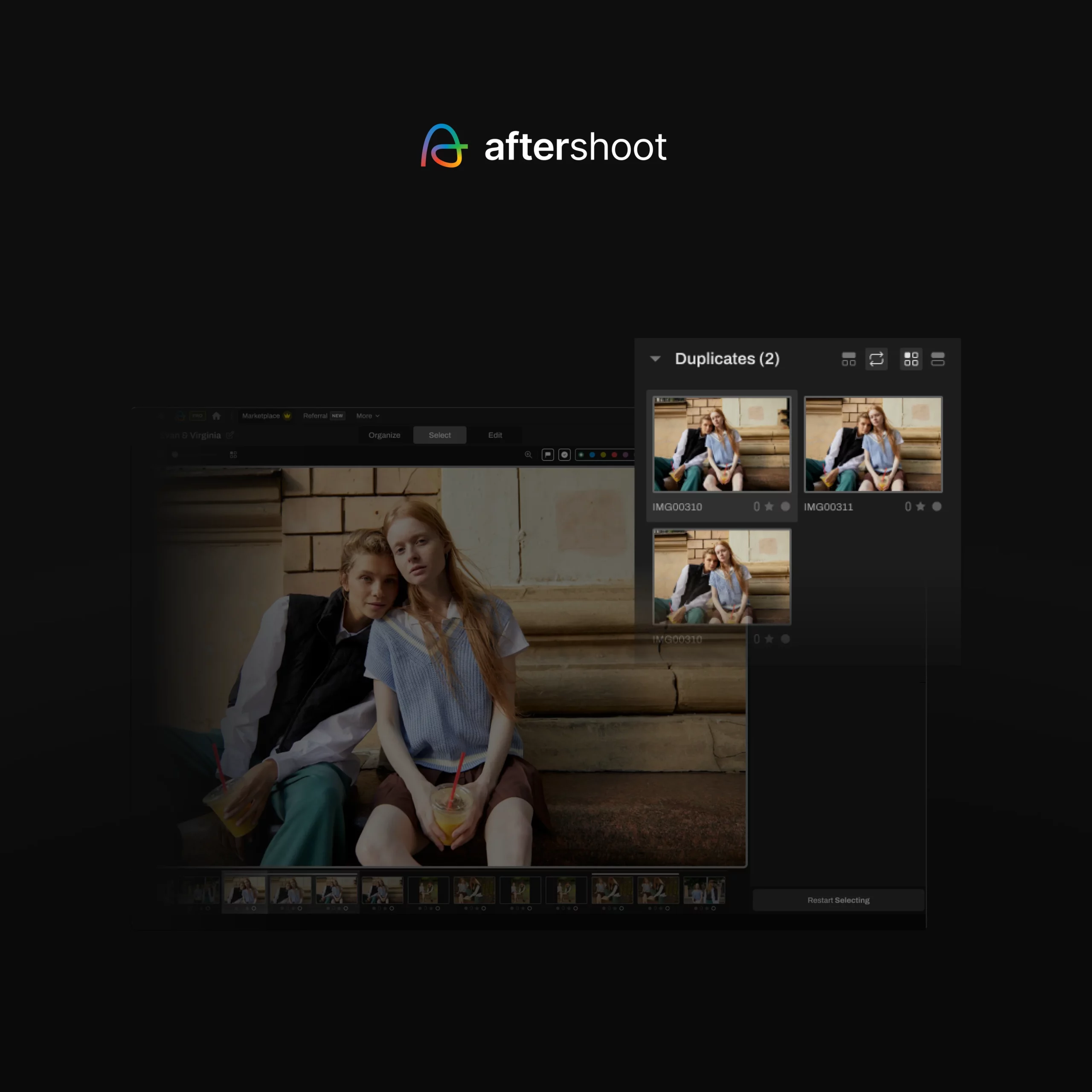
In Aftershoot, Cull to Target builds the selection around that number from the start, weighing quality, coverage across the day and variety together rather than chopping a ranked list at 500. You set it as a percentage of the album (between 10% and 60%), so 500 photos from a 4,000-frame wedding is about 12.5%.
If you cull manually, write the number down anyway. It keeps your second pass honest.
Step 3: Run a Fast First Pass for Technical Rejects
The first pass has one job: remove frames that could never make the gallery. Blinks, missed focus, misfires, flash failures, test shots and the fifth identical frame of a burst. Don’t judge expression or composition yet. Speed is the point.
Manually, that means flagging rejects with one keystroke per frame (in Lightroom, X to reject with auto-advance on) and not stopping to compare.
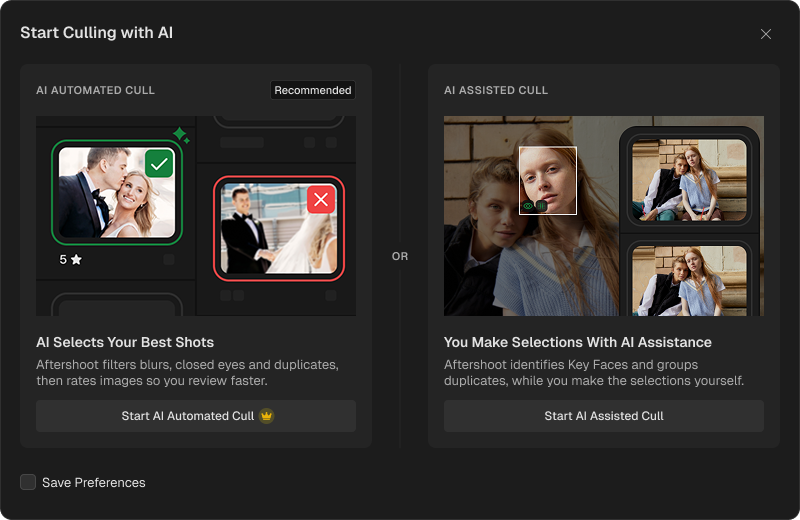
With AI, this is the pass software handles best. Aftershoot offers two ways to run it:
- AI-automated culling makes the initial selections for you. It groups duplicates, flags blur and closed eyes, and surfaces your strongest frames, which you then review and adjust.
- AI-assisted culling groups your duplicates and scores images, but leaves every selection to you.
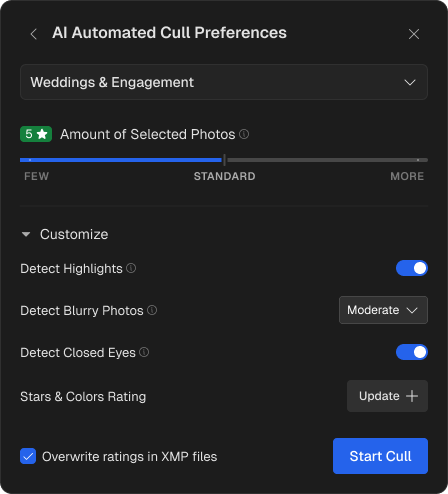
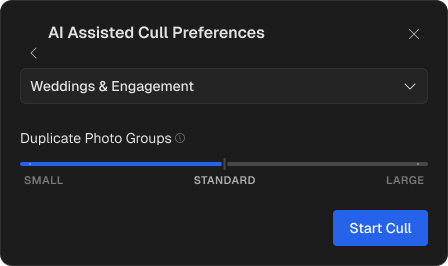
Automated suits a busy season where you’d rather review a shortlist than build one. Assisted suits photographers who want speed without handing over the editorial call. Either way, nothing is deleted: every rejected frame stays available to review.
AI culling in Aftershoot runs locally on your computer, so client files don’t have to be uploaded to the cloud, and it works offline.
Aftershoot Settings That Matter for Weddings
| Setting | What it controls | Wedding tip |
|---|---|---|
| Genre | Tells the AI what type of shoot it’s culling | Choose the genre that matches the shoot; the AI weighs selections differently by genre |
| Auto Target (Few / Standard / More / Extreme) | How broad or strict the overall selection is | Start at Standard, then restart the cull at another level if the selection lands too far from your target |
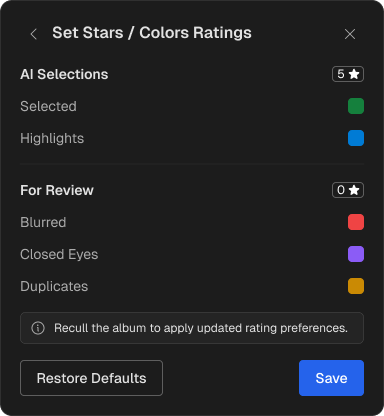
| Cull to Target | Selects a set share of the album (10–60%) | Use when you’ve promised a specific photo count |
| Duplicates | How tightly similar frames are grouped | Set toward Few to keep more variations from bursts; toward More if you shoot a lot of near-identical frames |
| Blurry | How sensitive blur detection is | Lower the sensitivity if your style includes intentional motion blur on the dance floor |
| Closed Eyes | Flags frames where a subject is blinking | Keep it on, but check the Closed Eyes group for laughing or kissing moments |
| Highlights | Surfaces your standout frames for sneak peeks | Available with Few, Standard and More; not with Extreme or Cull to Target |
You can change any of these after the cull and restart it; it only takes a moment.
Step 4: Cull by Section, Not by Timeline
Scrolling a 3,000-frame day from first to last is the slow way. Break it into the parts of the day instead (getting ready, ceremony, family formals, couple portraits, speeches, reception) and finish one before you open the next.
Some photographers go further and split each section by lens or by camera body, so they’re only ever comparing like with like: 35mm dancing shots against other 35mm dancing shots. It feels fussy, but it stops you from second-guessing a frame because a different focal length looks “better” out of context.
If you ran an AI first pass, review it the same way. In Aftershoot, results sort into groups – Selected, Highlights, Duplicates, Blurry and Closed Eyes (plus Maybes if you used Extreme or Cull to Target). Skim Blurry and Closed Eyes quickly for frames that still tell the story, then do your real review inside Selected, one section at a time.
Step 5: Work Backward Through Each Sequence
Instead of starting at the first frame of the processional or the first shot in a portrait burst, jump to the end of each sequence and work toward the start.
The strongest frames tend to come late. By then the couple has relaxed, you’ve dialled in the light and framing, and the awkward warm-up frames are behind you. Starting at the end means you find the keeper first and can skip the weaker, repetitive frames that led up to it, instead of provisionally keeping three “maybes” while you wait for something better.
It works especially well for portraits, first looks and anything posed, where a sequence builds toward its best moment.
Step 6: Compare Near-Duplicates and Keep One Frame
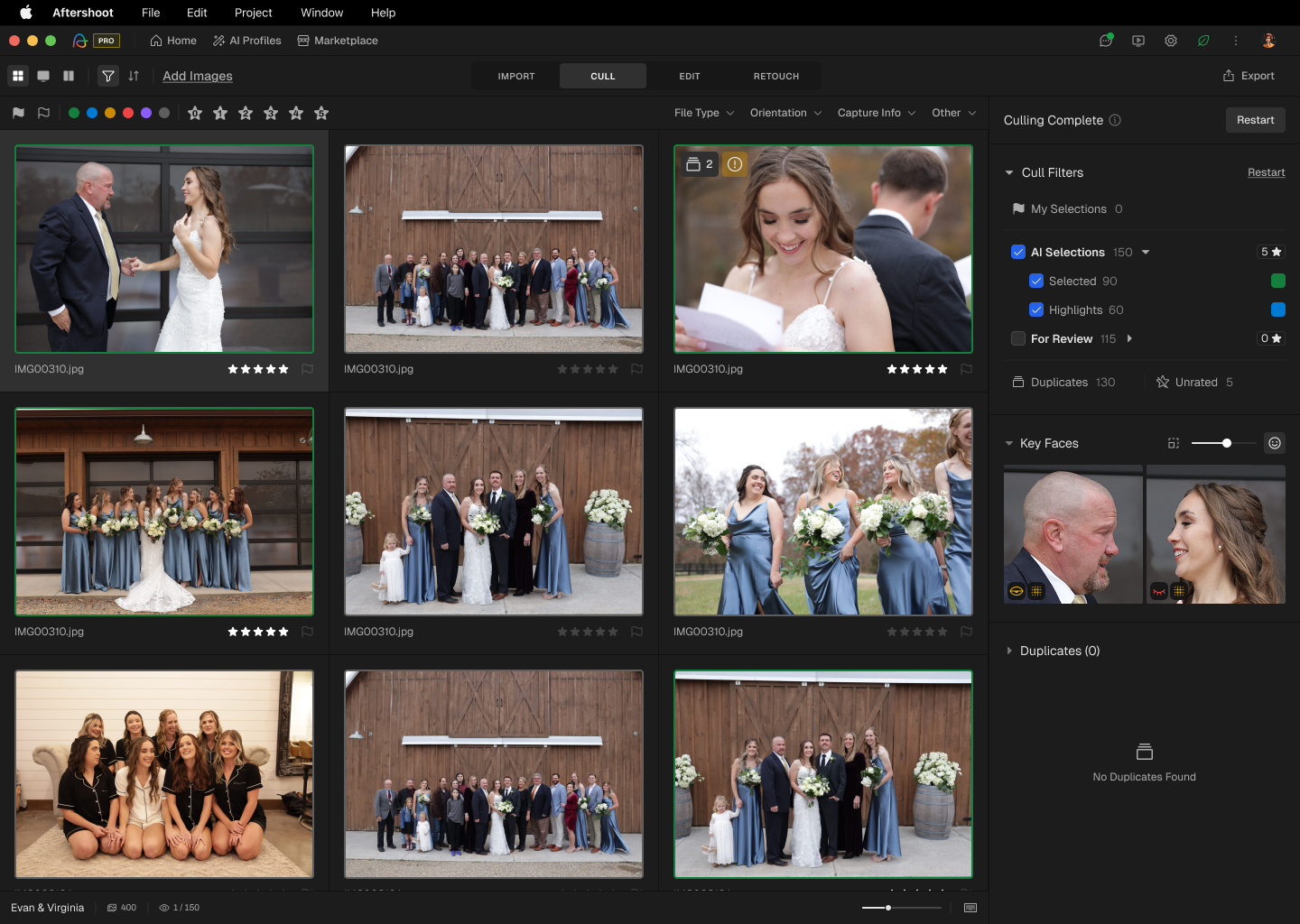
This is the second pass, where you make the actual choices. For every moment, the goal is one frame, occasionally two if they say genuinely different things (a wide and a tight, a laugh and a look).
- Compare side by side. Aftershoot’s Survey Mode shows up to 16 frames at once so you can zoom in and pick the winner without flicking back and forth. In Lightroom, select the burst and press N.
- Override freely. If the AI skipped a frame you love, promote it; if it kept one that doesn’t fit the story, drop it. Selections only change when you change them.
- Batch your decisions. The Spray Can tool lets you sort frames into categories in a single pass, such as gallery picks versus album candidates, rather than tagging them one at a time.
When you’re torn between two nearly identical frames, keep the one with the better expression and move on. Nobody will ever see the other one, and that’s fine.
Step 7: Check Coverage Against Your Must-Have List
A tight gallery is only a good gallery if nobody important is missing. Before you export, run through the moments and people the couple will look for first.
| Check | What to confirm |
|---|---|
| Key moments | Processional, vows, ring exchange, first kiss, recessional, first dance, cake, speeches, exit |
| Family formals | Every combination on the shot list has at least one frame where everyone’s eyes are open |
| VIPs | Parents, grandparents and the wedding party each appear across the day, not just in formals |
| Details | Rings, dress, florals, venue and décor are represented |
| Story flow | No section of the day is thin compared with the others |
In Aftershoot, the People filter makes the VIP check quick: after the cull, open the People tab, click a face, and see only the photos that person appears in (with a count that reflects your current filter). Select several faces and choose “All” to check that a specific family group was captured together.
Step 8: Pull Sneak Peeks, Then Export to Your Editor
Pick your sneak peeks while the cull is fresh. If you left Highlights on in Aftershoot, start there: it surfaces your standout frames so you’re choosing from a dozen strong candidates instead of hunting through 500. You still choose what goes out.
Then export. Aftershoot passes your selections to Lightroom Classic, Capture One, Photo Mechanic or Bridge with star ratings and color labels intact. If you’d rather not switch apps, you can carry the same selection straight into AI editing inside Aftershoot.
Once the gallery is edited, our guide on how to send photo proofs to clients covers the delivery side without the endless back-and-forth.
What to Keep and What to Cut
| Keep | Cut |
|---|---|
| Genuine emotion, even if focus is slightly soft | Technically sharp frames with no expression or connection |
| The single strongest frame of each moment | Near-duplicates that add nothing new |
| Frames with eyes open (or intentionally closed: a kiss, a laugh) | Unintentional blinks, especially in formals |
| Every family formal combination on the shot list | Warm-up and test frames |
| Frames that move the story forward between sections | Unflattering angles or mid-chew shots of guests |
| Details the couple paid for (florals, décor, attire) | Frames you’d hesitate to put in a portfolio or album |
A useful test for borderline frames: would the couple notice if it were missing? If not, cut it.
Common Wedding Culling Mistakes
- Editing while you cull. Adjusting exposure on a frame you might cut doubles the work. Cull first, edit only what’s left.
- Using star ratings for a first pass. Five levels of judgment per frame is slow. Use a simple pick/reject first, and save ratings for the second pass.
- Keeping too many “maybes”. A maybe is usually a no. If you’re unsure, compare it with the frame next to it and keep the better one.
- Culling tired. Decisions made at 2 a.m. after a 12-hour wedding get looser as you go. A fresh first pass the next morning is faster and more consistent.
- Waiting on slow previews. If every frame takes a second to render, fix the preview setup in Step 1 before blaming your decision speed.
Best Software to Cull Wedding Photos
Most wedding photographers cull in one of three ways: a dedicated AI culling app, a fast manual viewer, or the culling tools built into their editor. Here’s how the main options compare. Prices are US list prices as of October 2026; check each vendor’s site before you buy.
| Tool | How it culls | Where it runs | Starting price | Good fit for |
|---|---|---|---|---|
| Aftershoot | AI-automated or AI-assisted; Cull to Target for a set photo count | Desktop, works offline | $10/mo billed annually ($15 monthly), unlimited photos | Photographers who want the AI to make a first selection and to keep files local |
| Narrative | AI-assisted: scores and flags, you make every pick | Desktop app | $10/mo billed annually ($15 monthly) for Lite; Standard $20/mo annually | Photographers who want AI help without AI picks |
| Imagen | AI culling inside the Imagen app, with the option to cull on edited previews | Cloud-based | Culling add-on $12/mo billed annually or $18 monthly; included in the Limitless plan | Photographers already editing with Imagen |
| FilterPixel | AI culling with genre modes and a per-photo score and reason | Cloud processing | $14.99/mo billed annually (Standard) | Event and wedding shooters on tight same-day deadlines |
| Photo Mechanic | Manual; renders embedded previews almost instantly | Desktop | $14.99/mo, $149/yr, or $299 one-time | Fast manual culls with no AI involved |
| Lightroom Classic (Assisted Culling) | Built-in AI first pass on sharpness, eyes open and exposure | Inside Lightroom Classic | Lightroom plan $11.99/mo (annual, billed monthly) | Photographers who want to stay in one app |
A few things matter more for weddings than the feature lists suggest:
- Flat fee vs usage limits. Wedding season is lumpy. Unlimited plans (Aftershoot, Narrative) cost the same in October as in February; FilterPixel’s Standard plan caps its advanced DeepCull at 20 shoots a year.
- Local vs cloud. Cloud tools need an upload and a stable connection; local tools keep client files on your machine, which matters if you work under NDAs.
- Who makes the pick. If you want the software to propose a selection for you to review, you need an automated tool. If you want to make every call yourself, an assisted tool is the better fit.
For a deeper look at ten tools, including Excire, Capture One and FastRawViewer, see our full comparison of the best culling software.
Why Aftershoot is the Best Culling Tool for Wedding Photographers
Every tool in the table above can speed up a cull. Aftershoot comes out ahead for weddings because it’s built around the parts of a wedding cull that usually eat the most time: hitting a delivery number, covering the whole day, and getting through peak season without your costs or your evenings growing.
1. Aftershoot Culls to the Number You’re Targeting
Most culling tools find your best frames and stop there, so you trim the gallery down to your delivery count by hand. With Cull to Target, you set the count before the cull starts. Aftershoot then builds the selection around that number, weighing quality, coverage across the day and variety together. It doesn’t just cut a ranked list off at 500, so a strong ceremony doesn’t crowd out getting-ready or reception frames.
2. You Choose How Much the AI Decides
Some tools only assist and leave every pick to you. Others are built around automated selection. Aftershoot does both. AI-automated culling gives you a finished shortlist to review on a packed week. AI-assisted culling groups and scores your frames and leaves every call to you on a wedding you want to cull closely. You can switch modes from one album to the next.
3. Your Client Files Stay on Your Computer
Aftershoot culls locally and works offline. You don’t upload thousands of RAW files before you can start, and you don’t need a stable connection at a venue or on the road home. For photographers working under NDAs, client images never have to leave the machine.
4. Flat Pricing That Doesn’t Punish Busy Months
Culling with Aftershoot Select costs $10/month billed annually ($15 monthly), with unlimited photos. There are no per-shoot caps, and you don’t need an editing plan to use it. A 12-wedding October costs the same as a quiet February. You can also pause your plan in the off-season.
5. Checks Coverage, Not Just Sharpness
A technically perfect gallery can still miss Grandma. After the cull, the People filter shows how often each person appears in your selection. Highlights surfaces sneak-peek candidates from your selected frames. Nothing is ever deleted, and at least one frame from every duplicate group is kept, so a missed moment is always recoverable.
6. One App From Cull to Delivery
When the cull is done, you can export to Lightroom Classic, Capture One, Photo Mechanic or Bridge with ratings and labels intact. Or you can keep going in the same app with AI editing, retouching and client galleries, without re-importing anything.
| What weddings need | How Aftershoot handles it |
|---|---|
| A fixed delivery count | Cull to Target sets the count upfront and balances coverage |
| Control over picks | Switch between AI-automated and AI-assisted per album |
| Privacy and on-location work | Runs locally, works offline |
| Predictable costs in peak season | $10/mo billed annually, unlimited photos |
| Confidence nobody’s missing | People filter, Highlights, non-destructive culling |
| Fewer handoffs | Export with ratings intact, or edit, retouch and deliver in-app |
The fastest wedding culls come from a system (not from deciding faster): a set delivery number, a quick technical pass, a section-by-section review and a coverage check before you export. If you want to hand the first pass to AI, Aftershoot offers a 30-day free trial with full access and no credit card, so you can run it on your next wedding and compare it with your usual workflow.
FAQs on How to Cull Wedding Photos Fast
Q1. How many photos should you keep from a wedding?
For a full 6–8 hour wedding, most photographers deliver roughly 500–800 photos, or about 70–100 per hour of coverage. Elopements usually land between 150 and 350. Adjust for the number of key moments, your package tiers and what’s worked well in your past galleries.
Q2. How long does it take to cull a wedding?
A manual cull of a full wedding typically takes 3–5 hours. With an AI-automated first pass, most of that time shifts to reviewing a shortlist, which Aftershoot puts at around 20–30 minutes for most shoots. Slow previews and editing while you cull are the two biggest causes of long culls.
Q3. Should you cull wedding photos before or after editing?
Before. Culling first means you only edit the frames you’ll deliver, and it keeps your editing consistent because you’re working on a finished selection rather than revisiting rejects.
Q4. Can AI cull wedding photos accurately?
AI is reliable at the technical calls: blinks, missed focus, duplicates and exposure problems. It’s less reliable at judging which of two emotional moments matters more to this couple. Use it for the first pass and review family formals, key moments and guest candids yourself. In Aftershoot, rejected frames are never deleted, and at least one frame from every duplicate group is kept.
Q5. What’s the fastest way to cull wedding photos in Lightroom?
Build Smart Previews or use embedded previews on import, turn on auto-advance, and flag picks (P) and rejects (X) in a quick first pass before you rate anything. Lightroom Classic’s Assisted Culling can also run a first pass on sharpness and open eyes. For very large weddings, many photographers do the first pass in a dedicated culling app and send the selects to Lightroom.