

TL;DR
- Start with past clients whose galleries contain photographs suited to personal gifts, such as family portraits and wedding photographs.
- Recommend a few relevant print or gift options so clients have an easy place to start.
- Set your offer around product costs, your margin, and confirmed ordering deadlines.
- Use Sales Automation in Aftershoot Galleries to run seasonal Campaigns and follow-up on abandoned carts without contacting every client manually.
- Track the orders and revenue each promotion generates, then use those results to improve your next campaign.
Somewhere in a gallery you delivered months ago there’s that one photograph that would make a lovely holiday gift. The grandparents are together at a wedding. A newborn asleep on a parent’s shoulder. A family portrait that still hasn’t made it onto the living room wall.
Your client may love that photograph, they may also need a reminder that they can do something with it.
To get more from your client galleries this holiday season, give your past clients a useful reason to return: a thoughtful print suggestion, a relevant promotion, and a clear path to ordering.
Here’s how to plan that outreach and keep the follow-ups manageable while you’re still shooting, editing, and delivering new work.
Give Clients A Reason To Revisit Their Client Galleries
Delivering a client gallery and selling a print happen at very different moments.
When clients first receive their photographs, they might be focused on downloading them, sharing them, or choosing favorites. A few months later, those same photographs can answer a different question: What should I get my parents for the holidays?
That gives you a specific reason to reconnect.
Instead of sending a broad announcement about your print store, help clients connect a photograph to a person or purpose. A wedding portrait could become a gift for the couple’s parents. A family photograph could become a print for relatives who live far away.
Keep that connection at the center of your message. The promotion gives them a reason to act; the photograph gives them a reason to care.
If you’re also planning seasonal sessions, our holiday photoshoot guide covers ideas for creating new work. Here, the starting point is the work you’ve already delivered.
How To Choose Which Past Clients You Should Reconnect With?
Begin with a manageable group of galleries. You’ll be able to check the shopping experience, answer questions, and learn from the response before expanding your promotion.
Choose clients based on the relevance of the photographs and the relationship you have with them.
| Client group | Holiday angle | What to check before contacting them |
| Family and newborn clients | Prints for grandparents and close relatives | The gallery is accessible and suitable products are available |
| Wedding clients | Photographs for parents or a keepsake from the wedding | The message fits the couple’s circumstances and preferences |
| Repeat portrait clients | Gifts featuring photographs from different years | Older gallery links still work and are easy to find |
| Recent mini-session clients | Seasonal gifts from their latest session | Production and shipping deadlines allow enough time |
Before sending, check that the gallery opens correctly, the intended products can be ordered, and the contact details are current. Respect clients’ communication preferences and exclude anyone who has opted out of promotional messages.
For repeat clients, finding older photographs can be part of the problem. Aftershoot Galleries’ Collections lets you organize separate galleries under one shareable link.
A family’s maternity, newborn, and annual portrait galleries can sit together in a Collection, giving them one place to revisit different years. The galleries remain separate; clients simply have an easier way to find them.
Make Holiday Print And Gift Choices Easier
A client can love their photographs and still have no idea which one to print, what size to choose, or who to buy it for.
Give them a few useful starting points. Match every suggestion to products you actually offer through your store or fulfillment workflow.
- Suggest gifts for specific people
“Prints are available” leaves the client with several decisions to make.
“A family portrait for the grandparents” gives them somewhere to start.
Useful suggestions include:
- A wedding photograph featuring the couple with their parents.
- A newborn portrait for close relatives.
- A family photograph for someone who couldn’t attend the session.
- A photograph of siblings together for a parent’s desk.
These are gift ideas you can adapt to your clients, rather than a fixed product list. Check available formats before promoting them.
- Help clients choose photographs that work in print
Recommend the kinds of images that suit the intended use.
For a small desk print, a close portrait may be easier to appreciate than a wide photograph with several tiny faces. For a larger wall display, clients may want a photograph that works with the room and holds up at the selected size.
Encourage them to preview the crop carefully, especially when changing aspect ratios. Check that the files you’ve made available are suitable for the products you’re selling.
If clients can’t decide, offer a small amount of help with image selection. Keep the scope clear so a simple print purchase doesn’t become an unplanned consultation.
- Offer keepsakes alongside individual prints
Depending on your available catalog, albums or other photo products can give clients another way to revisit a session.
Explain what each option is useful for. An individual print highlights one photograph; an album can tell a fuller story.
Aftershoot Galleries now includes N-Photo as a professional Print Store fulfillment partner, expanding the available product and fulfillment options. Confirm which products and destinations are supported before building your promotion around them.
How To Build A Holiday Promotion That Protects Your Margin?
Choose the offer after you’ve checked the numbers.
A discount affects what’s left after product costs, fulfillment, shipping contributions, applicable fees, and any extra work you take on. An offer can generate orders and still leave you with less profit than expected.
Use this simple planning check:
Selling price after discount – costs you cover = contribution before overhead and taxes
Then choose an offer that fits your products and capacity.
| Promotion idea | When it may fit | What to decide first |
| Limited-time print discount | You want to give clients a clear reason to revisit their gallery | Eligible products, discount amount, margin, and end date |
| Selected gift recommendations | Clients need help choosing what to buy | Available products and the images that suit them |
| Gift bundle | You can sell and fulfill the combination through your workflow | Bundle price, packaging, setup, and fulfillment effort |
| Print credit included in a package | You’ve already promised a client benefit | Credit value, eligible purchases, and expiry terms |
A promotion doesn’t always need a discount. Clear recommendations, help choosing a photograph, and a useful ordering deadline can also make purchasing easier.
- Use client credits for a defined purpose
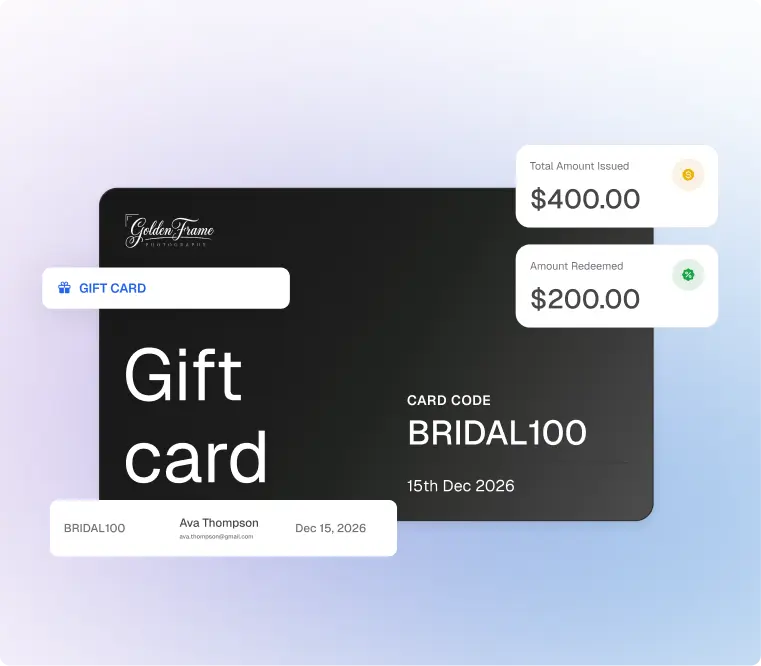
With Gifting and Credits, photographers can create a fixed-value Gift Card for a specific client. The client can use it across eligible print and product purchases until the balance is used or the Gift Card expires.
That can help you honor print credit included in a package, cover a reorder, or resolve a service issue.
The photographer creates and funds the credit. Keep the value, eligible purchases, and expiry terms clear when explaining it to the client.
- Separate your promotion deadline from your delivery deadline
A discount ending on Sunday doesn’t necessarily mean an order placed on Sunday will arrive before the holidays.
Check production and shipping information for the relevant products and destinations. Then distinguish between:
- Offer deadline: When the promotion ends.
- Ordering deadline: When clients should order for their intended delivery date.
- Delivery estimate: The expected timing provided by the fulfillment partner.
Avoid promising holiday arrival unless you can support that promise.
Reconnect With A Useful Message And A Direct Gallery Link
Your first message should help clients understand why you’re getting in touch, what they could do with their photographs, and where to order.
A useful structure is:
- Refer to their session or the photographs you delivered.
- Suggest a relevant gift or print idea.
- Explain the offer, if you’re running one.
- State the applicable deadline.
- Link directly to their gallery.
For a family client, that could mean reminding them that photographs from their session can become gifts for grandparents, then explaining how to choose a photograph and order through the gallery.
Keep the email and gallery promotion consistent. If the email advertises a particular discount, clients should be able to understand the same offer when they arrive.
They should also be able to see the eligible products and any important conditions without searching through another message.
Use Sales Automation To Reduce Manual Follow-Ups
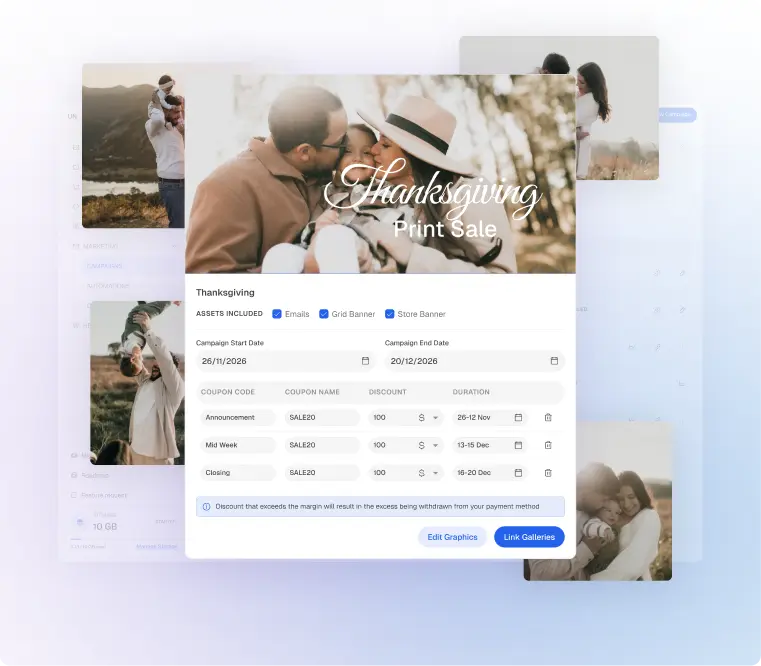
The holiday idea is straightforward. The administration can become a project of its own.
You need to decide which galleries to include, communicate the offer, remind clients at the right time, and check what the promotion generated.
Aftershoot Galleries brings those tasks into the gallery workflow through Sales Automation. You choose what to promote, which galleries to include, and what discount to offer. Galleries makes the outreach and results easier to manage.
- Use a Campaign for a seasonal sales moment
A Campaign supports a specific promotion, such as a limited-time holiday print offer across selected client galleries.
You can reach clients through email and gallery banners, add a discount, and track the orders and revenue generated by the promotion.
That gives clients a route from the invitation back to their photographs and into the Print Store. It also gives you one place to manage the promotion instead of coordinating each gallery separately.
- Use an Automation to follow up on abandoned carts
An Automation helps you follow up with clients who add products to their cart but leave without completing their purchase.
While a holiday Campaign invites clients back to explore prints and gifts, a cart abandonment Automation reminds them about a purchase they’ve already started, without you having to contact each client manually.
Cart abandonment is the Automation option currently available in Aftershoot Galleries, with more options coming soon.
- Keep the decisions with the photographer
Sales Automation reduces repetitive work, but you still decide:
- Which clients and galleries are appropriate.
- What products or offer to promote.
- Whether to include a discount.
- How to communicate deadlines.
- When an individual client needs a personal response.
If someone asks about a crop, a damaged order, or a particular gift, that conversation still benefits from your attention.
For more context on delivery, proofing, and the broader client experience, explore our introduction to Aftershoot Galleries.
Plan Follow-Ups Around Useful Information
Every follow-up should give clients something helpful: a recommendation, an approaching deadline, or an answer to a common purchasing question.
Use this as a planning framework, then confirm which messages your Campaign or Automation can handle.
| Timing | Purpose | What to communicate |
| At launch | Introduce the opportunity | Gift ideas, offer details, and the gallery link |
| During the promotion | Help clients choose | Product suggestions or guidance on selecting a photograph |
| Before the relevant deadline | Support a timely decision | The actual offer or ordering cutoff |
| After the promotion | Review and provide service | Handle order questions and assess campaign results |
Also, there’s no need to contact every client at every stage. If someone has already ordered, consider whether another promotional message is useful, and manage recipients accordingly.
Use supported options that suit your clients, and keep product availability and shipping information equally clear.
How To Measure What The Promotion Generated?
Start with the orders and revenue attributed to the Campaign. Then compare those results with the costs you covered.
Ask:
- Which galleries generated orders?
- Which products did clients choose?
- Did the discount leave enough margin?
- What questions created extra work?
- Were any recommendations or terms unclear?
Aftershoot Galleries lets you track the orders and revenue generated by each promotion. Use those results alongside your own cost information to decide what to repeat.
A campaign can also reveal a problem worth fixing before the next sales moment. If clients repeatedly ask where to order or which size to choose, improve that part of the experience.
Start With One Offer And A Manageable Group Of Galleries
Your first holiday promotion can be small: a few relevant galleries, products you’re confident selling, and a message that helps clients picture what their photographs could become.
Check the ordering experience yourself, make the deadlines clear, and use the response to guide your next campaign.
With Aftershoot Galleries, you can deliver photographs, sell prints and products, and use Sales Automation to make promotions and follow-ups easier to run.
Sign up for Galleries and prepare your first holiday promotion.
Start free with the Starter plan. Get 10 GB of photo storage & 1 GB video.
FAQs About Client Galleries And Holiday Print Sales
Q1. Can I run a holiday promotion if I’ve already delivered the gallery?
Yes, provided the gallery is still accessible and the products you want to promote are available to order. Check the link, image files, store setup, and contact details before sending your message. Previously delivered photographs can be relevant to holiday gifting even when the original session happened months earlier.
Q2. What if I don’t have enough time to help every client choose photographs?
Keep the offer focused and provide simple selection guidance in your message. Suggest a use, such as a desk print or a gift for grandparents, and explain what kinds of photographs suit it. If you offer personal help, define its scope so you can manage it alongside your existing workload.
Q3. Can clients buy Gift Cards through Aftershoot Galleries?
The launch functionality described here lets photographers create and fund a fixed-value Gift Card for a specific client. It can be used for eligible purchases until the balance is used or the card expires. This is useful for package benefits, reorders, or service recovery; it isn’t described as a client-purchased Gift Card feature.
Q4. Can I promote products from N-Photo to all my clients?
Check the available products, supported destinations, and fulfillment information before promoting them. N-Photo is a professional Print Store fulfillment partner inside Aftershoot Galleries, but that doesn’t establish that every product is available in every market. Build your offer around the options your clients can actually order.
Q5. What should I do when a client misses the holiday ordering deadline?
Explain the current delivery estimate and help them decide whether the purchase still works for their needs. A photograph can remain a meaningful gift after the holiday, but the client should know the expected timing before ordering. Avoid extending an arrival promise that your fulfillment partner can no longer support.




