
TL;DR
- RAW keeps everything your sensor recorded, usually 12 or 14 bits per channel. JPEG is an 8-bit file your camera has already edited and compressed.
- The real difference between RAW and JPEG is who makes the editing decisions and when. With JPEG, your camera decides on white balance, contrast, sharpening, and noise reduction. With RAW, you decide later.
- RAW is the safer choice for anything you can’t reshoot: weddings, events, mixed light, high-contrast scenes, and paid client work.
- JPEG makes sense when speed matters more than flexibility: news, live sports with fast turnaround, long bursts, and casual shooting.
- RAW files run several times larger than JPEGs, which means more storage, fuller buffers, and longer culling sessions. Compressed RAW and RAW + JPEG setups help with all three.
- Even if you shoot RAW, clients still receive JPEGs. RAW is the format you edit in, and JPEG is the format you deliver.
You nailed the moment: the first kiss, the goal celebration, the light breaking through the trees. Then you open the file and the highlights are blown, the skin tones are orange, and the shadows are a muddy black. Whether you can save that frame was decided before you pressed the shutter, by one menu setting: RAW or JPEG.
The RAW vs JPEG question is old, but most answers stop at “RAW is better, JPEG is smaller.” That doesn’t help you decide what to shoot this Saturday. This guide covers what each format keeps and throws away, what you can and can’t fix later, what RAW costs you in storage and editing time, and which format suits which shoot.
RAW vs JPEG: The Short Answer
A RAW file is the unprocessed data from your camera’s sensor. A JPEG is a finished image your camera made from that data by applying edits and then compressing the result.
Both start from the same capture. What differs is how much of it you keep.
What Is a RAW Image Format?
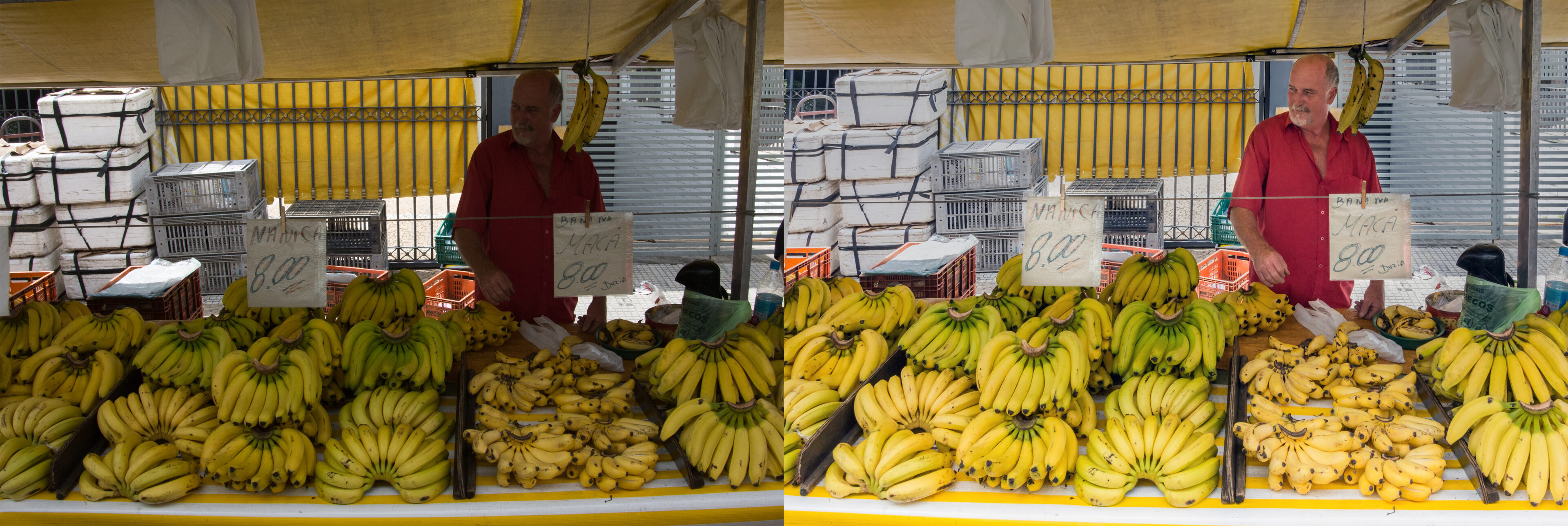
A RAW image format isn’t one single file type. Every manufacturer has its own: Canon uses CR3, Nikon NEF, Sony ARW, Fujifilm RAF, and Adobe’s open DNG is used by many phones and some cameras. They all work the same way. Each one stores the brightness and color data the sensor recorded, plus metadata such as your white balance and picture style settings, without applying any of those settings permanently.
That’s why photographers call RAW a digital negative. It isn’t an image yet. You need RAW editing software to “develop” it into one, and you can develop it again and again without touching the original data.
What Is a JPEG?
A JPEG is a processed, compressed image that any device, browser, or app can open. Photographer Nicole Morrison explained JPEG compression to Adobe with a simple comparison: “Think of a zip file.” The difference is that JPEG compression is lossy. To shrink the file, it permanently throws away detail the camera judges you won’t notice, and that detail can’t be brought back.
Your Camera Always Captures RAW First
Most RAW vs JPEG articles skip this part. Every photo starts as RAW data. When your camera is set to JPEG, it still reads the full sensor data, then quickly develops it using your in-camera settings (white balance, picture style, contrast, sharpening, noise reduction), saves the JPEG, and discards the RAW data.
So the real choice isn’t about image quality at capture. It comes down to two questions:
- Who edits the photo? The camera’s processor, in a fraction of a second, or you, at your desk.
- When are the decisions locked in? At the moment of capture, or whenever you choose to edit.
If your camera’s choices are right, a JPEG can look excellent. If they’re wrong, a JPEG gives you very little room to fix them.
RAW vs JPEG Side by Side: Key Differences at a Glance
| What You’re Comparing | RAW | JPEG |
| What it contains | Unprocessed sensor data plus settings stored as metadata | A processed image with edits baked in |
| Bit depth | Usually 12-bit or 14-bit | 8-bit |
| Tonal levels per color channel | 4,096 (12-bit) to 16,384 (14-bit) | 256 |
| Compression | Uncompressed, lossless, or lightly compressed | Lossy |
| Typical file size | Several times larger than a JPEG of the same shot | Small |
| White balance | Fully adjustable later | Baked in; big corrections reduce quality |
| Highlight and shadow recovery | Significant latitude | Limited |
| Ready to share? | No, it needs editing and export | Yes, straight out of camera |
| Compatibility | Needs software that supports your camera | Opens everywhere |
| Editing | Non-destructive (the original never changes) | Each re-save loses a little more quality |
| Best for | Client work, tricky light, anything you’ll edit | Speed, volume, quick sharing |
The takeaway: JPEG is better at convenience and RAW is better at recovery. Which one matters more depends on how often your shoots go exactly to plan.
What You Can (and Can’t) Fix Later in RAW vs JPEG Photos
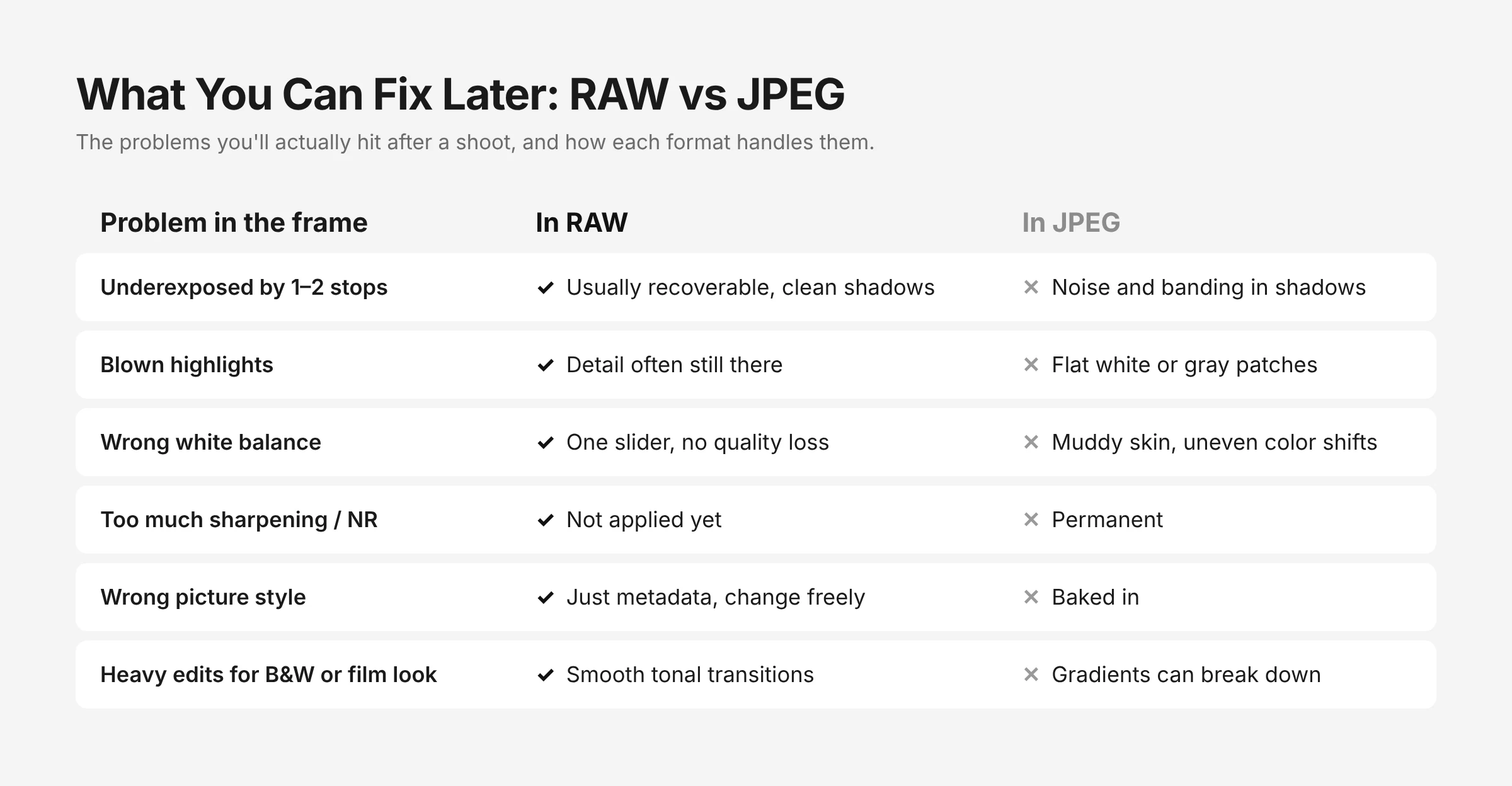
This is where the difference between JPEG and RAW shows up in practice. Here’s what happens when you try to fix common problems in each format.
| Problem in the Frame | Fixing It in RAW | Fixing It in JPEG |
| Underexposed by a stop or two | Usually recoverable with clean shadows | Shadows get noisy, blotchy, or banded |
| Blown sky or white dress | Detail is often still there to pull back | Clipped highlights turn into flat white or gray |
| Wrong white balance (tungsten, mixed light) | One slider fixes it with no quality loss | Correction shifts colors unevenly and can posterize |
| Too much in-camera sharpening or noise reduction | Not applied yet, so you set it yourself | Permanent |
| Wrong picture style (too contrasty, too saturated) | Just metadata, so you can change it freely | Baked in |
| Need a black-and-white or film look later | Full tonal data to work with | Works, but gradients can break down |
| Cropping heavily | Same pixel count as JPEG, but holds up better to further edits | Fine for light edits |
1. Exposure and Dynamic Range
Dynamic range is how much detail a file holds between its brightest highlights and darkest shadows. A RAW file keeps all the range your sensor captured. A JPEG keeps only the slice your camera’s tone curve chose.
In practice, a RAW file from a modern camera can usually take a large exposure correction and still look clean. A JPEG falls apart much sooner because the extra data was discarded at capture. When the bride walks from a dark church into full sun and you’re a stop off, that’s the difference between a usable frame and a lost one.
2. White Balance
In a RAW file, white balance is stored as a setting, not baked into the pixels. Moving from 3200K to 5600K in post costs nothing. A JPEG has already been rendered at whatever white balance your camera picked. Push it hard and you’ll see muddy skin tones and odd color shifts, especially in mixed lighting such as a reception hall with tungsten bulbs, LED uplighting, and window light.
3. Color and Bit Depth
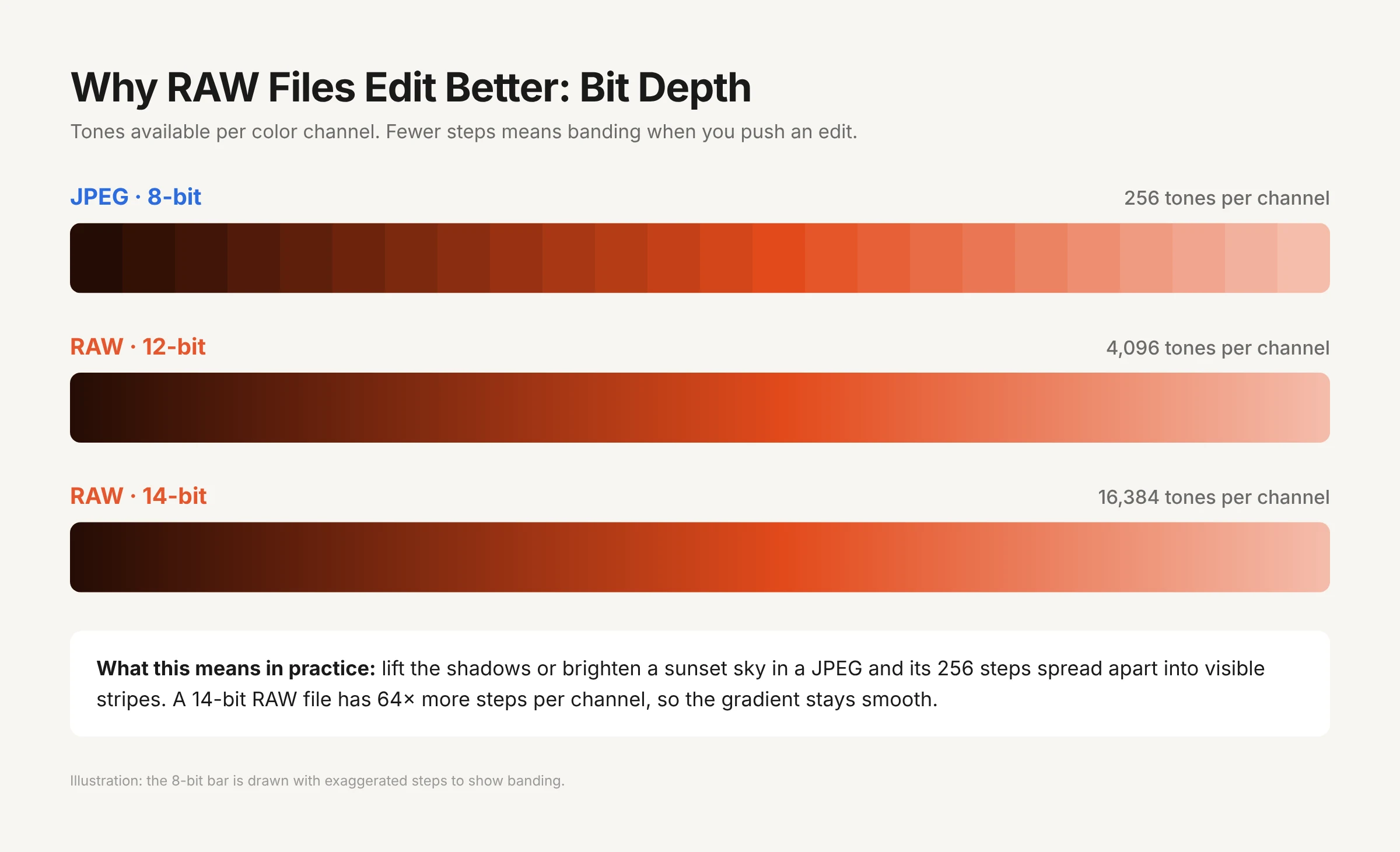
Bit depth sets how many tonal steps a file can hold, and it’s simple math:
| Bit Depth | Tones per Channel | Typical Format |
| 8-bit | 256 | JPEG |
| 12-bit | 4,096 | Many RAW files |
| 14-bit | 16,384 | Many RAW files from higher-end cameras |
A JPEG’s 256 levels per channel look fine until you edit. Brightening a sunset sky or lifting shadows spreads those 256 steps further apart, and you start to see banding: visible stripes where a smooth gradient should be. A 14-bit RAW file has 64 times as many steps per channel, so gradients stay smooth even after heavy edits.
4. Sharpening, Noise Reduction, and Picture Styles
Your camera’s JPEG engine applies sharpening, noise reduction, contrast, and saturation before it saves the file. Some manufacturers are known for excellent JPEG color (Fujifilm’s film simulations are a popular example). Still, these are permanent decisions made for an average scene. In a RAW file, none of them are applied until you choose to apply them.
5. Editing Over Time
Every time you edit and re-save a JPEG, it’s compressed again and loses a little more detail. RAW editing is non-destructive: your edits are stored as instructions, and the original file never changes. You can re-edit a RAW file five years from now with better software and get a better result than you could today. A JPEG stays the same as the day it was saved.
The Hidden Costs of Shooting RAW
RAW isn’t free. Here’s what you’re actually signing up for.
1. Storage
RAW files are often several times larger than JPEGs. Here’s an illustrative example for a full wedding. Quick note, these file sizes are assumed averages, so check your own camera’s numbers:
| Scenario | Frames | Avg. File Size | Total per Shoot | Plus Two Backups |
| JPEG only | 3,000 | ~12 MB | ~36 GB | ~108 GB |
| Uncompressed RAW | 3,000 | ~50 MB | ~150 GB | ~450 GB |
| RAW + JPEG | 3,000 | ~62 MB | ~186 GB | ~558 GB |
Across a 30-wedding season, that RAW + JPEG workflow comes to more than 16 TB of storage once backups are included. The cost isn’t only drive space. It’s also import time, backup time, and the time it takes to move files between drives.
2. Burst Speed and Buffer
Larger files fill your camera’s buffer faster. During a long burst, such as a sprinting athlete or a bouquet toss, a camera shooting RAW may slow down sooner than the same camera shooting JPEG. If you shoot fast action, check your camera’s buffer depth for each format before it matters.
3. Culling and Editing Time
Shooting RAW doesn’t give you more photos. It gives you heavier ones, and every one of them still needs a decision. Thousands of large RAW files mean slower previews, slower imports, and longer culling sessions before you even start editing.
This is where workflow tools earn their place. AI culling with Aftershoot Selects works through large RAW sets locally on your computer. It groups near-duplicates and flags blinks and blur, so you go straight to choosing the best frames instead of scrolling through hundreds of near-identical ones. If you shoot weddings, our guide on how to cull a wedding gallery step by step walks through the full process.
When to Shoot RAW vs JPEG: A Situation-by-Situation Guide
| Shooting Situation | Best Format | Why |
| Weddings and elopements | RAW (or compressed RAW) | No reshoots, mixed light, and high-contrast scenes such as white dresses and dark suits |
| Portraits and headshots | RAW | Skin tones and white balance need precise control |
| Landscapes and astrophotography | RAW | Maximum dynamic range and smooth gradients in skies |
| Real estate and interiors | RAW | Bright windows against darker rooms; heavy shadow recovery |
| Product and commercial work | RAW | Clients need accurate color |
| Live sports with on-site delivery | JPEG or RAW + JPEG | Speed of delivery and long bursts |
| Photojournalism and news | JPEG or RAW + JPEG | Files need to reach editors fast; many agencies limit editing |
| Events with same-day slideshows | RAW + JPEG | JPEGs for the slideshow, RAW for the final gallery |
| Travel, family, and casual shooting | Either | JPEG if you rarely edit; RAW if you want to keep the option |
| Time-lapses | JPEG (often) | Hundreds of frames, and storage adds up fast |
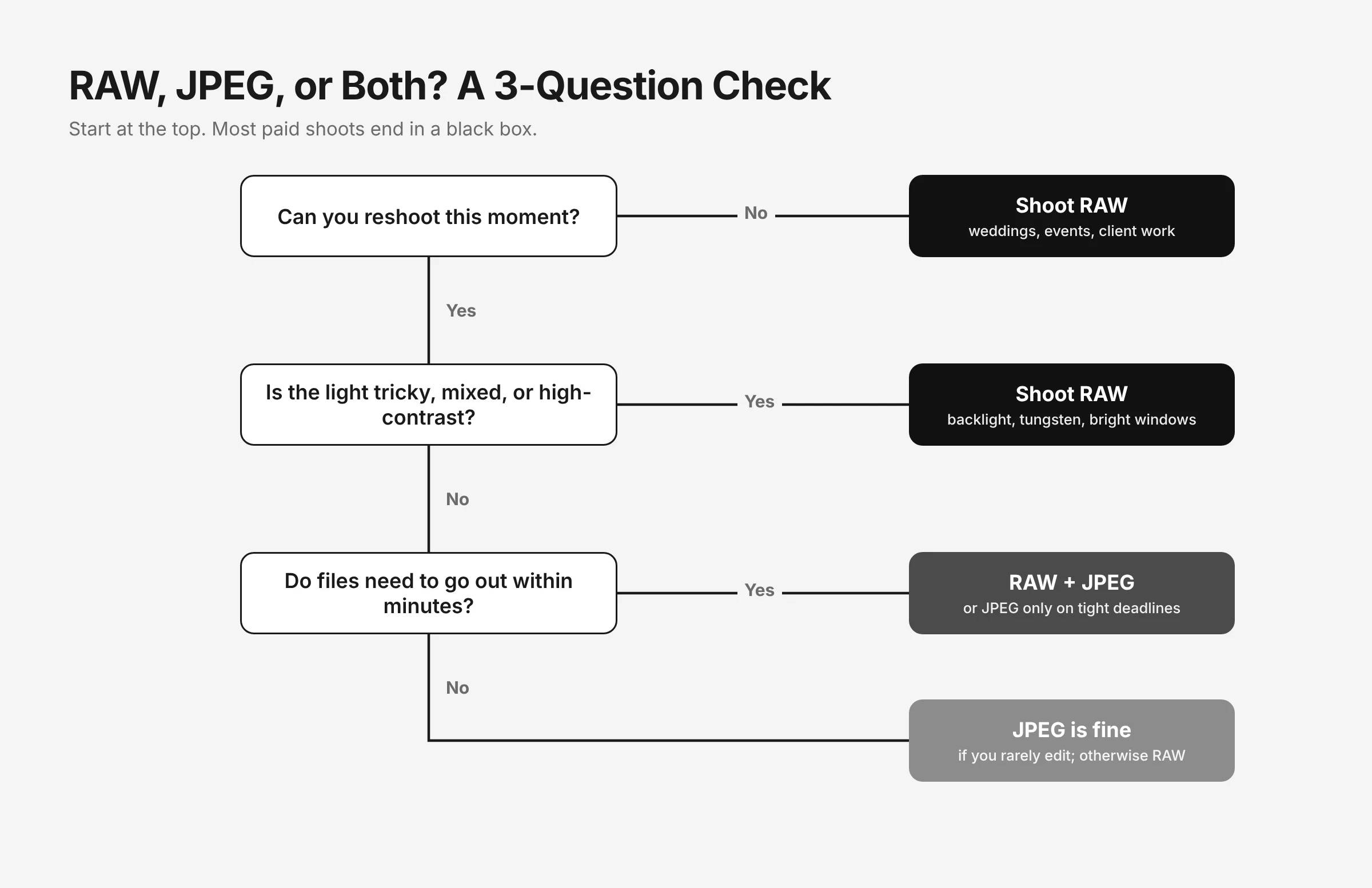
Shoot RAW When…
- You can’t reshoot the moment.
- The light is difficult: backlit, mixed, low, or high-contrast.
- You’ll edit the images anyway, or have a signature editing style to apply.
- The images are for paid work, print, or your portfolio.
Shoot JPEG When…
- You need to share or deliver images within minutes.
- You’re shooting long bursts and the buffer matters.
- The lighting is controlled and consistent, and your in-camera settings are dialed in.
- Storage is limited and editing isn’t part of the plan.
Shoot RAW + JPEG When…
- You want quick previews or same-day sneak peeks without opening RAW files.
- You’re learning to edit and want to compare your edit with the camera’s version.
- You want a ready-to-use backup format in case a RAW file isn’t supported yet (common with brand-new camera models).
How Working Photographers Set Up Their Cameras
Picking a format is only half the decision. These settings are where experienced photographers get the benefits of RAW with fewer of the costs.
1. Use Compressed RAW for High-Volume Shoots
Most modern cameras offer lossless compressed or compressed RAW (Canon calls it C-RAW, and Nikon offers High Efficiency RAW). These files can be much smaller than uncompressed RAW while keeping the editing flexibility that matters for client work. Wedding educator Pye Jirsa of SLR Lounge lists shooting compressed RAW as the first step toward faster wedding editing. Before you switch, test it on your own camera: shoot the same high-contrast scene in both modes and push the shadows hard.
2. Split RAW and JPEG Across Dual Card Slots
If your camera has two card slots, you can record RAW to Slot 1 and JPEG to Slot 2. You get an instant-sharing copy and a second copy of every frame, without doubling the size of either card.
3. Set a Neutral Picture Profile
This one catches a lot of RAW shooters. Your camera’s LCD preview and histogram are based on a JPEG rendering, even when you shoot RAW. A punchy, high-contrast picture style can make highlights look clipped when the RAW file still holds plenty of detail. A neutral or flat profile gives you a more honest histogram, and it doesn’t affect the RAW data.
4. RAW vs JPEG on Your Phone
Phones have a version of this choice too. iPhones save HEIC by default, and many Android phones save JPEG. Both are processed formats, and phones apply heavy computational processing on top. Pro iPhone models offer Apple ProRAW, and many Android phones can save DNG files in Pro or manual mode.
Phone RAW files are large and often look flatter than the default shot. For tricky light or images you plan to print, they offer the same editing flexibility as camera RAW files. For everyday shots, the default format is usually fine. If a client or app won’t accept HEIC, you can convert HEIC photos to JPG in your browser.
Common Myths About RAW vs JPEG Images
Myth 1: RAW Photos Look Better Straight Out of Camera
They usually look worse. A RAW vs JPEG image comparison straight from the card often favors the JPEG, because the camera has already added contrast, saturation, and sharpening. RAW files look flat because nothing has been applied yet. The advantage only shows up once you edit.
Myth 2: Shooting RAW Makes Your Photos Higher Resolution
At the same image-size setting, RAW and JPEG have the same pixel dimensions. RAW gives you more tonal and color data per pixel, not more pixels.
Myth 3: Professionals Never Shoot JPEG
Many sports and news photographers shoot JPEG every day because their deadline is minutes after the final whistle. The professional choice is the format that fits the job.
Myth 4: You Can Convert a JPEG Back Into RAW
You can’t. Once data is discarded during JPEG compression, it’s gone. Saving a JPEG as a DNG or TIFF changes the container, not the contents.
Where Does JPEG Fit In After the Edit?
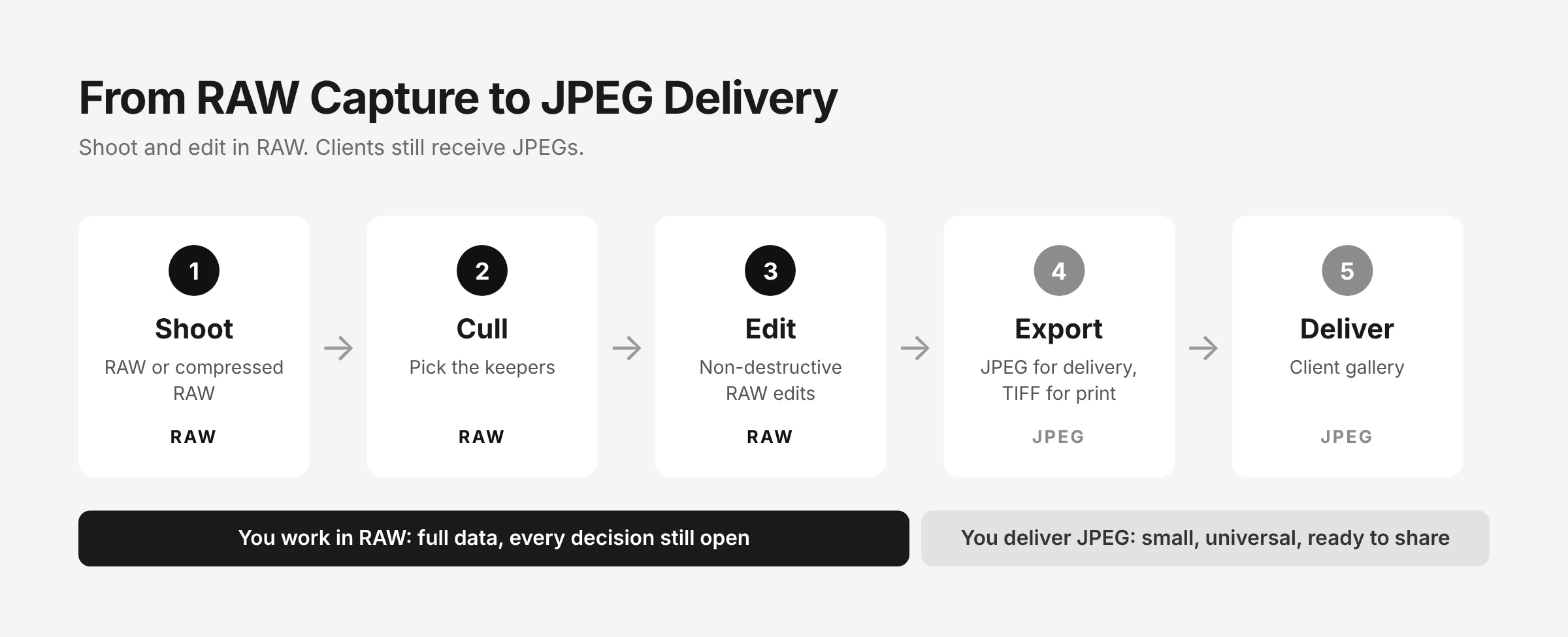
Here’s the part the RAW vs JPEG debate tends to forget: even RAW-only photographers deliver JPEGs. Clients, printers, social platforms, and websites all expect them. RAW is the format you edit in, and JPEG is the format you deliver.
A typical professional flow looks like this:
- Shoot in RAW (or compressed RAW).
- Cull to your best frames.
- Edit the RAW files non-destructively.
- Export to JPEG for delivery, or to TIFF for high-end print work.
- Deliver through a client gallery.
Steps 3 and 4 don’t require switching apps. Aftershoot’s built-in RAW editor lets you fine-tune exposure, color, and tone on the original RAW file, then export to JPEG or TIFF directly. That keeps edits consistent across a full gallery without round trips to another program. If consistency is your sticking point, here’s how photographers keep edits consistent across an entire gallery.
Format conversion doesn’t stop at export, either. A print lab may want TIFFs, a client may send you PNG logos for an album cover, and a planner might need smaller files for a website. Aftershoot’s free converters handle these one-off jobs in your browser with no account needed, for example when you need to turn TIFF files into JPEGs or convert PNG to JPEG for email.
For delivery, Aftershoot Galleries gives clients a clean place to view, download, and favorite their final JPEGs. Start free with the Starter plan and get 10 GB of photo storage & 1 GB video.
How to Start Shooting RAW Without Getting Overwhelmed
If you’ve been shooting JPEG and RAW feels intimidating, this is a gentle way to switch:
- Switch to RAW + JPEG for two weeks. You’ll always have a ready-to-share file while you learn.
- Pick one tricky scene with high contrast or mixed light, and edit the RAW and JPEG versions side by side. Push exposure and white balance on both. Seeing the difference yourself is more convincing than any article.
- Learn five sliders first: exposure, highlights, shadows, white balance, and contrast. Most RAW editing is these five.
- Choose an editor that teaches as you go. Photon (by Aftershoot) is a free RAW editor for Mac and Windows with an optional AI Coach that explains what to adjust in each photo and why. It works with JPEGs too, so you can learn on both formats. For more options, see our roundup of free RAW editors for Mac and PC.
- Drop the JPEG when you stop opening it. Once you’re reaching for the RAW every time, switch to RAW only (or compressed RAW) and reclaim the storage.
The Final Verdict on RAW vs JPEG
The difference between RAW and JPEG isn’t “good file vs. bad file.” It’s flexibility vs. finality. A JPEG is a decision your camera made for you in a fraction of a second. A RAW file keeps that decision open until you’re ready to make it yourself.
For client work, unpredictable light, and anything you can’t reshoot, RAW is the safer choice, and compressed RAW keeps the storage and culling load manageable. For speed, volume, and situations where the file has to leave your camera within minutes, JPEG is the practical choice. Either way, your clients will still receive JPEGs. The format you shoot in only determines how much control you have before that.
FAQs for RAW vs JPEG
Q1. Is RAW Better Quality Than JPEG?
RAW holds more image data: more tonal levels, more dynamic range, and no lossy compression. That makes it better for editing, but not necessarily better-looking straight out of camera. An unedited JPEG often looks punchier because the camera has already applied contrast and sharpening. If you plan to edit, RAW gives you a higher-quality result. If you won’t edit, a well-exposed JPEG can be all you need.
Q2. Can You Convert a JPEG to RAW?
No. JPEG compression permanently discards image data, and no software can restore it. You can save a JPEG in another format, such as TIFF or DNG, but that only changes the file container. The file will still have the same 8-bit, already-processed data. If you might need RAW flexibility, you have to capture in RAW (or RAW + JPEG) at the time of shooting.
Q3. Why Do My RAW Photos Look Dull Compared to JPEGs?
RAW files show the sensor’s data with little or no processing, so they look flat, soft, and less saturated than in-camera JPEGs. Your camera adds contrast, color, and sharpening to its JPEGs automatically. Most RAW editors apply a starting profile on import, and a few adjustments to contrast, saturation, and sharpening will usually bring a RAW file past the JPEG version.
Q4. Should Beginners Shoot RAW or JPEG?
Beginners who want to learn editing should shoot RAW + JPEG. You’ll have a finished JPEG to share immediately and a RAW file to practice on. Comparing your edits with the camera’s JPEG is one of the fastest ways to understand exposure and white balance. If you rarely edit and mostly share to social media, JPEG is fine.
Q5. Do Professional Photographers Shoot RAW or JPEG?
Most wedding, portrait, commercial, and landscape photographers shoot RAW or compressed RAW, because they can’t reshoot and need precise control over color and exposure. Many sports and news photographers shoot JPEG or RAW + JPEG, because they need to send images to editors within minutes. The choice comes down to turnaround time, not skill level.
Q6. Does Shooting RAW + JPEG Slow Down My Camera?
Yes, shooting RAW + JPEG can slow down your camera. Writing two files per frame fills the buffer faster, which may shorten long bursts. Using two card slots (RAW on one, JPEG on the other), fast memory cards, and a smaller JPEG size setting all help. If you shoot fast action, test your burst depth in each mode before an important shoot.