
TL;DR
- A photography business plan is a short working document covering your services, pricing, ideal client, marketing, operations, finances and goals. For most solo photographers it fits in 5–10 pages, or one page to start.
- Most photography business plans count money but not hours. Post-production often takes as many hours as the shoot itself, or more, so build a capacity check into your plan before you set booking targets.
- Price backward from your income goal: target profit plus yearly expenses gives your revenue target, and dividing that by your average booking value gives the number of bookings you need.
- When you plan for growth, decide early how you’ll scale culling and editing. AI-assisted in-house editing keeps costs flat and control with you. Outsourcing costs more per image but takes the work off your desk.
- Copy the template below, fill in your own numbers, and review the plan every quarter. Your slow season is the best time to update it.
You’ve booked a few clients and your calendar is filling up. Maybe someone asked whether you’ve “written a business plan yet.” Then you open a template and it asks for market size, a five-year projection and an exit strategy. You close the tab.
A photography business plan doesn’t need to read like a bank loan application. It has to answer three things: who you’re shooting for, what you’ll charge, and whether the hours actually work. Most templates skip the third question, and it’s the one that decides whether your plan holds up in October or leaves you editing until 2 a.m.
This guide covers each section of a photographer’s business plan. It includes a fill-in template you can copy, a fully worked example with real math, and a cost comparison for scaling post-production when bookings pick up.
What Is a Photography Business Plan (and Do You Need One)?
A photography business plan is a written map of how your business makes money: what you sell, who buys it, how they find you, what it costs to run and what you need to earn. It’s less about impressing investors and more about making decisions on purpose instead of by default.
Do you really need one? If you’re starting a photography business, or already running one, yes. A formal 30-page plan isn’t required. But 67% of photographers were self-employed according to the U.S. Bureau of Labor Statistics. For most photographers, nobody else is checking whether the pricing covers the costs. The plan does that job.
Your photography business plan should help you:
- Set prices that cover your real costs, including editing time, not only shooting time.
- Know how many bookings you need each month to hit your income goal.
- Spot capacity problems before peak season, not in the middle of it.
- Decide where to spend on gear, marketing or software, based on what moves the business forward.
If you’re still at the very beginning and want the broader checklist (niche, registration, portfolio, first clients), start with our guide to starting a photography business. Then come back here to put it into a plan.
The 9 Sections of a Photography Business Plan
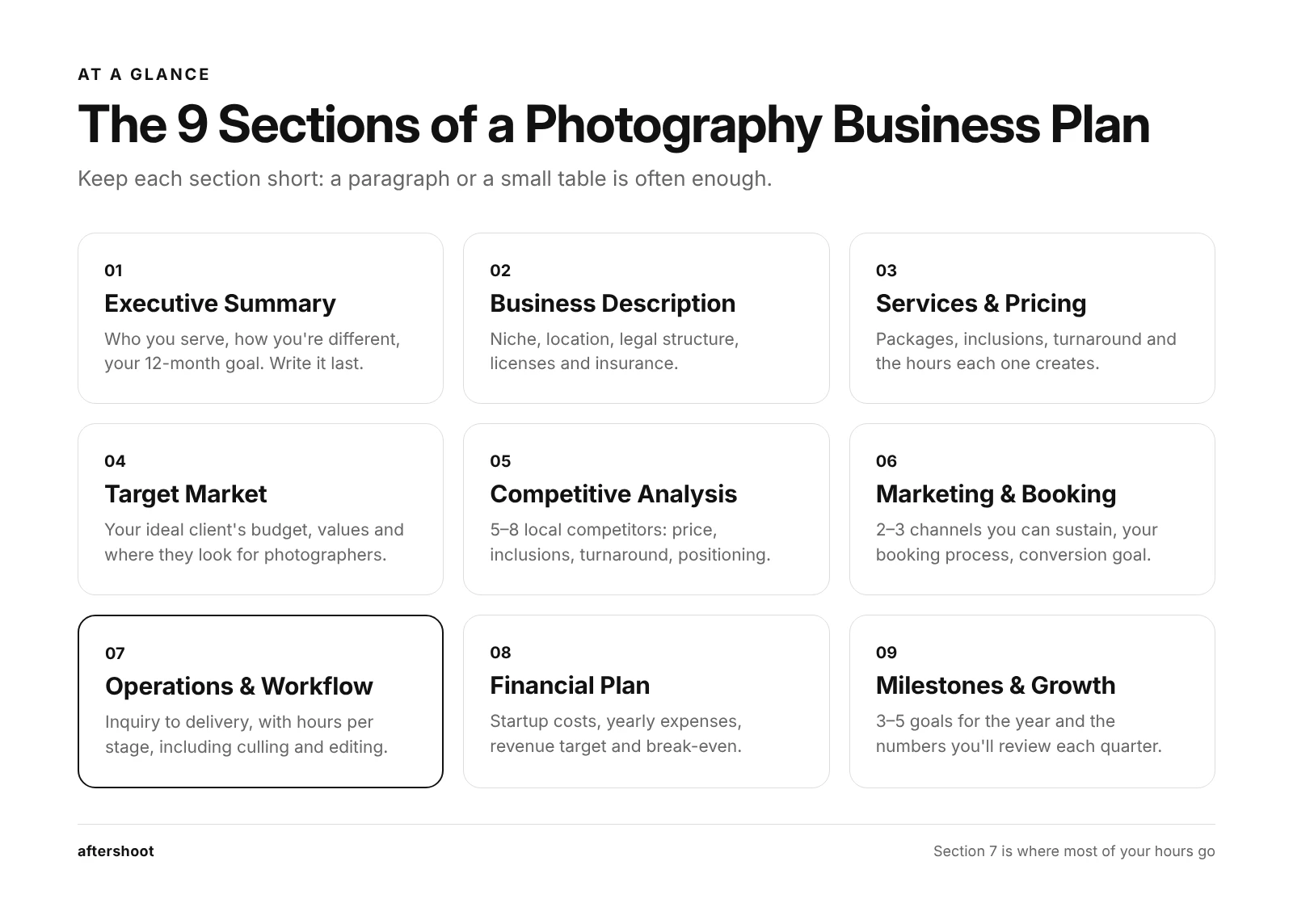
Most photography business plans follow the same structure. Here’s what each section should contain, with the questions to answer in each. Keep every section short; a paragraph or a small table is often enough.
1. Executive Summary
This is a short snapshot of the whole plan: who you are, what you shoot, who you serve, how you’re different and your goal for the next 12 months. Write it last, even though it appears first.
Use this one-line formula to start:
“I photograph [type of client] in [location] who want [result], through [your style or approach], and my goal this year is [measurable target].”
2. Business Description and Legal Structure
Cover your business name, location, niche, whether you work from home or a studio, and your legal structure (sole proprietorship, LLC and so on). Note the licenses, permits and insurance you need. Requirements vary by state and country, so check with your local small business office or an accountant.
Questions to answer:
- Is this full-time, part-time or a side business right now?
- What legal structure fits your liability risk and tax situation?
- What insurance do you need (liability, equipment, professional indemnity)?
3. Services, Packages, and Pricing
List what you sell and what each option includes: coverage hours, number of edited images, turnaround time, albums, prints, add-ons. Then attach a price to each.
The most common mistake here is pricing by comparing yourself to other photographers instead of calculating your costs. Our photography pricing guide walks through the backward-pricing formula step by step. If you shoot weddings, our breakdown of wedding photography packages shows how to structure tiers couples can compare easily.
Questions to answer:
- How many edited images are included, and what’s the delivery timeline?
- Which add-ons carry the most margin (albums, extra hours, rush delivery)?
- How many post-production hours does each package actually create?
4. Target Market and Ideal Client
Describe the person most likely to book you and pay your prices: their budget, life stage, where they spend time online and what they care about. “Couples getting married” is too broad. “Couples planning a $40,000+ wedding at outdoor venues within 90 minutes of Austin” is a target market.
Questions to answer:
- What does your ideal client value most: style, speed, experience or price?
- Where do they look for photographers (Instagram, Google, planners, venues)?
- What’s their typical budget for photography?
5. Competitive Analysis
Pick five to eight photographers in your niche and area. Note their starting prices, what’s included, turnaround times and how they present themselves. Quick note, you’re not copying them; you’re looking for a gap you can fill in and leverage.
Let me show you a simple table that would work well here:
| Competitor | Starting Price | What’s Included | Turnaround | Their Positioning | Your Opening |
| Photographer A | $2,800 | 6 hrs, 400 images | 8 weeks | Light and airy, budget-friendly | Faster delivery |
| Photographer B | $4,500 | 8 hrs, album | 10 weeks | Luxury, editorial | Similar style, lower entry price |
| Photographer C | $3,200 | 8 hrs, 600 images | 6 weeks | Documentary | More portrait direction |
PS: This is an illustrative example
Look at the turnaround column in particular, delivery time is one of the few things clients notice right away, and you can compete on it without lowering your price.
6. Marketing and Booking Plan
Choose two or three channels you can keep up consistently instead of seven you’ll abandon. For most photographers, that means a mix of SEO (your website and Google Business Profile), referrals (past clients, venues, planners) and one social platform.
Include:
- Your channels and how often you’ll show up on each.
- Your booking process: inquiry, consultation, contract, deposit.
- Your conversion goal, for example booking 1 in every 4 inquiries.
Every booking needs a signed agreement before you take a deposit. If you don’t have one yet, our guide to building a photography contract covers the clauses that protect you. For channel-by-channel tactics, see the Aftershoot marketing guide for photographers.
7. Operations and Post-Production Workflow
This section describes how a booking moves from inquiry to final delivery: gear, backups, software, turnaround commitments and who does what. It’s also where most photographer business plans are thinnest, even though it’s where most of your time goes.
Map your workflow in stages and estimate the hours each one takes:
| Workflow Stage | What Happens | Hours Per Booking (Your Estimate) |
| Pre-shoot | Consultation, timeline, location planning | |
| Shoot | Coverage hours plus travel | |
| Backup and import | Card offload, catalog setup | |
| Culling | Selecting keepers from the full shoot | |
| Editing | Color, exposure, consistency across the set | |
| Retouching | Skin, distractions, hero images | |
| Delivery | Gallery setup, client communication |
If culling and editing together come out larger than your shoot time, you’re normal. That’s also the clearest place your plan can buy back time. We cover how in the post-production scaling section below.
8. Financial Plan
This is the section that turns the plan into something you can measure. Keep it to three parts: startup costs, yearly operating costs, and your revenue target with break-even point.
- Startup Costs
Estimates for a home-based photography business vary widely by niche. Rough estimates suggest that you could start a home-based photography business for somewhere between $2,000 to $20,000. Wedding photographers sit at the higher end because they need backup bodies, fast lenses and flash. Portrait photographers can often start lean.
| Startup Cost Category | What It Covers | Lean Start | Established Setup |
| Camera bodies | Main body (plus backup for events) | $1,000-$2,000 | $4,000-$7,000 |
| Lenses | 1-2 versatile primes or zooms | $500-$1,500 | $3,000-$6,000 |
| Lighting and accessories | Flash, batteries, cards, bags | $200-$500 | $1,000-$2,000 |
| Computer and storage | Editing machine, backup drives | $800-$1,500 | $2,500-$4,000 |
| Software | Editing, culling, galleries | 0-$600/yr | $600-$1,500/yr |
| Legal and admin | Registration, contract template | $100-500 | $500-$1,500 |
| Insurance | Liability and equipment | $200-$500/yr | $500-$1,200/yr |
| Website and branding | Domain, portfolio site, logo | $100-$400 | $500-$2,000 |
*These ranges are estimated to help you plan better. Price your own gear list and local requirements before you commit.
- Revenue Target and Break-Even
Work backward from what you want to earn, not forward from what you hope to book:
- Target profit (what you want to keep before tax) + yearly business expenses = revenue target
- Revenue target ÷ average booking value = bookings needed per year
- Bookings needed ÷ working months = bookings needed per month
Your break-even point is the number of bookings that covers your yearly expenses before you pay yourself anything. If expenses are $14,000 and your average booking is $3,500, you break even at four bookings. Every booking after that is profit.
For context, the median annual wage for photographers is $44,660, according to the BLS Occupational Outlook Handbook (May 2025). Your plan decides whether you land above or below that line.
9. Milestones and Growth Plan
End with three to five measurable milestones for the next 12 months and a rough direction for the next three years. This is where you plan how to grow a photography business deliberately: raising prices, adding a niche, hiring a second shooter or taking on more bookings.
Track three to five numbers every quarter:
- Inquiries per month
- Booking rate (inquiries to signed contracts)
- Average booking value
- Post-production hours per booking
- Average delivery time
That fourth number matters most. If your bookings go up but post-production hours per booking stay the same, growth will cost you your evenings. For ideas on adding revenue beyond your core service, see our guide on how to make money as a photographer.
Photography Business Plan Template (Copy and Fill In)
Copy this into a Google Doc or Notes and fill in the brackets. Start with the one-page version; expand into the full plan once your first 10 bookings give you real numbers.
Photography Business Plan Example: A Wedding and Portrait Photographer
ONE-PAGE PHOTOGRAPHY BUSINESS PLAN
Business name: [Name]
Niche and location: [e.g., Wedding and engagement photography, Denver + destination]
Legal structure: [Sole proprietor / LLC / Other]
Status: [Full-time / Part-time / Side business]
1. Executive summary
I photograph [ideal client] in [location] who want [result], through [style/approach]. This year my goal is [measurable target, e.g., 20 weddings and 30 portrait sessions].
2. Services and pricing
- Package 1: [Name] – [What’s included] – [Price] – [Delivery time]
- Package 2: [Name] – [What’s included] – [Price] – [Delivery time]
- Package 3: [Name] – [What’s included] – [Price] – [Delivery time]
- High-margin add-ons: [Albums, prints, extra hours, rush delivery]
3. Ideal client
- Who they are: [Age range, life stage, budget]
- What they value most: [Style / speed / experience / price]
- Where they find photographers: [Channels]
4. Competitors and my opening
- Competitor 1: [Price, positioning] → My opening: [Gap]
- Competitor 2: [Price, positioning] → My opening: [Gap]
- Competitor 3: [Price, positioning] → My opening: [Gap]
5. Marketing plan
- Primary channel: [Channel] – [Weekly commitment]
- Secondary channel: [Channel] – [Weekly commitment]
- Referral source: [Venues, planners, past clients]
- Booking goal: [X inquiries/month, Y% booking rate]
6. Operations and workflow
- Hours per booking (shoot + post-production + admin): [Hours]
- Post-production approach: [Manual / AI-assisted / Outsourced / Hybrid]
- Delivery promise: [Sneak peek in X days, full gallery in Y weeks]
- Gallery delivery platform: [Tool]
7. Financials
- Yearly business expenses: $[Amount]
- Target profit (before tax): $[Amount]
- Revenue target: $[Expenses + profit]
- Average booking value: $[Amount]
- Bookings needed per year: [Revenue target ÷ average booking value]
- Break-even bookings: [Yearly expenses ÷ average booking value]
8. Capacity check
- Total client hours needed per year: [Bookings × hours per booking]
- Peak-month hours: [Peak bookings × hours per booking]
- Available working hours in peak month: [Hours]
- Gap (if any) and how I’ll close it: [Raise prices / cut post-production time / outsource / cap bookings]
9. Milestones (next 12 months)
- Q1: [Milestone]
- Q2: [Milestone]
- Q3: [Milestone]
- Q4: [Milestone]
Review date: [Every quarter, e.g., first Monday of Jan/Apr/Jul/Oct]
Photography Business Plan Example: A Wedding and Portrait Photographer
I know what you’re thinking… these templates are easier to fill in once you’ve seen one completed. So, here’s a hypothetical photographer business plan for a solo wedding and portrait photographer. The numbers are illustrative assumptions, chosen to show how the sections connect. Swap in your own numbers!
Here’s The Snapshot:
- Niche: Weddings (primary) and family/couples portraits (secondary)
- Goal: $75,000 profit before tax, working solo
- Yearly business expenses: $14,000 (insurance $500, software $1,500, gear replacement $5,000, marketing $3,000, website and galleries $300, accountant $1,200, travel $2,500)
- Revenue target: $75,000 + $14,000 = $89,000
The Booking Mix
| Service | Price | Bookings Per Year | Revenue |
| Wedding package (average) | $3,500 | 20 | $70,000 |
| Portrait session (average) | $475 | 40 | $19,000 |
| Total | 60 | $89,000 |
Break-even comes at four weddings ($14,000 ÷ $3,500). On paper, this business looks healthy. Now run the capacity check.
The Capacity Check Most Plans Skip
Here’s an estimate of hours per booking, split into shooting, admin and post-production:
| Hours Per Booking | Wedding | Portrait Session |
| Shooting, travel, prep | 10 | 2.5 |
| Client communication and admin | 3 | 1 |
| Post-production (culling, editing, delivery) | 18 | 4 |
| Total hours | 31 | 7.5 |
Multiply across the year:
- Weddings: 20 × 31 = 620 hours
- Portraits: 40 × 7.5 = 300 hours
- Marketing and business admin: ~8 hours a week × 48 weeks = 384 hours
- Total: 1,304 working hours
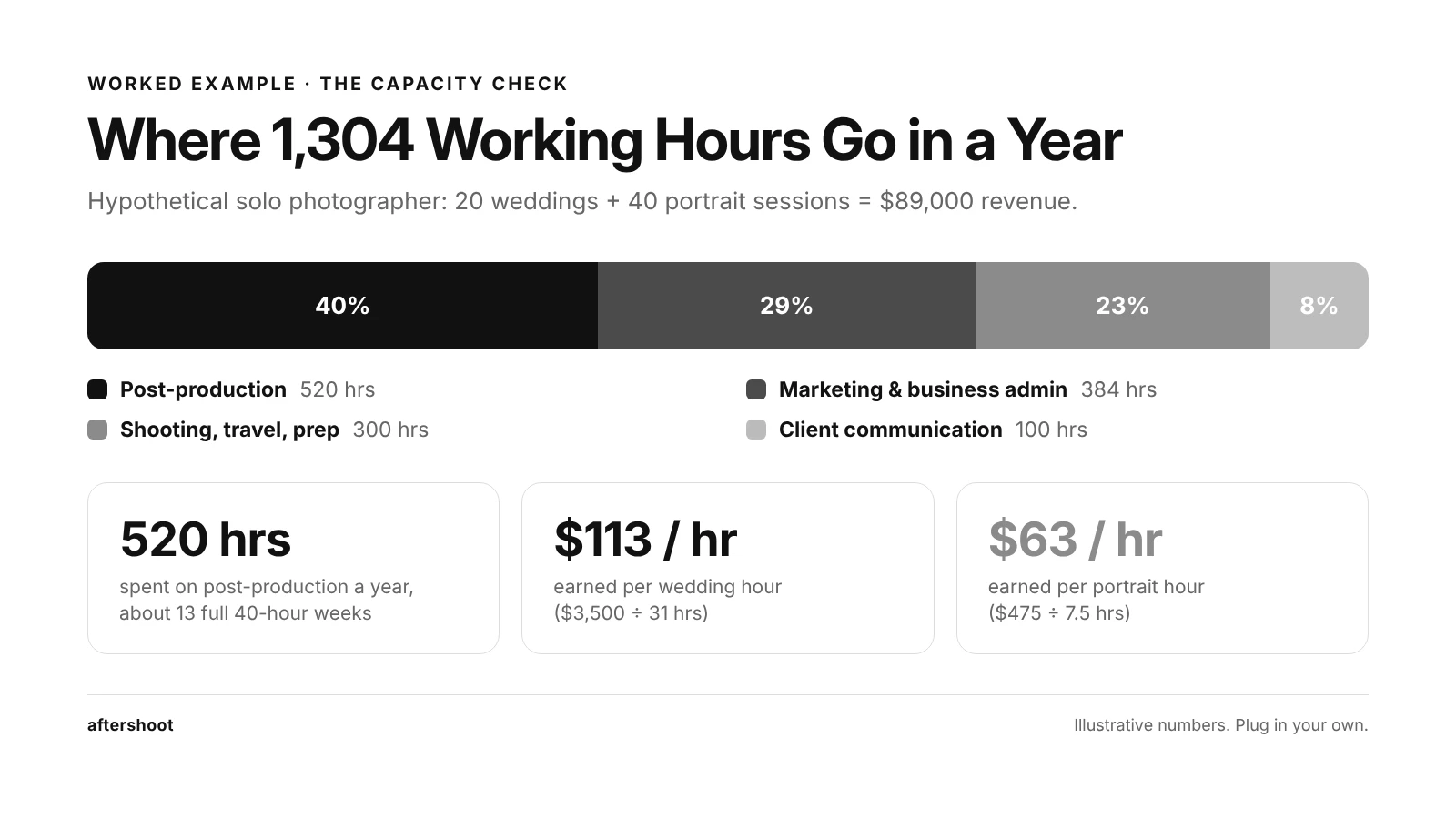
Two things stand out here:
- First, post-production is the biggest single block of time. (20 × 18) + (40 × 4) = 520 hours a year, about 40% of all working hours. That’s 13 full 40-hour weeks spent at the computer after the shoot.
- Second, the hourly math changes how the services compare. A wedding earns $3,500 ÷ 31 hours ≈ $113 per hour. A portrait session earns $475 ÷ 7.5 hours ≈ $63 per hour. Portraits fill the calendar but pay roughly half as much per hour of your time. That’s useful to know when you decide which service to grow, or whether to raise portrait prices.
Keep in mind that the peak season also adds pressure. Let’s say June brings four weddings and four portrait sessions: (4 × 31) + (4 × 7.5) + 32 hours of marketing = 186 hours, roughly 43 hours a week. And 88 of those hours are post-production. Book one more wedding that month and you’re past 50 hours a week.
That’s why the capacity check belongs in every photography business plan. If the numbers don’t fit, you have four options: raise prices, cap bookings, cut post-production hours per booking, or hand part of the work to someone else. The last two lead to the next decision.
How to Scale Post-Production in Your Photography Business Plan: In-House AI vs. Outsourcing
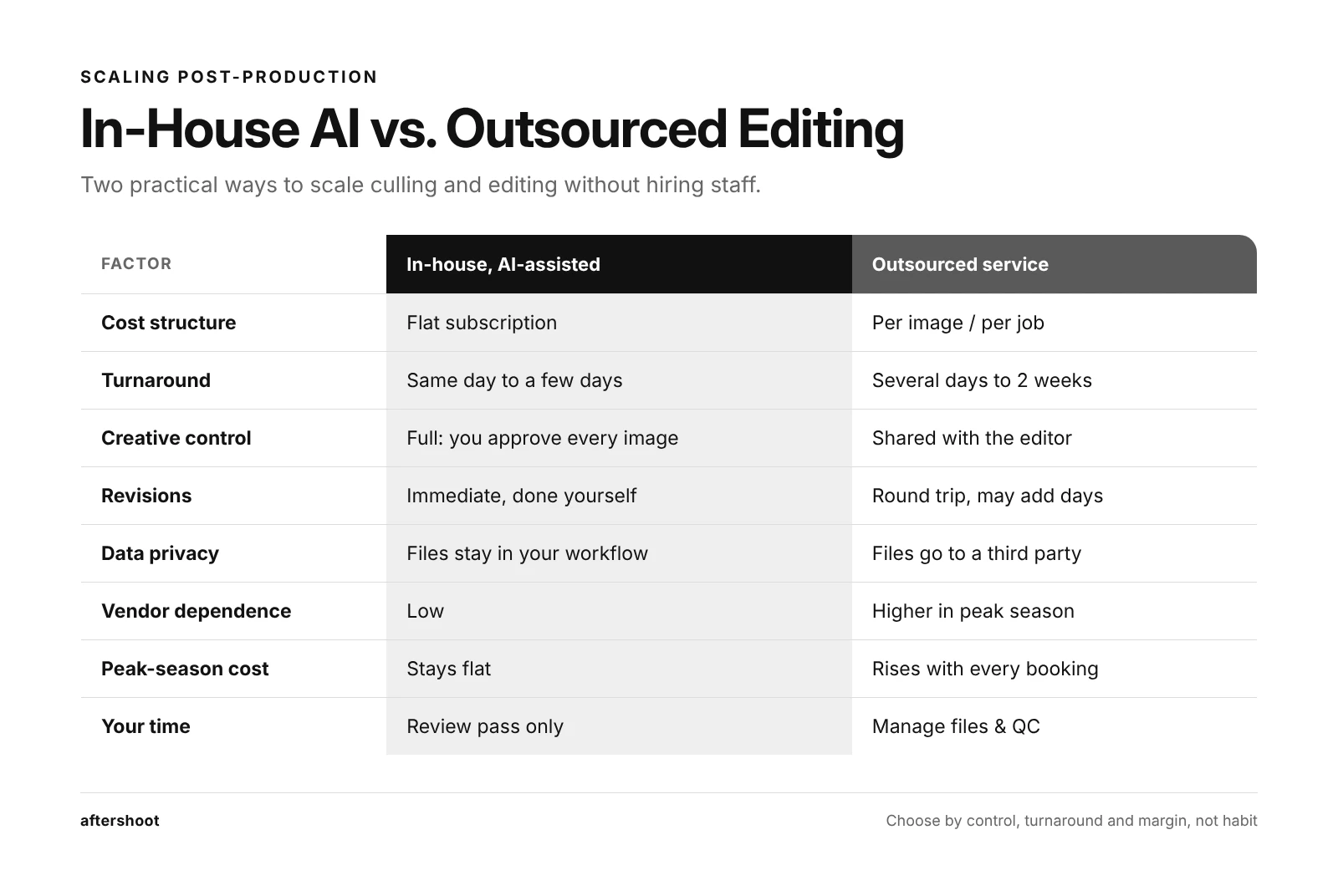
Once your bookings grow past what your evenings can absorb, there are two practical ways to scale post-production without hiring staff. You can keep the work in-house with AI-assisted culling and editing, or outsource it to an editing service. Both work. They suit different businesses, and the choice affects your costs, turnaround and control, so it belongs in the operations section of your plan.
Side-by-Side Comparison
| Factor | In-House with AI-Assisted Culling and Editing | Outsourced Editing Service |
| Cost structure | Flat subscription, same cost at 300 or 3,000 images | Per image or per job; costs rise with every booking |
| Turnaround | Same day to a few days; depends on your review time | Typically several days to two weeks, plus upload and download time |
| Consistency | AI learns from your past edits and applies your look across the set | Depends on the editor assigned and how well they’ve learned your style |
| Creative control | Full. You review, adjust and approve every image | Shared. You set the style guide; the editor makes the calls |
| Revisions | Immediate; you change it yourself | Requires a round trip and may add days |
| Data privacy | Files stay on your machine and in your workflow | RAW files and client images go to a third party; check their data handling |
| Vendor dependence | Low. If the tool is down, you can still edit manually | Higher. Your delivery dates depend on their queue in peak season |
| Seasonal scalability | Cost stays flat in your busiest month | Scales with volume, but peak-season queues can stretch turnaround |
| Onboarding | Train the AI on your past catalogs; most of the learning curve is yours | Send style references and sample edits; expect a few rounds of feedback |
| Your time | You still spend time reviewing, but less on repetitive adjustments | Very little editing time, but you still manage files and quality-check |
Cost Model: 20 Weddings and 40 Portrait Sessions
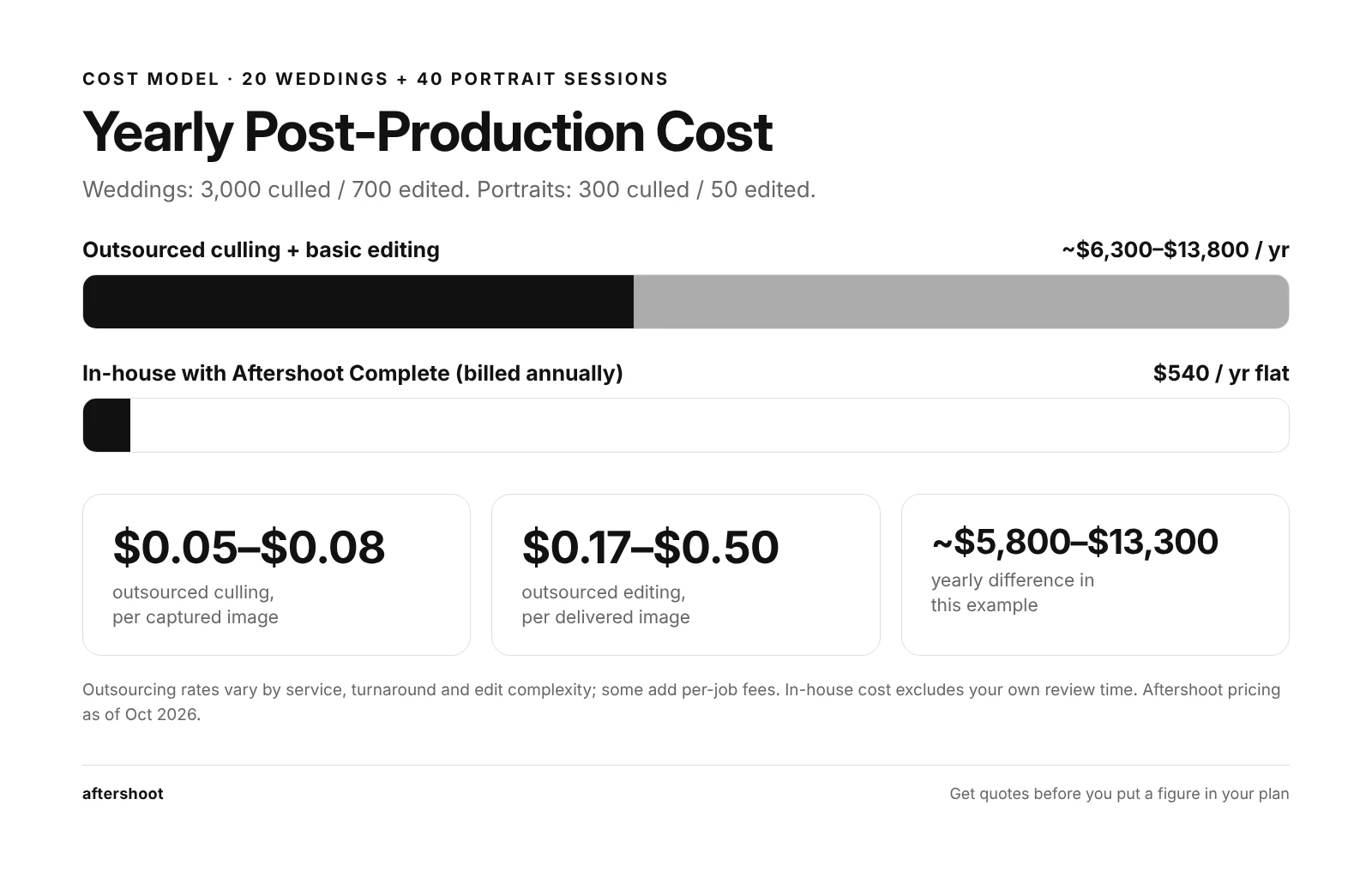
Using the example business above: each wedding produces roughly 3,000 captured images and 700 delivered; each portrait session produces 300 captured and 50 delivered.
Outsourced (culling + basic editing):
Published rates for outsourced culling typically run somewhere between .05 to .08 per image. Essential editing tiers start around 17 cents per image and climb with retouching and turnaround options. Using 0.05–0.08 for culling and 0.17–0.50 for editing:
| Booking Type | Culling Cost | Editing Cost | Cost Per Booking | Yearly Cost |
| Wedding (3,000 culled / 700 edited) | $150-$240 | $119-$350 | $269-$590 | $5,380-$11,800 (×20) |
| Portrait (300 culled / 50 edited) | $15-$24 | $8.50-$25 | $23.50-$49 | $940-$1,960 (×40) |
| Total | Approx $6,300-13,800 per year |
Rates vary by service, turnaround speed and edit complexity. Some services also add per-job fees. Get quotes before you put a figure in your plan.
In-house with AI-assisted culling and editing:
Billed annually, Select (AI culling) is $10/month, Edit (AI editing) is $30/month, Retouch (AI retouching) is $20/month, and Complete (all three) is $45/month. That’s $540 a year for the Complete plan, with no per-image fees. The trade-off is that the review time is yours. You decide on the final selects and fine-tune edits, so budget a few hours per wedding rather than zero.
In this example, the yearly cost difference is roughly $5,800-$13,300. That’s more than the business’s entire marketing budget.
Which One Belongs in Your Plan?
Choose in-house AI-assisted post-production if:
- Your editing style is a big part of why clients book you, and you want final say on every image.
- You shoot high volumes, where per-image fees add up fast.
- Fast turnaround is part of your positioning (sneak peeks in 48 hours, galleries in two weeks).
- You’d rather not send client files to a third party.
Choose outsourcing if:
- You’d rather spend zero hours editing and your margins can absorb the per-image cost.
- Your turnaround promise is long enough to cover the service’s queue in peak season.
- You have a clearly documented style that an external editor can follow.
A hybrid works too. Plenty of photographers cull and edit in-house with AI, then outsource only heavy retouching or album design. Whichever route you pick, write down the cost per booking and your turnaround promise in the plan. That’s what turns it from a preference into a budget line.
If you want to test the in-house route, Aftershoot’s AI culling goes through the full shoot, flags blinks, blur and duplicates, and groups similar frames so you can choose your best shots faster. AI editing learns from your past edits and applies your style across the whole gallery, while you keep the final say on every image. Then deliver through Aftershoot Galleries with client proofing and print sales built in. Start free with the Starter plan and get 10 GB of photo storage & 1 GB video.
Turn Your Photography Business Plan Into a Working Document
The best photography business plans aren’t long. They’re honest. They show what you charge, what it costs you, how many bookings you need, and whether the hours fit. Most photographers skip that last check, and it’s why a plan that looks fine in January falls apart in June.
Start with the one-page template. Fill it in with real numbers, even rough ones. Run the capacity check before peak season, not during it. Then put a quarterly review on your calendar. Your slow season is the right time to adjust prices, rethink your workflow and set the next set of milestones.
A plan you update four times a year is worth more than a perfect one you never open again.
FAQs for Photography Business Plan
Q1. How long should a photography business plan be?
For most solo photographers, 5–10 pages is enough, and a one-page plan is a perfectly good place to start. The length matters less than what’s in it: clear pricing, a defined ideal client, a marketing plan, real expense numbers and a capacity check. If you’re applying for a loan or bringing in a partner, expand each section with more detail and three-year financial projections.
Q2. What is the most important part of a photography business plan?
The financial plan and capacity check, read together. The financial plan tells you how many bookings you need. The capacity check tells you whether you have enough hours to deliver them. A plan that hits its revenue target but needs 60-hour weeks in peak season isn’t sustainable, so test both before you set booking goals.
Q3. Do I need a business plan before starting a photography business?
You don’t legally need one, but writing at least a one-page plan before starting a photography business helps you avoid the most common early mistakes: underpricing, ignoring editing time and spending on gear before you have bookings to pay for it. Write the plan alongside the practical setup steps (registering your business, getting insurance, building a portfolio), not after them.
Q4. How do I write a wedding photography business plan?
Use the same nine sections, with extra attention to seasonality and post-production. Weddings cluster in peak months and produce thousands of images each, so your plan should include peak-month capacity, travel costs, a second-shooter budget if you need one, and a clear turnaround promise. Price packages based on total hours per wedding, including culling and editing, not just coverage hours.
Q5. How often should I update my photography business plan?
Review it every quarter and do a full rewrite once a year. Quarterly reviews let you check your key numbers (inquiries, booking rate, average booking value, post-production hours per booking) and adjust before small problems become expensive. The annual rewrite, ideally in your slow season, is when you reset prices, goals and your workflow plan.
Q6. How do I grow a photography business once the plan is working?
Grow in this order: raise prices first, then cut the hours each booking takes, then add volume or a new service. Raising prices increases profit without adding work. Cutting post-production time creates capacity. Adding bookings before you’ve done either usually means longer hours, not a better business. Your quarterly review shows which step comes next.