

TL;DR:
- Manual retouching creates bottlenecks that slow down gallery delivery and eat up your weekends.
- Advanced professional AI retouching algorithms apply subtle default edits, eliminating plastic skin and overedited looks while retaining natural texture and expressions.
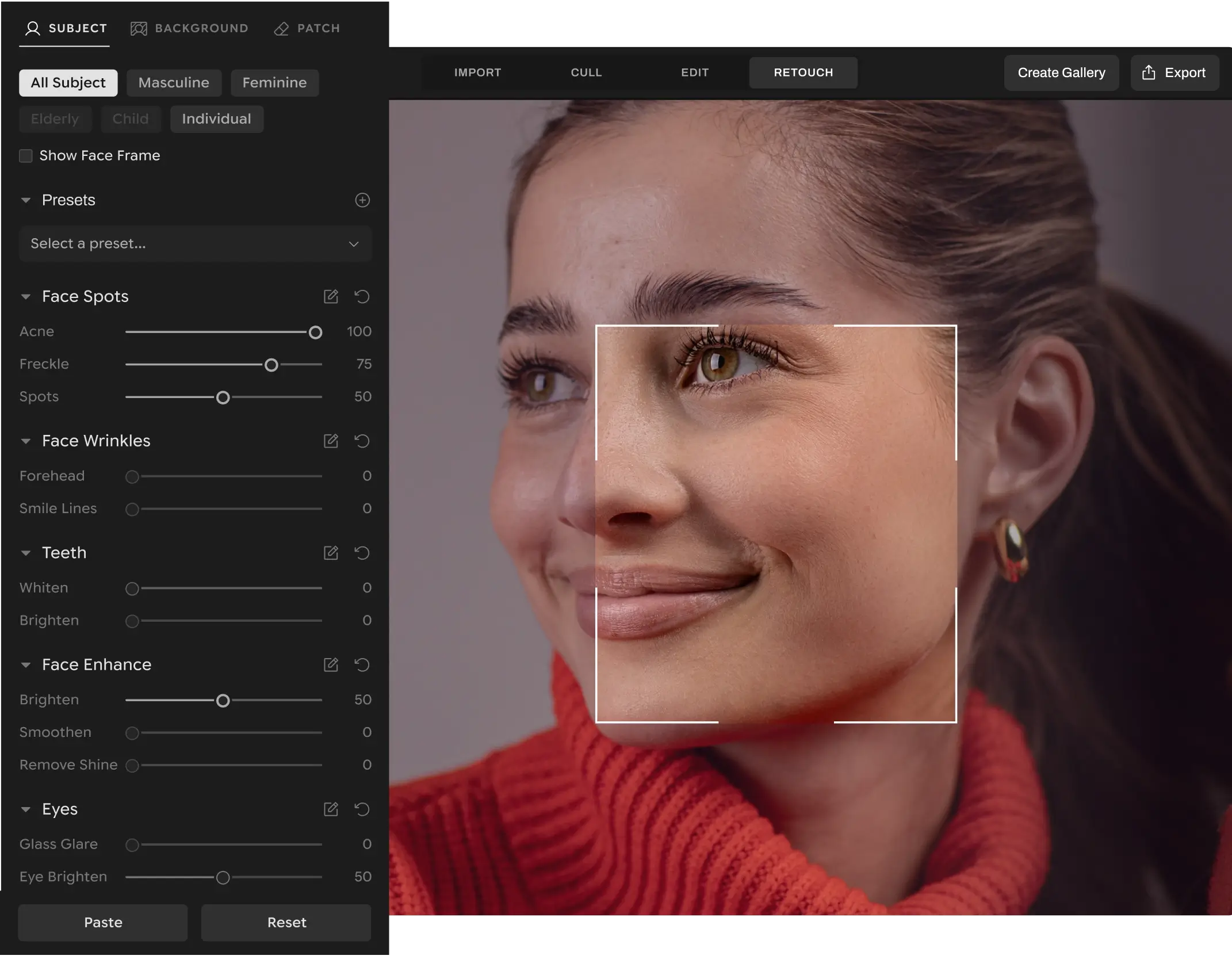
- Fine-tune retouching settings on a single image and instantly sync adjustments across high-volume shoots for complete album-wide visual consistency.
- Streamline culling, base color edits, and AI photo retouching inside a single native platform without breaking focus with Photoshop round-trips.
- Aftershoot Retouch handles repetitive tasks like blemish removal, teeth whitening, and background cleanup natively, with no per-image fees.
- Seamlessly combine culling, base color editing, and AI photo retouching in one native platform like Aftershoot, and eliminate the friction of round-tripping to Photoshop.
Here’s a pattern that photographers often follow; they get through their culling, finish the base color edits, and then hit the wall when it comes to retouching. They spend their entire Sunday manually masking out blemishes, smoothing skin, and fixing flyaway hairs on hundreds of photos.
Manual retouching is the time-thief of post-production. It’s a necessary detail for delivering a premium client experience, but doing it all by hand simply doesn’t scale.
This guide covers why manual retouching workflows break down, what professional AI retouching actually looks like, and how you can reclaim your evenings by automating the heavy lifting.
Why Manual Retouching Doesn’t Scale
For a handful of hero images, jumping into Photoshop to remove an exit sign or smooth out a harsh wrinkle makes sense. But wedding, portrait, and school photographers aren’t dealing with one photo.
You’re dealing with hundreds of faces across an album.
When you’re manually masking every blemish or constantly moving files back and forth between Lightroom and Photoshop, post-production gets tedious fast. These repetitive, detail-heavy tasks add unnecessary friction to your workflow. And when you’re working through hundreds of images, it’s easy to start rushing.
That’s often when overediting creeps in: teeth become unnaturally bright, skin starts looking plastic, and subtle retouching turns into something that no longer feels quite real.
👁️ Also Read: Aftershoot’s AI Photo Retouching vs Manual Retouching: Which Workflow Wins?
What Makes Good AI Retouching Different?
Photographers have seen plenty of software companies promise to “revolutionize” their workflow. Most of those promises don’t age well (present company notwithstanding). Early AI tools often destroyed natural texture, leaving subjects looking like wax figures.
A professional AI workflow should offer:
- Subtlety by default: It should preserve natural skin texture, freckles, and real expressions.
- Batch processing: You should be able to retouch one photo and sync those exact settings across the rest of the scene.
- Total creative control: The AI should act as an assistant, letting you dial the adjustments up or down based on your preference.
The Automated Path Forward
Aftershoot Retouch takes care of repetitive editing tasks so you can spend less time behind your computer.
Instead of manually masking every face in a 500-image gallery, Aftershoot’s auto-detect surfaces what needs polishing. It handles the heavy lifting, from smoothing skin to ironing out clothing creases, applied consistently across the entire album.
Here is how Aftershoot scales your retouching workflow without sacrificing quality:
- Consistent, natural polish.
Aftershoot analyzes each image to apply flattering, natural face retouching that keeps your clients authentically themselves. It removes blemishes and reduces glare while keeping real skin texture intact. - Sync adjustments instantly.
Retouch one photo in Loupe View, then sync the same settings across the entire batch. It’s a fast way to get consistent results for families, couples, and bridal parties with zero extra effort. - No workflow breaks.
Aftershoot lets you cull, apply your base edits, and retouch everything in one platform. Skip the export-import-export cycle that breaks your focus.
Comparing Workflows: Manual vs. AI
| The Workflow | The Process | The Outcome |
| Manual Retouching | Round-tripping files to Photoshop, manually masking faces, and using the healing brush on hundreds of images. | Hours of repetitive work, inconsistent edits, and delayed gallery delivery. |
| Aftershoot Retouch | Adjusting AI sliders for one image and syncing those settings across the entire album natively. | Consistent, natural results in minutes, giving you your weekends back. |
Get Your Time Back
Retouching shouldn’t be the bottleneck in your business. By taking repetitive adjustments off your plate, Aftershoot Retouch helps you deliver galleries faster and get your evenings back.
FAQs for AI Photo Retouching
Q1. What is AI photo retouching?
AI photo retouching uses artificial intelligence to automatically identify and enhance specific parts of an image, such as skin, eyes, teeth, and clothing. It applies natural-looking adjustments like blemish removal or skin smoothing without requiring manual masking or brushing.
Q2. How does AI photo retouching speed up post-production for professional photographers?
AI photo retouching automates repetitive tasks like blemish removal, skin smoothing, and glare reduction without manual masking or round-tripping files to Photoshop. Tools like Aftershoot Retouch allow photographers to cull, edit colors, and retouch high-volume galleries in a single streamlined workflow.
Q3. Does AI retouching make photos look fake?
It depends on the tool and the settings. Professional tools like Aftershoot Retouch are designed to be subtle by default, preserving natural skin texture and real expressions. You maintain control over the sliders, ensuring the final result looks polished but authentic.
Q4. Can I batch retouch a full shoot?
Yes. With Aftershoot, you can open one image, adjust the AI Retouching sliders to your liking, and then sync those exact settings across the rest of your selected photos. The AI automatically adapts the effect to each new face in the batch.
Q5. Does Aftershoot Retouch charge per image?
No. Aftershoot’s AI Retouching plan offers unlimited photos with no per-image fees. Whether you shoot three portrait sessions a month or ten weddings, you pay a fixed flat rate, allowing you to edit as much as you need without worrying about the cost scaling up.
Aftershoot Retouch starts at $20/ month (billed annually).




