
TL;DR
- Couples search for photographers in different ways as they narrow down their choices, so make sure you show up in all three places: Google Maps, regular search results, and AI answers.
- SEO for wedding photographers has four pillars, built from the bottom up. Your Google Business Profile and reviews come first, then a clear website, then blog posts, then links from other wedding sites.
- Start with your Google Business Profile. It’s free, and it puts you in the map results when couples search for photographers near your location.
- Each keyword gets one page. Putting “[city] wedding photographer” everywhere doesn’t help, because your own pages end up competing with each other.
- Google can’t see your photos. It reads the words around them, so every main page needs plain text about what you shoot, where, and roughly what it costs.
- Blog the weddings that matter, not every wedding. One strong post per venue you want to shoot again beats a weekly schedule.
- Expect months, not weeks. Venue searches move first; “[city] wedding photographer” takes longest. Check Google Search Console once a month and judge the trend, not the week.
Your camera has a place in your camera bag. Your lenses have their own compartments. Your presets are organised down to the last slider.
But how much time do you spend making sure couples can actually find your work on Google?
In a 2025 poll of more than 330 wedding and elopement photographers, SEO ranked as the number one source of inquiries.
Yet for many, wedding photographer SEO is a messy mix of tips picked up from YouTube videos, Facebook groups, and other photographers. Rename some images here, publish a blog there, install an SEO plugin, and hope for the best.
Sounds familiar?
Here’s the thing: SEO doesn’t have to be a guessing game. This guide breaks SEO for wedding photographers into four pillars and eight practical steps, in the order you should tackle them.
How Couples Search for a Wedding Photographer (+ 3 Places You Need to Show Up)
A newly engaged couple rarely books a photographer on their first Google search. They often start broad, with something like “Austin wedding photographer.” Then, a few weeks later, they’ve seen enough to know what they like, so they get specific. They search for “documentary wedding photographer Austin,” then add their venue name, then their budget, before narrowing down to one.
Each of those searches is a chance for you to be found. And SEO makes sure you’re findable and convincing when they do.
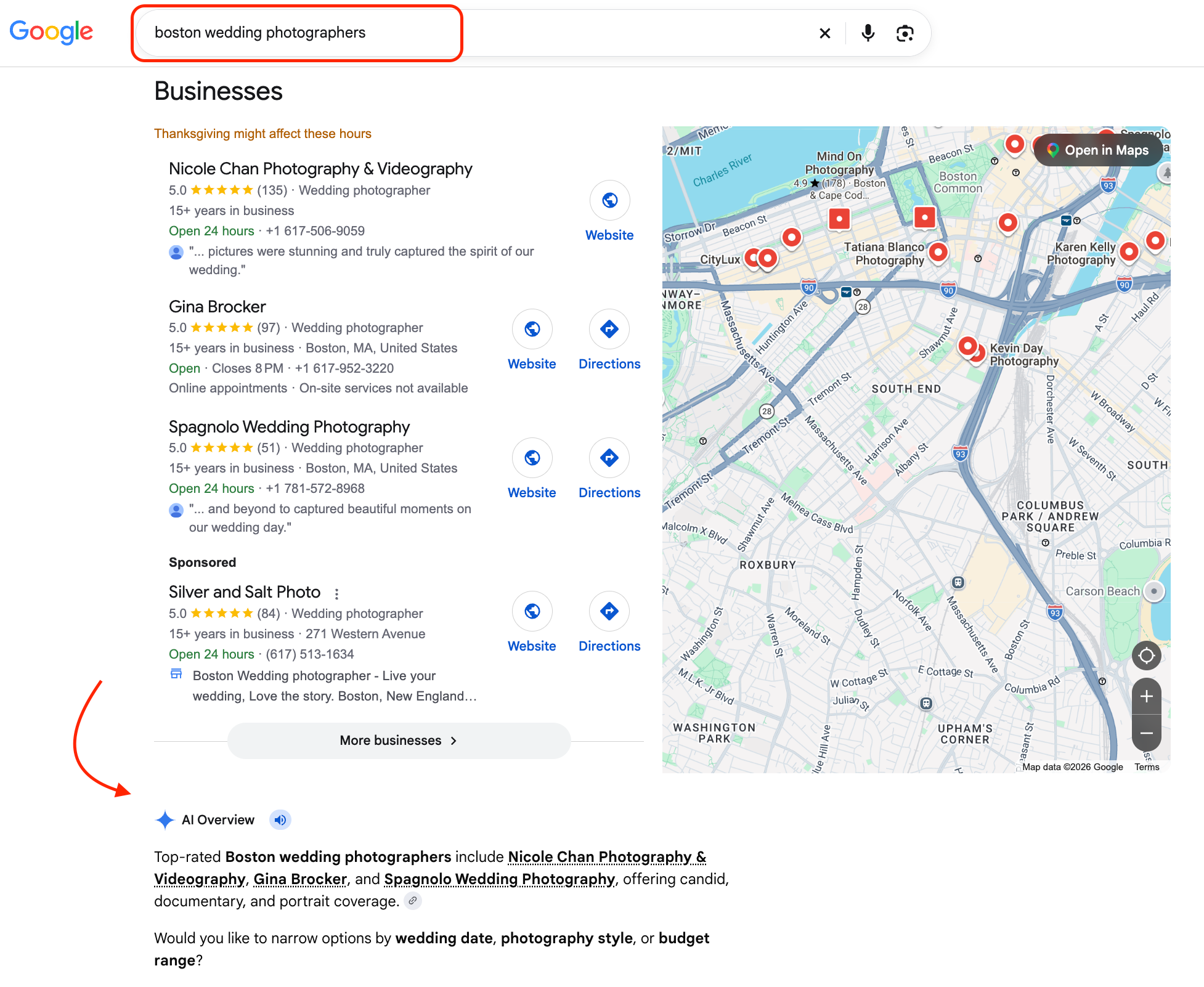
| Where couples see you | What it looks like | What gets you there |
| Map pack | A map with three local businesses under it | Google Business Profile and reviews (Step 1) |
| Search results | The regular list of websites | Keywords, words on your pages, blog posts and links (Steps 2–7) |
| AI answers | Google’s AI Overviews, ChatGPT and similar tools | Clear text about what you do and where, plus consistent details and mentions on other sites |
AI answers are the newest of the lot, and the most challenging to crack. In a November 2026 study, 5W PR asked ChatGPT, Claude, Gemini, and Perplexity 24 wedding-planning questions, three times each. The Knot was named in 177 of the 288 answers, and Zola in 158. In other words, AI answers often point couples to large wedding platforms, so a complete listing on sites like The Knot and Zola is one more way to appear in them (Step 7).
AI tools draw on what’s published about your business, on your own site and on other websites. The steps in this guide cover both.
The 4 Pillars of SEO for Wedding Photographers
When photographers decide to work on SEO, they often start with whatever SEO tips for wedding photographers they’ve heard most recently: publish a blog post, improve a plugin score, or rename a batch of images.
But SEO isn’t about ticking off random tasks. You need to build across four pillars to start seeing the results.
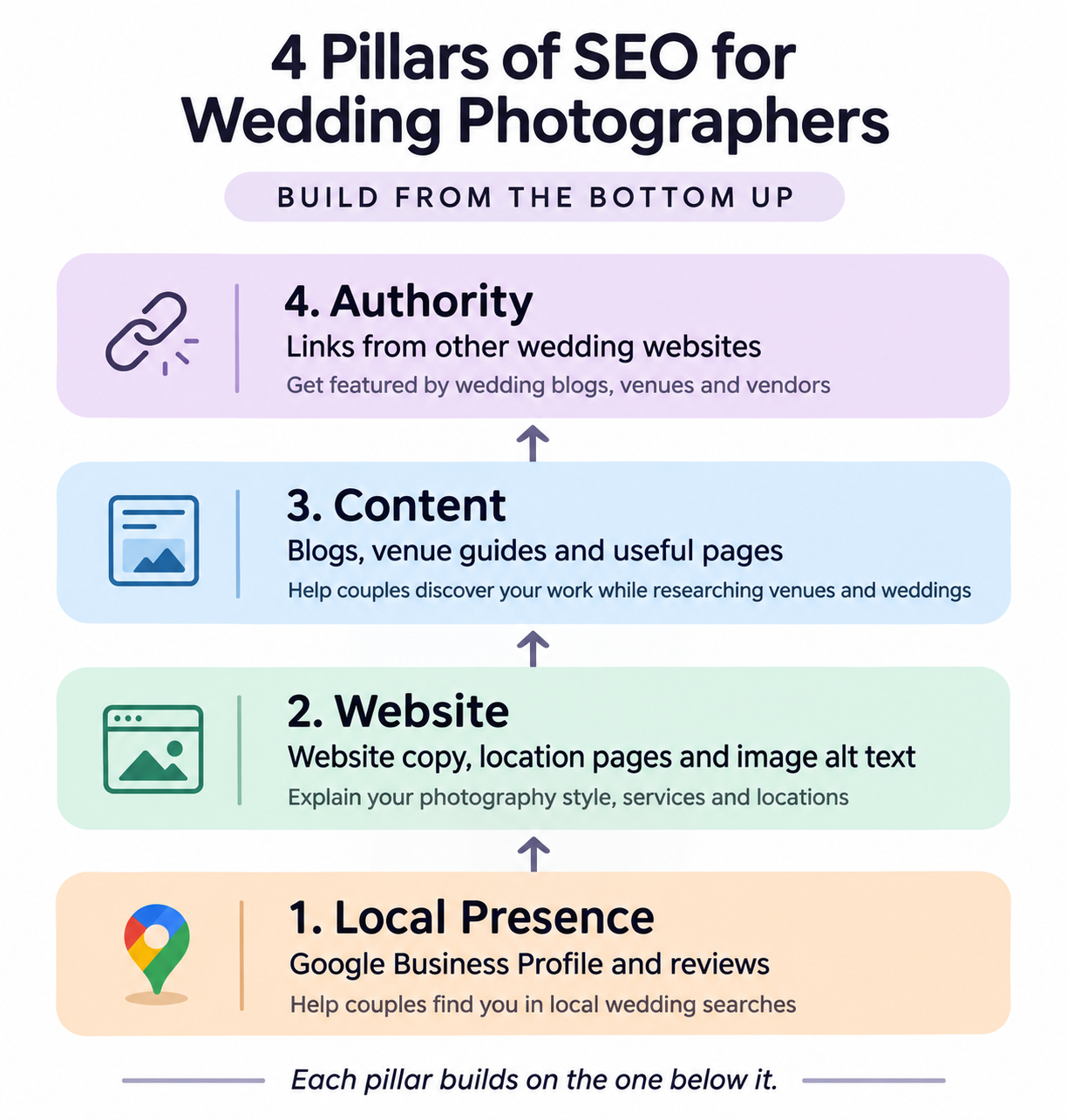
- Local presence: Your Google Business Profile and client reviews help couples find you in local searches.
- Website: Your website copy, location pages, and image alt text help Google understand what you photograph, your style, and where you work.
- Content: Blog posts, venue guides, and helpful pages allow couples to discover your work during research.
- Authority: Links from wedding blogs, venues, and other industry websites help build your website’s credibility and get ranked and cited by AI chatbots.
Below are eight steps to help you build each pillar, one at a time.
Step 1: Set Up Your Google Business Profile
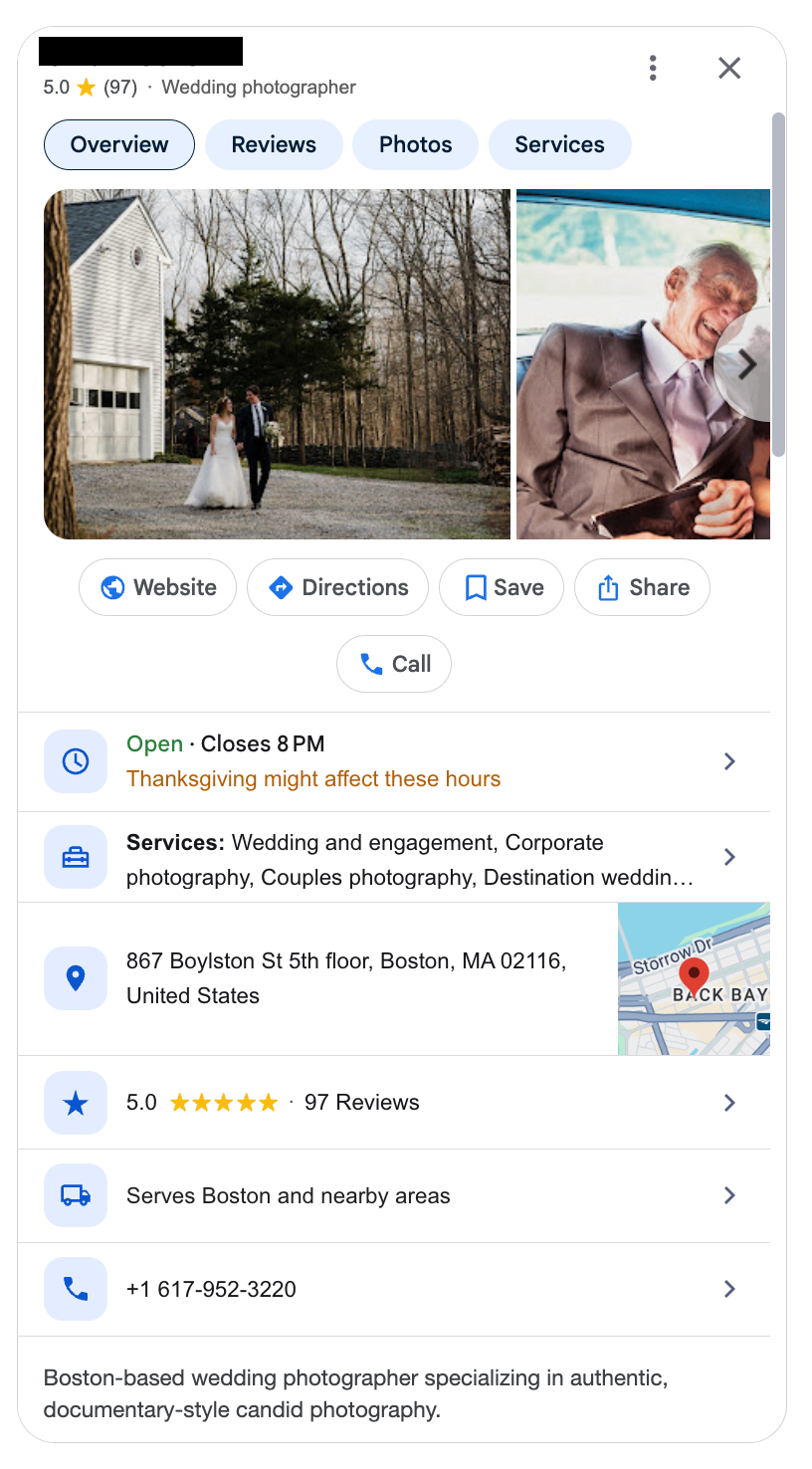
Create and verify your free Google Business Profile to help couples find you on Google Maps and in local search results when they look for wedding photographers in your area.
Your profile displays key details like your business name, location, contact information, photos, and reviews. It is one of the easiest ways to start building visibility in local searches.
Claim Your Profile and Fill in Every Field
As per Google, having a Business Profile with complete, accurate information helps with local search visibility. To do so:
- Go to google.com/business and sign in with the Google account you use for work.
- Use your real business name. Don’t add keywords like “Best Austin Wedding Photographer” because they violate Google’s guidelines.
- Choose “Wedding photographer” as your main category. Or any other available category that accurately describes your primary business.
- Write a short description about what you shoot, your style, and the locations you cover. Google recommends describing your services, what makes you special, and other useful business information.
- Add your website, phone number, and inquiry hours.
- Upload at least 10 of your best photos to showcase your expertise. You can optionally also include a photo of yourself.
Hide Your Address If You Don’t Have a Studio
If you’re a wedding photographer who works from home or travels to couples, you can hide your home address and list the cities or regions you serve instead.
Ask Every Past Couple for a Review
Reviews do two jobs at once. They help you rank in the map results, and they’re often the first proof a couple reads. Ideally, you should ask couples for a review within a week of delivering the gallery, when they’re still excited and sharing their photos.
Copy the review link from your Google Business profile and send them something like this:
Hi [names]! It was such a joy photographing your wedding at [venue]. If you have two minutes, a Google review would mean a lot and help other couples find me: [review link]. Thank you!
Step 2: Choose One Keyword for Every Website Page
Give each keyword its own page: your homepage targets “[city] wedding photographer”, and every other page targets something more specific, so your pages don’t compete with each other.
A keyword is the phrase a couple types into Google when looking for a photographer. Many photographers assume that using their main keyword more often will help them rank higher. It’s a reasonable guess, but also the most common mistake in wedding SEO.
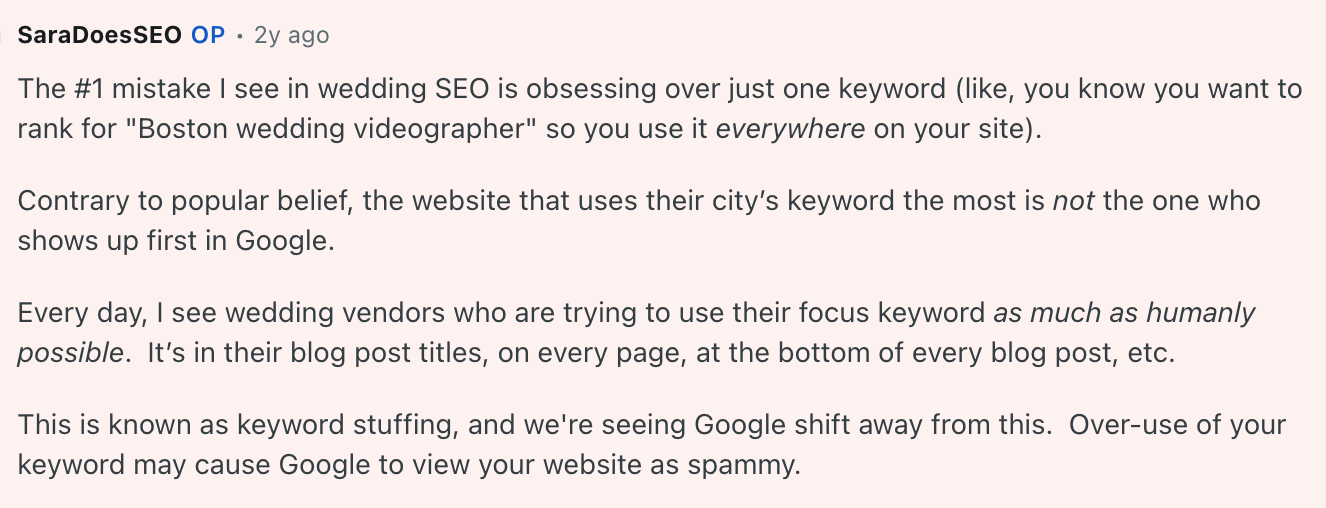
A Wedding Photographer SEO specialist shares her insights on Reddit
Find Phrases Couples Actually Use for Search
You don’t need a paid tool to find keywords/phrases. Start typing “wedding photographer [your city]” into Google and note what autocomplete suggests.
Then scroll to the “People also ask” box to find real questions couples are asking.
If you work in a small town, first check whether couples search for photographers in your area. Free tools like Google Trends and Google’s Keyword Planner can tell you.
If very few people search your town’s name, target the nearest bigger city or your wider region instead.
Give Each Keyword Its Own Page
When “Austin wedding photographer” is on your homepage, your about page, every blog title, and your footer, Google can’t tell which page you want to rank. So your own pages end up competing with each other.
To fix this, give your main keyword to one page, usually your homepage or your wedding page, and make that page the most useful page on the subject.
If you shoot more than weddings, the same rule applies: each service gets its own page, not a shared “Services” page. Use the table below as a template for your own site. Replace [city], [region], [style], [place], and [venue name] with your details, then give each page the keyword in its row:
| Page | Keyword pattern | Example |
| Homepage | [city] wedding photographer | Austin wedding photographer |
| Wedding page | [style] wedding photographer [region] | Documentary wedding photographer Texas Hill Country |
| Elopement page | [place] elopement photographer | Big Bend elopement photographer |
| Pricing page | wedding photography packages [city] | Wedding photography packages Austin |
| Venue posts | [venue name] wedding | [Venue name] wedding |
Add a Location Page Only for Areas You Serve
A location page targets a second city or region, like “San Antonio wedding photographer” for an Austin-based photographer. Create such a page when you’re already booking weddings in that area, not just because you’d like to.
Each page should have unique content and real examples from that area, such as venues you’ve photographed, how far you travel, and what couples can expect. Don’t just copy your homepage and replace the city name. Google considers nearly identical pages created for different cities to be “doorway pages” and treats them as spam.
Step 3: Add Keywords to the Right Page
Use your main keyword once in the page title, meta description, main heading, and first paragraph. Add alt text to 5–10 images and keep the URL short and simple.
Google doesn’t weigh every word on a page equally. It pays more attention to certain parts of a webpage, such as its main heading and page title, just as a couple skims your homepage: headline first, then the rest.
Keep it natural and avoid repeating the keyword. This is what’s called “on-page” SEO.
Page Title and Meta Description
A page title is the blue headline couples see in Google’s search results. And the summary underneath it is the meta description. For your homepage, something like this works:
- Page title: Austin Wedding Photographer | [Your Name] Photography
- Meta description: Documentary wedding photography for Austin couples who want real moments, not stiff poses. See recent weddings and starting prices.

Main Heading and First Paragraph
The biggest heading on the page should say what you do and where. The first paragraph should mention your city and your shooting style in plain words, the same way you’d describe your work to a couple over coffee.
If a stranger couldn’t tell what you shoot and where from those two lines, neither can Google.
Page URL
Keep your main page URL addresses short: /weddings, /about, /pricing. It’s tempting to squeeze keywords in, like /about-los-angeles-photographer, but we recommend against it. You don’t want to be over-optimized.
Put Alt Text on 5–10 Images per Page
Alt text is a small but useful part of wedding photography SEO: a short description of a photo that search engines like Google use to understand images on a webpage.
Describe what’s in the photo, then add the venue and city if they fit: Bride and groom walking through the oak grove at [venue], Austin
You don’t need alt text on every image, which is good news if your galleries run into the hundreds. Just 5-10 images per page or blog post should be enough.
Help Your Photos Show Up in Google Images and Pinterest
Add descriptive alt text and file names to your photos. Include the venue or location in nearby captions where relevant. Google uses these details to understand your images and decide when to show them in search results.
On Pinterest, pin photos directly from your blog posts instead of your gallery. Give each pin a title and description that mention the venue and photography style. This helps couples discover your work and brings them back to your website.
Don’t Overthink File Names
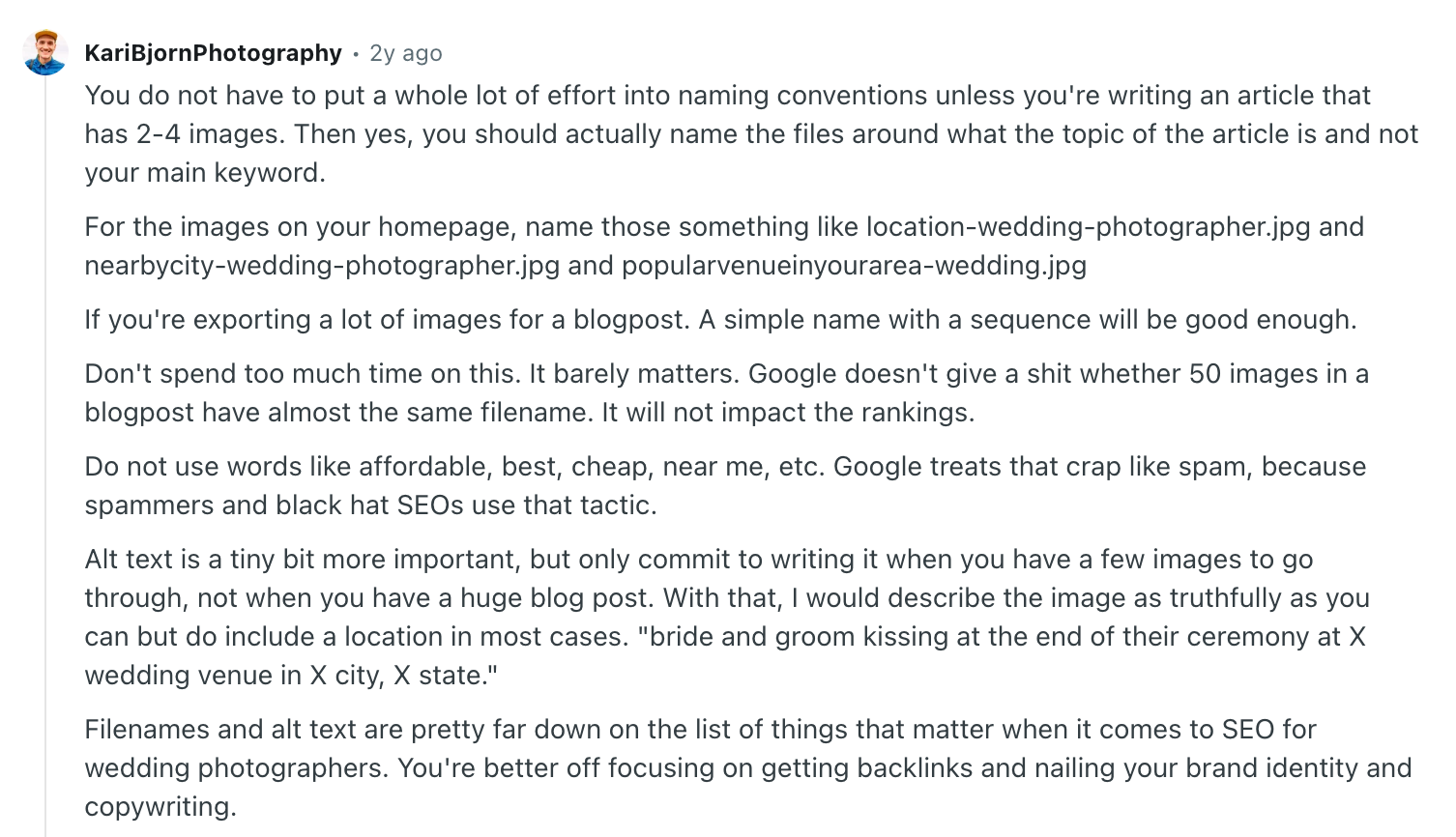
Many photographers spend hours renaming every photo with a slightly different keyword. It feels productive, but the payoff is small. A plain description, like “first-look-oak-grove.jpg”, is plenty.
As a photographer on Reddit puts it:
Step 4: Add the Right Words to Your Website
Add plain text to every main page describing what you shoot, where you work, and your starting prices, because Google and AI tools read words, not photos.
Your photography speaks through images, so it’s natural to fill your homepage with photos. But Google and AI tools can’t look at a photo and understand that it’s a candid first look at a vineyard outside Austin.
Here’s how to add proper context to your website:
- A clear first line. Say what you shoot and where: “Documentary wedding photographer in Austin and the Texas Hill Country.”
- 300 or more words on your homepage. Who you work with, how you work, and what a wedding day with you feels like.
- “Starting at” pricing. It answers the first question most couples have, and it gives Google and AI tools something specific to match to budget searches.
- How each type of session works. How couples should make a booking, when the deposit is due, and when the gallery arrives.
- An FAQ page. Answer the questions most commonly asked by couples
- An about page with a real photo of you. Write it for the couple, about what it’s like to work with you, not as a list of fun facts.
Add Your Business Details as Schema Markup
Turn on LocalBusiness or ProfessionalService schema in your website platform or SEO plugin, and fill in your business name, service area, and reviews. Schema markup is a small piece of code that gives search engines and AI tools these details in a format they can read directly. Check your platform’s settings before adding any code by hand.
Skip FAQ schema for now. Since 2023, Google shows FAQ rich results for only a small group of sites, mostly government and health. Treat schema as a finishing touch, not a shortcut.
Step 5: Make Sure Your Images Load Fast
Resize and compress every image before it goes on your website, so your pages load in under three seconds on a phone.
If your homepage hosts too many full-size exports, your website pages will load slowly, and the couples scrolling your website on their phone will give up before the first image even appears. Google pays attention to that too.
- Make a web export preset in Lightroom. A long edge of about 2,000–2,500 pixels and JPEG quality around 70–80% is a good starting point for most website templates. Export everything for your site through it.
- Compress before you upload. Free tools like TinyPNG shrink files further without visible loss.
- Test your homepage. Run it through PageSpeed Insights and look at the mobile result. If it’s slow, oversized images are usually the first thing to fix.
Some website platforms also resize images for you, so you may already be in decent shape. Uploading sensibly sized files still helps, and it means your site stays fast even if you ever switch platforms.
Step 6: Blog Your Best Weddings at Venues You Want to Shoot Again
Write one blog post for each venue you want to shoot at again, and add to it every time you photograph a wedding there.
Blogging is one of the most useful SEO tips for wedding photographers, because your homepage can only rank for a handful of searches. On the contrary, blog posts help you show up for more specific searches.
For example, ranking for “Orlando wedding photographer” is difficult because every photographer in the city is competing for the same search. But ranking for searches related to a specific wedding venue in Orlando is easier. Couples making these searches have often already booked the venue and are now looking for a photographer who has worked there.
That said, you don’t need to blog about every wedding.
Pick Weddings at Venues Couples Search For
Start with venues you’ve photographed and would love to shoot at again. Write a detailed post about each venue to attract couples who’ve recently booked it and are now looking for a photographer. It can continue bringing in potential clients long after publishing.
Write One Post for Each Venue and Keep Updating It
Two blog posts targeting the same venue end up competing with each other. Instead, create one detailed post per venue and add new wedding photos whenever you shoot there again.
If you want to write another post about the same venue, make sure it targets a different search. For example, write about “Summer weddings in Southwest Michigan” instead of targeting the venue name again.
A venue-specific blog post on a photographer’s website
Write About the Wedding Day, Not Just the Photos
A slideshow and a vendor list give Google nothing to rank. Add 300–500 words describing the wedding day. Mention where the couple got ready, the best lighting spots, how they used the venue, and one helpful tip for couples planning their wedding there.
Choose 30–50 Images and Describe 5–10 of Them
Instead of showing your whole gallery, show your strongest work. Add alt text to the 5–10 images that best show the venue and the moments.
Credit Every Vendor and Request Them to Share Your Post
Mention and link to the planner, florist, and venue in your blog post. Then share the post with them. They may share it or link to it on their websites, which helps your SEO (more on this in Step 7).
Link Each Venue Post to Your Main Pages
Add a link to your homepage or wedding page in every venue post, using descriptive text such as “documentary wedding photography in Austin” instead of generic phrases like “click here.” You should also link from your wedding page to your best venue posts.
These internal links connect your blog posts to the main page you chose for your target keyword in Step 2. This helps Google understand how the pages relate to each other and which page you want to rank for your main keyword.
Don’t wait until a blog post is due to start choosing photos. Selecting 30–50 images from a gallery of 2,000 or more can take hours, and by then, the couple and vendors may have stopped sharing photos from the wedding.
Instead, choose your blog photos while editing the full gallery. This lets you publish sooner, while the couple, guests, and vendors are still sharing images and your post has a better chance of getting noticed.
👁️ Also read: How to cull wedding photos faster
Step 7: Get Listed on Other Wedding Sites
Get your business listed on wedding directories, vendor websites, and wedding blogs. Make sure your business name, phone number, and location are consistent across all listings.
Think about how couples choose a photographer. Your own website says you’re great, but a recommendation from their planner carries more weight. Google works the same way.
When another relevant website links to yours, Google treats it as a vote of confidence. These links are called backlinks. They help boost your website’s credibility and can make it easier to rank higher in search results.
Here’s how to earn them:
- Wedding directories. The Knot, WeddingWire, and your local wedding guides.
- Local business listings. Chambers of commerce, wedding associations, and local business groups.
- Vendors you’ve worked with. Send planners, florists, and venues a few images with permission to share. Request that they credit you with a link.
- Wedding blogs. Submit your best real weddings for a feature.
One small habit makes all of this count for more: Keep your business name, phone number, and location written the same way everywhere. It sounds minor, but matching details help Google and AI tools connect every mention back to you.
👁️ Also read: How to market your wedding photography business
Step 8: Check What’s Working Once a Month
Check Google Search Console monthly to see how many impressions and clicks your website gets and which searches bring people to it. Look for progress over several months rather than expecting results in a few weeks.
Google Search Console is free, and it shows how Google sees your site. Once a month, check these three numbers:
| Number | What it tells you |
| Impressions | How often your site showed up in search results |
| Clicks | How often someone clicked through to your site |
| Queries | The exact searches that showed your site, including ones you never targeted |
The queries list is especially useful. It shows the venue names and questions people search for, including ones you may not have thought to target. Each one could give you an idea for your next blog post.
How to Show Up in ChatGPT and AI Overviews
The eight steps above also shape what AI tools say about you. Couples can now ask ChatGPT or Google’s AI Overviews for photographer recommendations, not just Google.
ChatGPT, Gemini, Perplexity, and Google’s AI Overviews answer from what’s published about your business, so clear website text, matching business details, reviews, and mentions on other wedding sites are what they draw on.
That said, you don’t need a separate setup for AI search. The four pillars above already cover the basics. However, a few things deserve extra attention:
- Clear text on your website about what you shoot, where, and your starting prices (Step 4).
- Matching business details everywhere you’re listed (Step 7).
- Reviews on your Google Business Profile and wedding directories (Steps 1 and 7).
- Mentions on other wedding sites, such as vendor pages, directories, and features (Step 7).
Check What AI Tools Say About You
Once a quarter, ask ChatGPT, Gemini, and Perplexity two questions:
- “Best [style] wedding photographer in [your city].”
- “What can you tell me about [your business name]?”
Note which photographers get named and which websites the answers cite. Answers change between tools and from one day to the next, so look for patterns over a few checks rather than a single result. If the details about you are wrong or out of date, update the pages and profiles the answers cite.
How Long Does Wedding SEO Take to Show Results?
SEO takes time, especially with a new website. Ranking for competitive searches like “Orlando wedding photographer” can take months or even years. Smaller searches, such as specific venue names, are usually easier to rank for.
You may have heard that Google keeps new websites out of search results for a year in a so-called “sandbox.” But Google has said this isn’t true. It simply takes time for Google to understand your website and decide where it belongs in search results.
Expect some ranking ups and downs along the way. A sudden drop after a Google update doesn’t necessarily mean you’ve done something wrong.
Popular SEO Tips for Wedding Photographers You Can Skip for Now
Some popular SEO advice takes hours to implement, and changes very little. Skip these until the eight steps are done:
| Skip this | Why |
| A different keyword in every image file name | File names barely move rankings, and stuffing them can look spammy |
| Alt text on every single photo | 5–10 well-described images per page is enough |
| “Best,” “affordable,” “cheap,” or “near me” in your copy | Couples don’t trust it, and Google treats it as a spam signal |
| Your city keyword in every blog title and URL | Your pages end up competing with each other |
| A fixed posting schedule | Google doesn’t reward posting on the same day each week |
| Chasing a green score in an SEO plugin | The score checks a formula, not whether couples find the page useful |
| Paid rank-tracking tools | Search Console is free and enough for your first six months |
The Best SEO for Wedding Photographers Starts With Step One
It’s easy to read a guide like this and feel like SEO is a mountain of work. But you don’t have to do it all at once.
Start with a few hours of setup, then build small habits over time. Set up your Google Business Profile this week. Next week, choose a keyword for your homepage and rewrite its opening paragraph. By the end of the month, your website will give Google and couples a clearer idea of who you are and where you work.
What brings in the most new searches is blogging your best weddings. But it’s often the first thing you put off during a busy season, when editing galleries takes priority.
Get Your Blog Selects Out While the Couple is Still Sharing
Aftershoot culls the full wedding for you and highlights your strongest images, so your sneak peeks and venue posts don’t wait until the gallery is done. Every final pick is still yours. Try Aftershoot’s AI Culling for Free
FAQs for SEO for Wedding Photographers
1. How Long Does SEO Take for Wedding Photographers?
For a new website, expect a few months before you see steady impressions in Search Console. Competitive keywords like “[city] wedding photographer” can take months to years, depending on how many established photographers you’re up against. Smaller searches, like venue names, usually move sooner.
A Google Business Profile with good reviews is often the quickest win, because it can put you in the map results before your website ranks.
2. How Do I Get My Photography Business into ChatGPT or AI Overviews?
Build a strong online presence so AI tools can find and recommend your business. ChatGPT and other AI tools use information from your website, Google Business Profile, reviews, and mentions on other wedding websites.
Clearly explain what you photograph and where you work. Keep your business details consistent across listings and get links from vendors and directories. And check whether your business appears in AI answers by searching for it once a quarter.
3. Should I Show My Prices on My Website?
A “starting at” price usually helps. Couples want a rough idea before they reach out, and a page with real numbers gives Google and AI tools something specific to match to budget searches. You don’t need to list every package. Only a starting price and what it includes is enough to filter in the couples who are a good fit.
4. Does Blogging Help SEO for Wedding Photographers?
Yes, when your posts target searches your main pages don’t cover, like venue names. A post about a venue can reach couples who’ve booked it and are looking for a photographer. Posting more often doesn’t help on its own. One detailed post per venue, updated after each new wedding there, usually does more than several short posts with only photos and a vendor list.
5. What is Local SEO for Photographers?
Local SEO is the part of SEO that helps you show up for searches tied to a place, like “wedding photographer in Austin” or “photographers near me.” It covers your Google Business Profile, reviews, the location details on your website, and your listings on local and wedding directories. For most wedding photographers, it’s the place to start, because couples usually search by city or region.
6. Which Website Platform Is Best for Photography SEO?
Showit, Squarespace, WordPress, and Pic-Time can all rank well on Google. What matters is whether you can edit five things: page titles, meta descriptions, headings, image alt text, and page URLs.
If your platform lets you change all five, your content matters more than the platform itself. Switching platforms just for SEO rarely makes sense. You could even lose rankings if you don’t redirect your old pages properly.