

TL;DR:
- Post-production, not shooting, is where photographers lose the most time each week
- This guide breaks down the best photography workflow software for culling, editing, retouching, and delivery in 2026
- Aftershoot Complete stands out as it covers all four stages at a lower cost than combining separate tools
As a photographer, you may agree that your time behind the camera is only a part of the job. Once the shoot is over, the real work begins; culling massive galleries, making precise edits, retouching portraits, and preparing client deliveries quickly add up, turning post-production into one of the most time-consuming parts of the job.
That said, photography workflow software exists to consolidate these fragmented steps into one seamless process. This guide breaks down the best tools for every stage of your workflow in 2026, and why it’s worth building your studio around Aftershoot Complete.
Best Photography Workflow Software: Pricing Comparison Based on Annual-Plan Rates
| Tool | Starting price | Recommended plan for professionals |
| Aftershoot | Select: $10/month ($120 billed annually.) Includes AI culling, duplicate grouping, and key-face detection. | Complete: $45/month, billed annually. Includes unlimited AI culling, editing, and retouching. |
| Adobe Lightroom | Lightroom: $11.99/month on an annual plan, billed monthly. | Photography Plan: $19.99/month on an annual plan, billed monthly. Includes Lightroom, Lightroom Classic, and Photoshop. |
| FilterPixel | Standard: $14.99/month, billed annually.Includes unlimited basic culling and 20 DeepCull shoots/year. | Pro: $34.99/month, billed annually. Includes 70 DeepCull shoots/year, Magic Number, and two AI profiles. |
| Capture One | Pro: about $18/month, billed annually. | Pro: about $18/month, billed annually. Includes RAW editing, tethering, masking, and colour tools. |
| Imagen | Pay-as-you-go: $0.05/photo + $7 monthly minimum. | Limitless: $179/month, billed annually. Includes unlimited editing, retouching, and AI culling. |
| Pixieset | Basic: $8/month, billed annually. Includes 10 GB storage. | Pro: $24/month, billed annually. Includes 1 TB storage and 4K video support. |
| Photo Mechanic | $149/year, billed annually. | $149/year. Includes fast ingest, culling, keywording, and export. |
| Luminar Neo | From about $79 one time. | Max: about $129 one time. Includes desktop and mobile access plus AI editing tools. |
| picdrop | Free: $0. Includes 1 GB storage and three galleries. | Pro: €8.39/month, billed annually. Includes 500 GB storage, unlimited galleries, and custom branding. |
Pricing note: Prices reflect annual-plan rates where available. Some providers bill annually upfront, while others bill monthly under an annual commitment. Usage-based and one-time pricing are labelled separately.
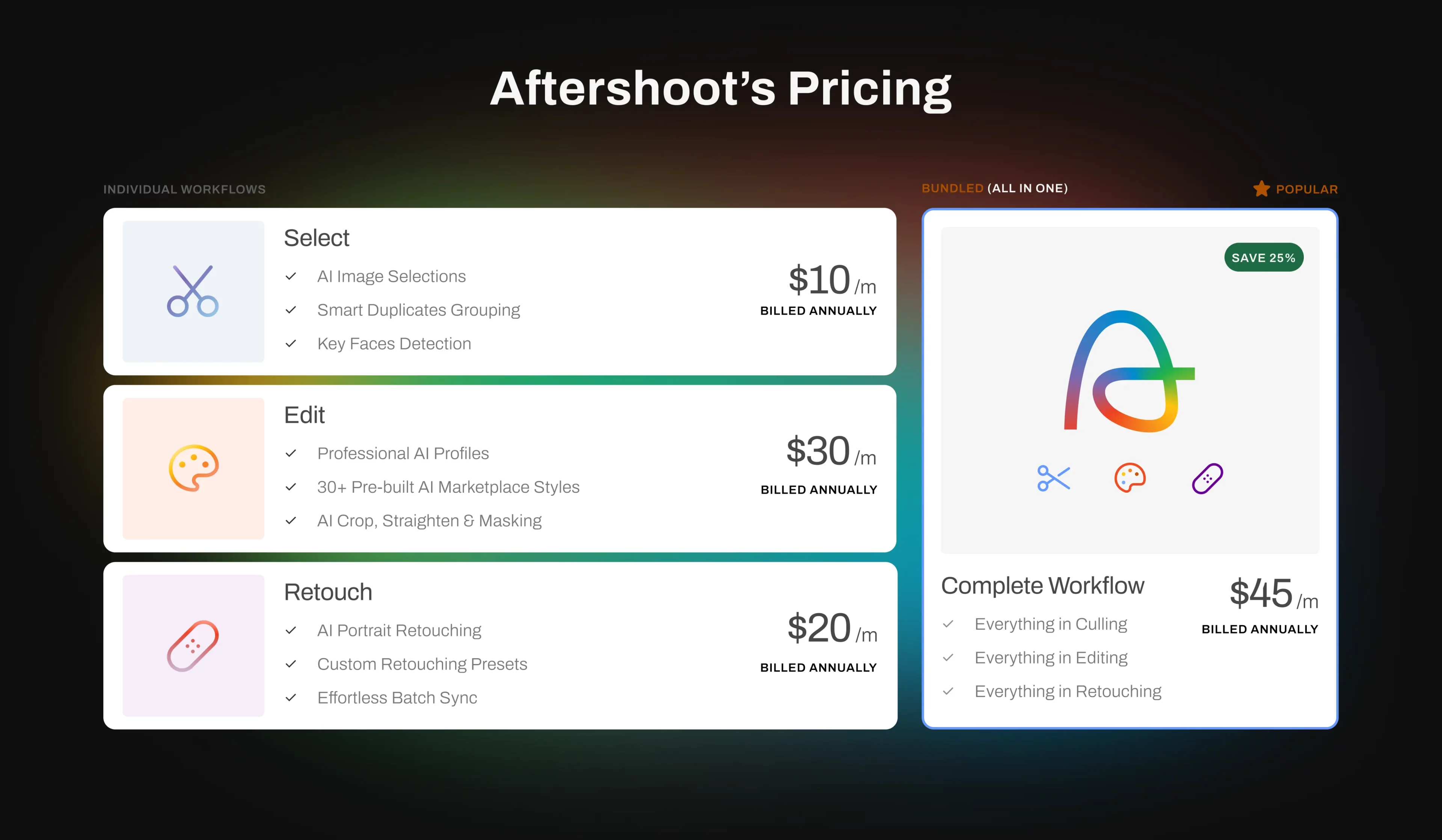
Aftershoot Complete’s modular pricing is genuinely the standout here. You’re not paying $45+ a month if all you need is culling, and if you do want the full pipeline, the bundled rate still lands below what most photographers pay for Lightroom Classic plus a separate gallery platform combined.
If you take a closer look, the biggest differentiator is how thoughtfully Aftershoot Complete is priced. You only pay for the features you need; whether that’s culling, editing, retouching, or the complete workflow. And if you do choose the full suite, it still costs less than paying separately for Lightroom Classic and a dedicated gallery platform.
The Four Stages of a Photography Workflow
Every professional photographer moves through the same four stages after a shoot: culling, editing, retouching, and delivery. They’re the actual decisions that shape how fast you deliver, how consistent your final images look, and how much of your week gets eaten behind the desk instead of shooting. The software you choose for each stage (or a single tool that covers all four like Aftershoot Complete) is what ultimately determines your turnaround time and your bottom line.
Stage 1: Culling Software
Culling is where photographers spend the most time, making it one of the most important software decisions they’ll make.
- Aftershoot Select
Aftershoot Select leads this category, starting at $10/month for culling, or bundled into the full Complete plan at $45/month annually if you want editing and retouching too. Its AI reads over 30 factors per image and groups true duplicates while preserving intentional compositional variations, keeping your cull roughly 20% leaner without cutting shots you actually meant to keep.
The engine trains locally on your own selections, so it gets more accurate to your taste over time (without uploading client files anywhere, yes, we take your data privacy very seriously).
- Photo Mechanic
Photo Mechanic remains the choice for photographers who want raw speed and keyboard-driven browsing, without any AI assistance. Photo Mechanic charges a one-time fee of $299 for its perpetual license that offers updates for 1 year, which is appealing if you want to avoid subscriptions entirely. They also offer subscription options of $14.99/ month and $149.00/ year, respectively. However, the down side is that you’re doing every selection manually, since there’s no AI assistance.

- FilterPixel
FilterPixel starts at $14.99/month for basic culling, with Pro tiers starting from $34.99/month for unlimited Autocull, which adds blur and closed-eye tagging, AI quality scoring, and face-based views. It’s a solid dedicated culling and basic editing tool, but it doesn’t offer retouching or delivery, so you’ll be pairing it with at least two other subscriptions.
Stage 2: Editing Software
Once your gallery is culled, editing needs to be done fast, without it feeling automated, and losing the human touch.
- Aftershoot Edit
Aftershoot Edit starts at $30/month for editing, or $45/month bundled with culling and retouching on an annual plan. Beyond AI editing that matches your personal style, it now includes Aftershoot Develop, full manual RAW editing with sliders, subject masking, and crop tools built directly into the app. This means Lightroom becomes optional rather than a dependency. Recent updates also improved white balance consistency across images shot in the same scene, and added an aggressive cropping mode that tightens compositions automatically.
- Adobe Lightroom
Adobe Lightroom costs $11.99/month as a standalone plan with 1TB of cloud storage and 250 monthly generative credits, or $19.99/month for the Photography plan, which adds Photoshop and Lightroom Classic on desktop. It’s still the industry standard for manual editing and cataloging, but it doesn’t cull or retouch, so you’re always pairing it with something else, which may weigh down on your pocket.

- Capture One
Capture One offers a Pro subscription at $18/month, billed annually for desktop editing, an All in One tier at $24.67/month billed annually for broader workflow flexibility, and a Studio tier at $48.50/month built specifically for high-volume, client-facing production. It wins on color-critical work, tethering with 550+ supported cameras, and AI-assisted tools such as Match Look and AI Crop, but it stays purely manual and editing-only, with minimal AI culling and retouching.

- Imagen AI
Imagen AI uses pay-as-you-go pricing at $0.05 per photo with a $7/month minimum. You can also opt for a subscription plan starting from $129/month billed annually with a defined number of edits for more predictable billing. It does a good job learning your editing style through a personal AI profile. However, retouching options are largely optional add-ons charged per photo. Delivery isn’t part of the platform at all.
Stage 3: Retouching Software
Retouching at scale is where a lot of workflow tools fall apart.
- Aftershoot Retouch
Aftershoot Retouch handles this natively (which is rare) starting at $20/month standalone billed annually, or as part of the $45/month Aftershoot Complete bundled plan. Recent upgrades improved acne, blemish, freckle, and stray hair detection significantly, including tricky scenarios like curly hair and backlit portraits.
New additions include background replacement (currently in beta for single-subject shots) and a cloth dewrinkle tool that removes fabric creases while preserving texture and embroidery. Since retouching runs inside the same app as your culling and editing, there’s no exporting to a separate tool just to fix a blemish.
- Luminar Neo
Luminar Neo is a one-time purchase starting at $99 for the Standard plan (all 24+ AI editing tools, Lightroom and Photoshop plugin support), up to $179 for the Max plan with a creative library, premium presets, and five years of update coverage. It offers decent AI-driven retouching for individual images but isn’t built for batch processing an entire wedding gallery, and generative AI tools require a renewal fee after the first year.
- Imagen AI
Imagen AI offers retouching tools such as Smooth Skin and Whiten Teeth, but these are charged per photo as optional add-ons rather than included outright, which adds up fast across a full gallery.
Lightroom, Capture One, and Photo Mechanic don’t offer meaningful AI retouching, so any skin, hair, or blemish work has to be done manually.
Stage 4: Client Delivery and Gallery Software
Your workflow doesn’t end at export. Clients need a way to view, select, and ideally, purchase their photos.
- Aftershoot Galleries
Aftershoot Galleries comes built into the Aftershoot Complete ecosystem at no extra software cost beyond your existing plan. It’s a responsive, branded gallery platform supporting photos and video up to 4K, with face-based search so clients can find every photo of a specific person, instantly.
Clients can favorite, comment, and download directly, cutting out the usual email back-and-forth. A built-in print store connects to WHCC, Bay Photo, and Atkins Pro Labs, turning delivered galleries into an actual revenue stream through packages and coupons.

- Picdrop
Picdrop starts free for occasional use with 1GB storage and 3 galleries. Paid tiers start from a Pro plan at $15.99/month (billed annually) for 500GB storage, unlimited galleries, and client proofing tools. An Advanced tier at $47.49/month (billed annually) is an option for teams needing up to 4 members and 1TB storage. It integrates cleanly with Lightroom and Capture One exports and hosts data in Germany, which appeals to privacy-conscious studios, but it’s delivery-only, you’ll still need separate software for culling, editing, and retouching.
- Pixieset
Pixieset starts at $8/month billed annually for the Basic plan with 10GB storage, scaling up through Plus ($16/month billed annually, 100GB), Pro ($24/month billed annually, 1TB), and Ultimate ($40/month billed annually, unlimited storage). It’s a mature, well-reviewed gallery and print-sales platform, but like Picdrop, it’s disconnected from the rest of your editing workflow.
Why Aftershoot Complete Wins Across Every Stage
Most of the tools above are genuinely good at one job. Lightroom edits well. FilterPixel culls affordably. Picdrop delivers cleanly. The problem is that professional photographers need all four stages working together. Stitching together separate subscriptions means multiple learning curves, multiple bills, and constant app-switching that eats up the time you supposedly saved.
Aftershoot Complete is the only tool on this list that owns the entire pipeline natively:
- Duplicate-aware AI culling that respects your creative intent
- AI editing plus full manual RAW controls, so Lightroom isn’t required
- AI retouching for skin, hair, backgrounds, and clothing at full-gallery scale
- Built-in client galleries with proofing, branding, and print monetization
But the real differentiator is how this translates to cost. If you piece together a workflow from the list above, say, FilterPixel for unlimited culling ($34.99/month), Lightroom for editing ($11.99/month), and Pixieset for gallery delivery starting at $8/mo, you’re already paying over $50 a month before adding a dedicated retouching tool, and you’re still manually exporting and importing files between three or four separate platforms.
Aftershoot’s modular pricing changes that math. You can pay $10/month for culling alone if that’s all you need, or bundle culling, editing, and retouching into the full Complete plan for $45/month annually. Because Galleries are built directly into the ecosystem, that $45/month covers your entire workflow from import to print sale. You’re not locked into paying for features you don’t need, but if you do want the full stack, you get a single tool that actually costs less than the fragmented workflow it replaces.
You build the stack that fits your studio.
FAQs for Best Photography Workflow Software
Q1. What is a photography workflow software?
It’s software that manages the post-shoot process, culling, editing, retouching, and delivery, so you’re not relying on separate apps for each stage.
Q2. Is Aftershoot Complete better than Lightroom for workflow?
Lightroom remains strong for manual editing and cataloging, but it doesn’t cull or retouch on its own. Aftershoot Complete handles culling, editing, and retouching together, and now includes full manual RAW editing too, so many photographers use it instead of pairing multiple tools.
Q3. Can I use Aftershoot Complete without Lightroom or Capture One?
Yes. Aftershoot Develop gives you full manual editing controls, cropping, masking, and export options built directly into the app, so a separate editor isn’t required.
Q4. How much does photography workflow software cost?
Pricing varies by tool and by how much of the workflow it covers. Aftershoot Complete uses modular pricing, so you can pay for just culling, just editing, or bundle culling, editing, and retouching together for a discount, while tools like Pixieset and Picdrop only cover delivery, and FilterPixel only covers culling.
Q5. Does workflow software replace a client gallery platform?
It can. Aftershoot Complete includes Aftershoot Galleries, a built-in delivery and proofing platform with print sales, so a separate gallery tool like Pixieset or Picdrop isn’t necessary.




